




Somewhere in your Drive there’s a file called Tasks_Final_v2. It has a column for owner, one for status, one for due date, and a conditional formatting rule that turns a cell green when someone types “Done.” You built it in about ten minutes on a Tuesday and it solved a real problem.
Then the rows piled up. Now there are 180 of them, three people edit it, two of them forget to, and nobody is sure whether the sheet reflects what’s actually happening or what was happening two weeks ago.
Spreadsheets are excellent at holding information. They were never designed to help you finish work. That gap is small when you’re tracking twelve things and impossible to ignore by the time you’re tracking two hundred.
Why spreadsheets feel like the right place to start
There’s a reason almost every team lands here first, and it isn’t laziness.
You can open a blank sheet and have a working tracker before your coffee cools. No demo call, no admin setup, no asking anyone for a license. If the structure is wrong, you add a column. If a column is useless, you delete it.
Everyone already knows how to use one. You don’t have to teach a new hire what a cell is. Drop them a link and they can contribute within a minute.
And for simple tracking, it genuinely works. A list of 20 items with an owner and a date is a list of 20 items with an owner and a date. A spreadsheet handles that beautifully.
The problem shows up later, and it shows up gradually enough that most teams don’t notice until they’re already buried.
Where spreadsheets start to break down
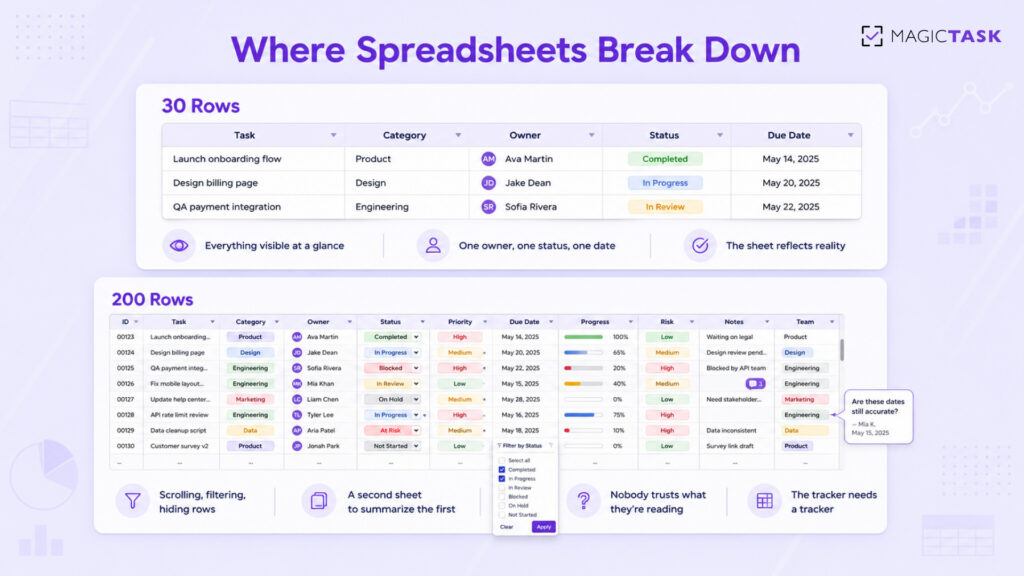
Volume. At 30 rows you can see everything. At 200 you’re scrolling, filtering, hiding rows, and building a second sheet that summarizes the first one. The tracker now needs a tracker.
No real prioritization. You add a Priority column. Within three weeks every row says High, because everyone marks their own work as High. The column stops carrying information and becomes decoration.
Messy collaboration. Two people open the sheet at once. One sorts by due date without selecting the full range and quietly scrambles the row alignment. Someone leaves a comment that nobody sees for four days. There’s no notification when the row you care about changes, so you check manually, or you don’t check at all.
Everything is manual. A status cell is only accurate if a human remembers to update it. People finish work and forget to mark it. Others mark things done in advance because they intend to finish. The sheet drifts from reality a little more each week.
No consistency across teams. Marketing has a sheet. Design has a different sheet. One writes “In Progress,” another writes “WIP,” a third writes “ongoing.” When a manager tries to see all of it together, they end up copying and pasting on a Friday afternoon.
What you’re actually missing
The friction above is visible. What’s missing is harder to spot, because you can’t miss what was never there.
Clarity about the next step. A row that says “Website revamp, In Progress” tells you nothing about what to do tomorrow morning. Big blurry items sit in the sheet for months because nobody knows where to grab them.
Honest progress visibility. A cell that reads 60% is someone’s guess. There’s no underlying data behind it. You can’t tell whether the work is moving or whether one person is quietly stuck.
Any sense of momentum. You finish something hard, you type “Done,” and the cell turns green. That’s it. Nothing acknowledges the effort. Compare that with any game you’ve played, where progress is visible, immediate, and worth chasing. Motivation isn’t a soft concern here. It’s the reason your sheet is abandoned by week three.
Consistency over time. Spreadsheet systems rely entirely on discipline. The moment things get busy, updating the tracker is the first thing to go, and once it’s a week stale people stop trusting it. A tool that only works when you’re on top of things is useless exactly when you need it.
Execution, not record-keeping. Add up the time your team spends maintaining the sheet: formatting, chasing updates, reconciling versions. That’s time spent describing work instead of doing it.
What a better system looks like
The fix isn’t a fancier spreadsheet. It’s a shift in what the tool is for.
Tasks should arrive clear enough to start. Progress should be visible without anyone typing a percentage. The system should give you something back when you finish, so opening it tomorrow feels appealing rather than like homework. And it should hold up when the workload doubles, which is the exact moment a spreadsheet folds.
Most project management tools solve the first half of that and ignore the second. Jira and Asana will happily hold ten thousand tasks. Neither does much to make you want to open them on a Wednesday morning when you’re tired. Asana gives you a unicorn animation. That’s roughly where the motivation design ends.
How MagicTask approaches it
MagicTask was built by people who noticed that games are very good at keeping humans engaged with repetitive effort, and productivity tools are very bad at it.
Work is structured as quests, not rows. Instead of a flat list, your work lives in Realms, with larger pieces broken into Dungeons and individual quests. The structure does the thing your Priority column was supposed to do and never managed: it tells you where something sits and what it belongs to.
Tasks are sized S, M, L, or XL. This sounds minor and changes everything. You have 40 minutes before a call, so you pick an S or an M. You have a clear Thursday, so you take the XL you’ve been avoiding. No more staring at a row called “Q3 planning” and deciding to answer email instead. Sizing also stops the classic spreadsheet failure where one row secretly contains three weeks of work.
Finishing produces a real signal. Completing a quest earns XP. XP builds levels. Levels unlock themes you can equip. The points themselves don’t matter; what matters is that effort now has feedback attached to it. In a spreadsheet, the reward for finishing a hard task is that the cell turns green and you move on. That’s not enough to keep anyone coming back for six months.
Streaks reward consistency, not heroics. The XP system is built around daily effort rather than distant outcomes, so showing up on an average day counts. This matters because the point of a productivity system is surviving the ordinary weeks, not the ambitious ones.
The interface stays out of the way. Clean layout, minimal chrome, no seventeen-panel dashboard. Part of the reason spreadsheets exhaust people is visual noise, and most tools that replace spreadsheets replace it with a different kind of noise.
For teams, this changes what a manager sees. Instead of chasing status updates over Slack and reconciling three sheets, progress is generated by the work itself. And because the system is designed around motivation rather than compliance, people update it, which is the whole problem a spreadsheet never solves.
Making the shift
Moving off spreadsheets fails when people try to recreate their sheet inside a new tool. Here’s what works better.
Start by cutting, not migrating. Don’t import 200 rows. Take the work you’re doing this week, put that in, and see how it feels. Most of what’s sitting in your old tracker was never going to get done anyway.
Shift the question from “is this tracked?” to “is this finished?” Those two questions produce very different work habits.
Choose clarity over customization. The pull toward building custom fields and elaborate views is strong for anyone who has spent years in spreadsheets. Resist it for the first month. You’ll find you needed far less structure than you thought.
Let the sizing do the deciding. When you sit down, don’t scan everything and pick what feels urgent. Look at how much time you have, pick a quest that fits, and finish it. Decision fatigue is a bigger drag on most people’s week than the work itself.
Spreadsheets earned their place. They’re fast, familiar, and free, and for a small list they’re hard to beat. They just weren’t built to carry a growing workload, and pretending otherwise costs your team hours every week.
If your sheet has stopped telling you the truth, run two weeks of work through MagicTask instead. Fourteen days are enough to see the difference between work that’s tracked and work that’s actually finished.