


Change Realm Skip to main content

How to Use MagicTask to Organize Work and Life

Use MagicTask to Organize Work and Life

Task management is not easy. The years of effort organizations across the world have put into developing efficient strategies is proof of this.

We’ve all been in situations when we sat in front of our PCs and didn’t know where to start. And then we look at the list of things we need to do, and our immediate reaction is to just panic.

But these efforts have been fruitful, and we now have a pretty good understanding of how we can complete them and deliver on time.

Companies have also come up with many technological solutions that help individuals handle their tasks on time – both at work and at home. And Magic Task is one of those solutions that do this well. It helps teams and individuals complete their tasks effectively and collaborate with their team members on different projects.

Let’s have a look at how you can use MagicTask to be more efficient and organized.

7 Easy Ways to Keep Work and Life Organized With MagicTask!

1. Set Up Recurring Tasks

If you have a lot of recurring tasks, it's not a good idea to rely on your memory to complete those. Too many tasks increase your cognitive load and affect the quality of your work. When there are too many things around you, it's easy to forget any of them.

It’s not easy to keep track of recurring tasks like monthly reviews, paying your bills, and daily workout schedules without any tools. The trouble with recurring tasks is that not all tasks happen at the same intervals of time. And setting individual reminders every time you need to do them can get tiring pretty quickly.

MagicTask simplifies this. Rather than recreating tasks each time after it finishes, you can just set up recurring tasks, and it will send you regular reminders about them. This feature will help you keep your mind at ease and ensure that you complete your responsibilities on time.

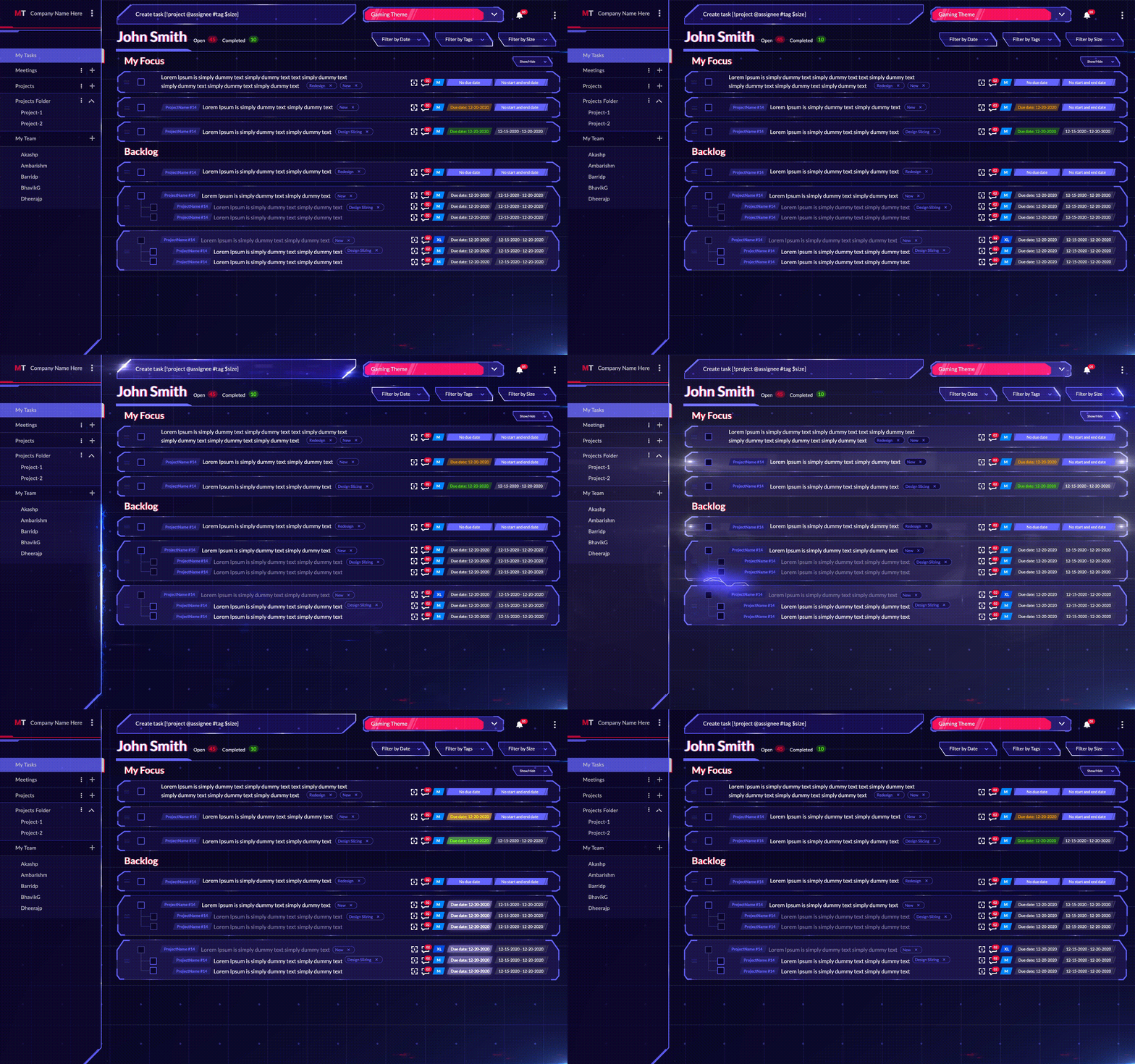
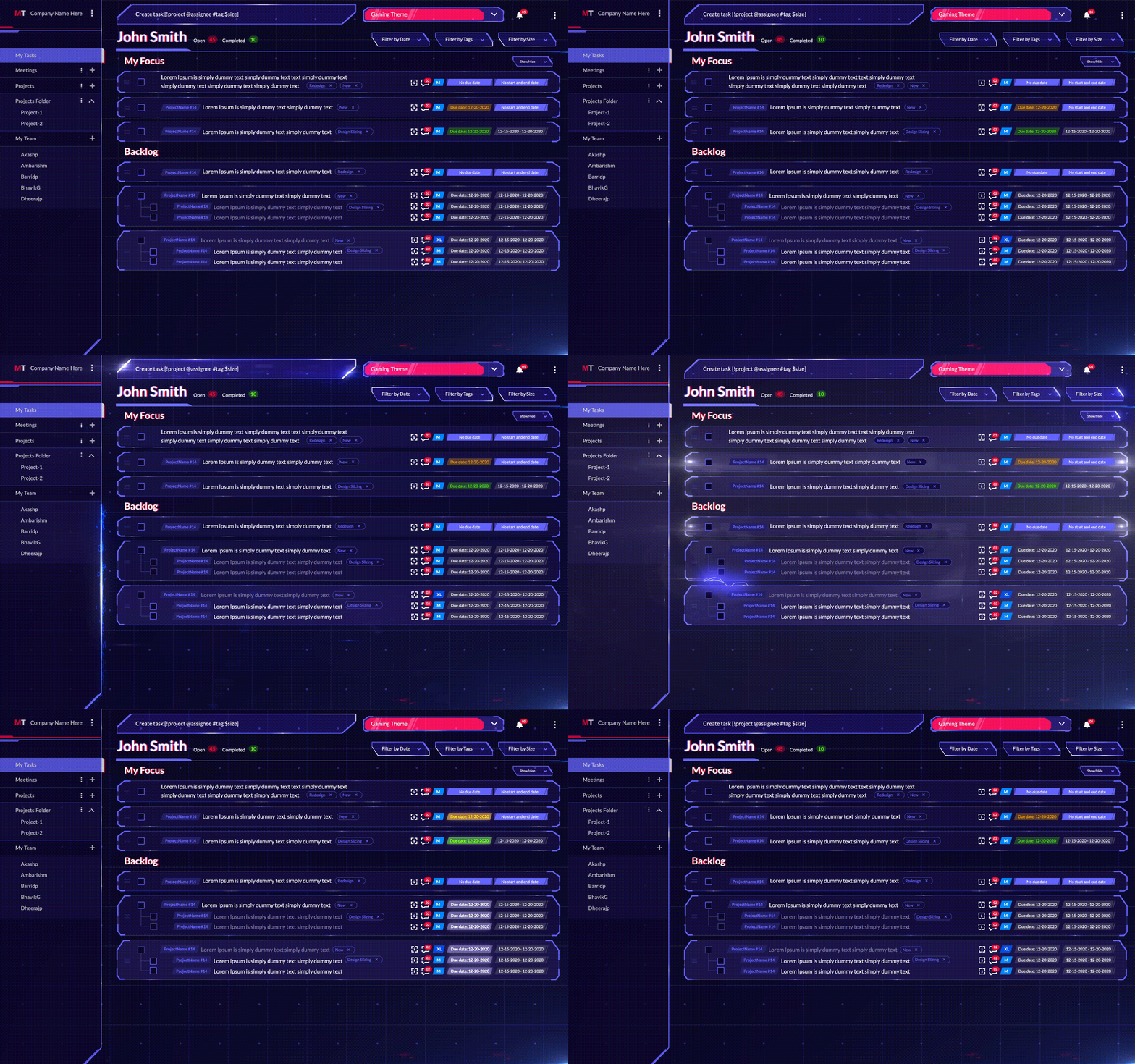
2. Use 'My Focus' and 'Backlog' Tasks to Organize
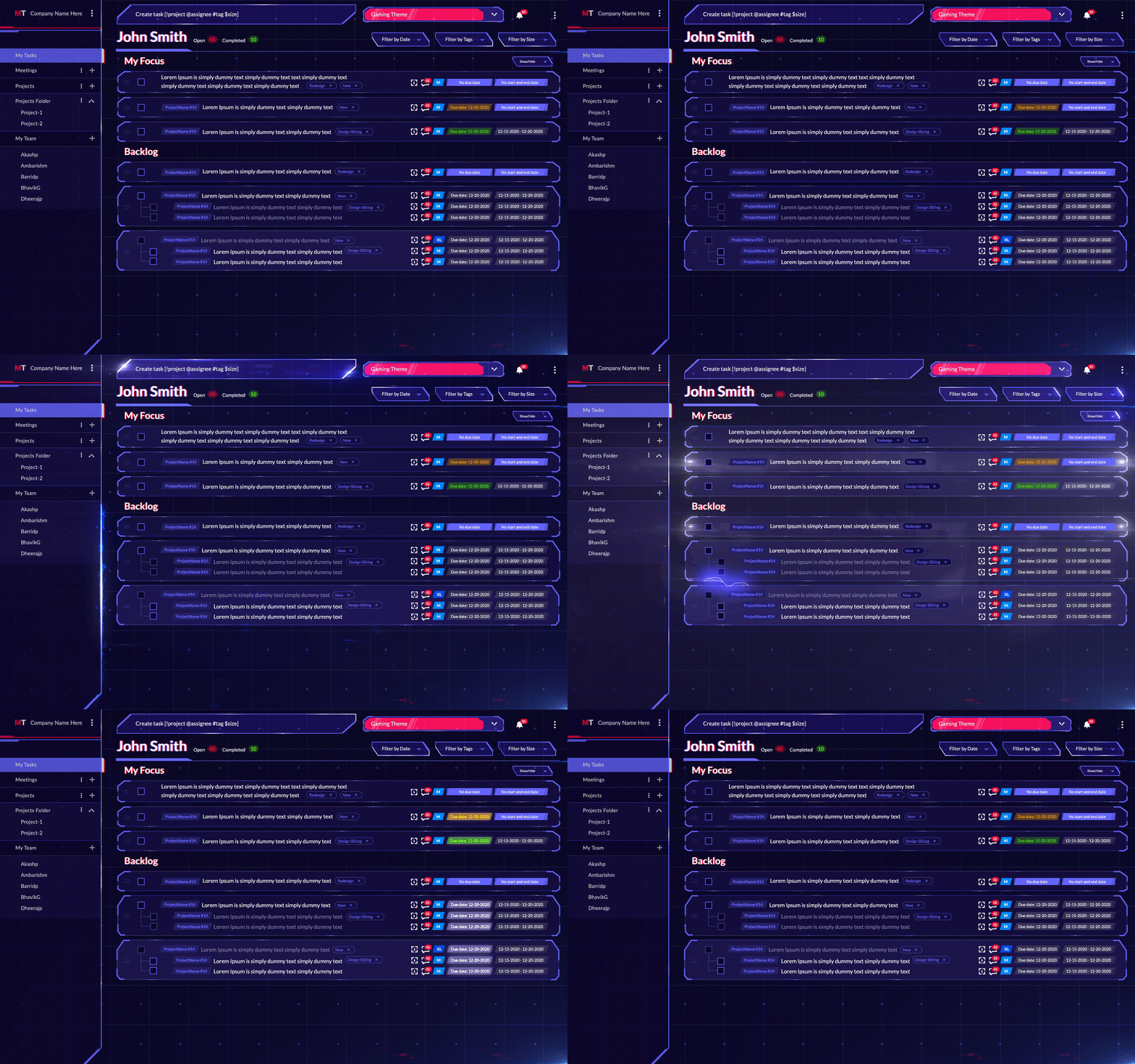
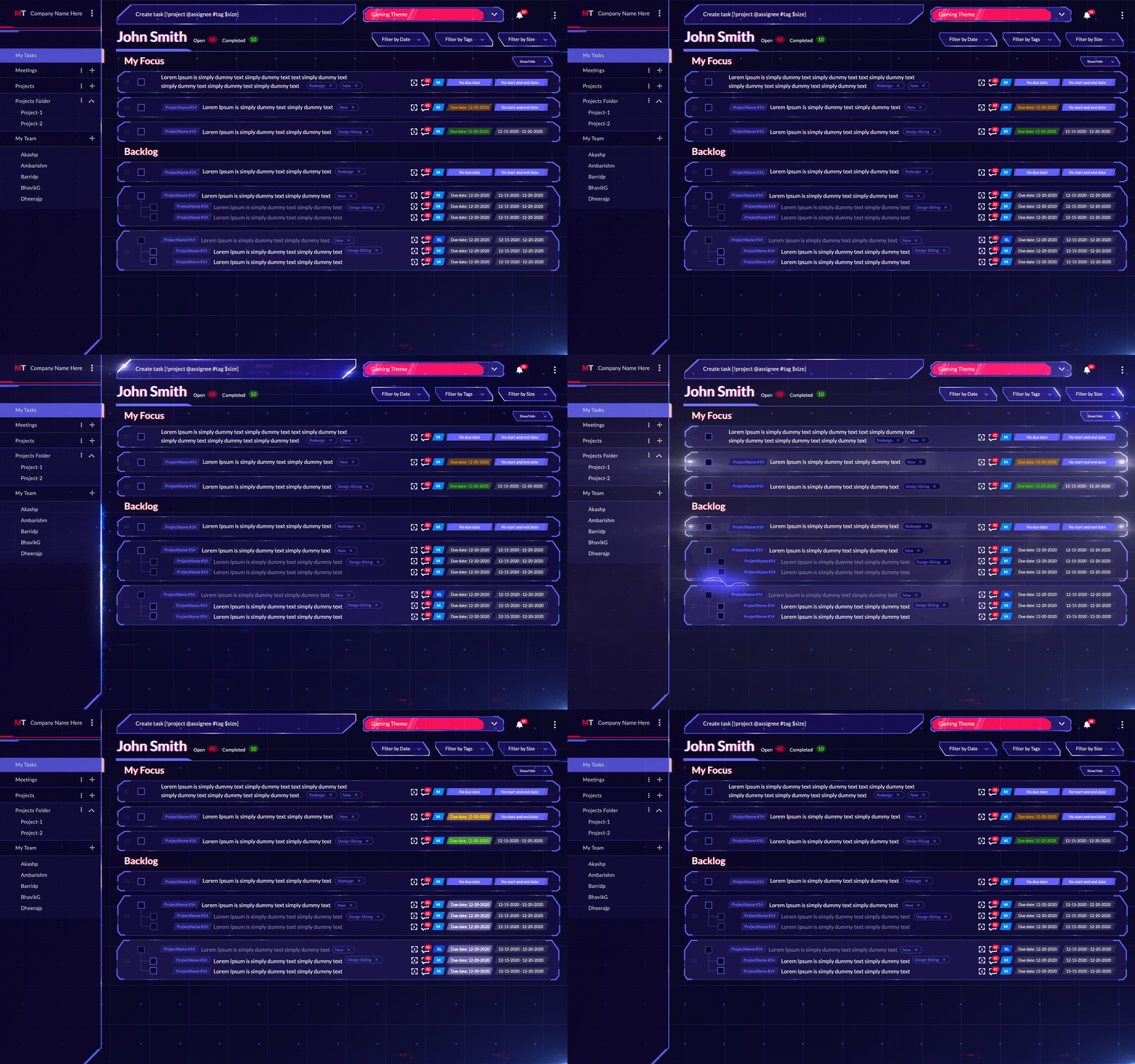
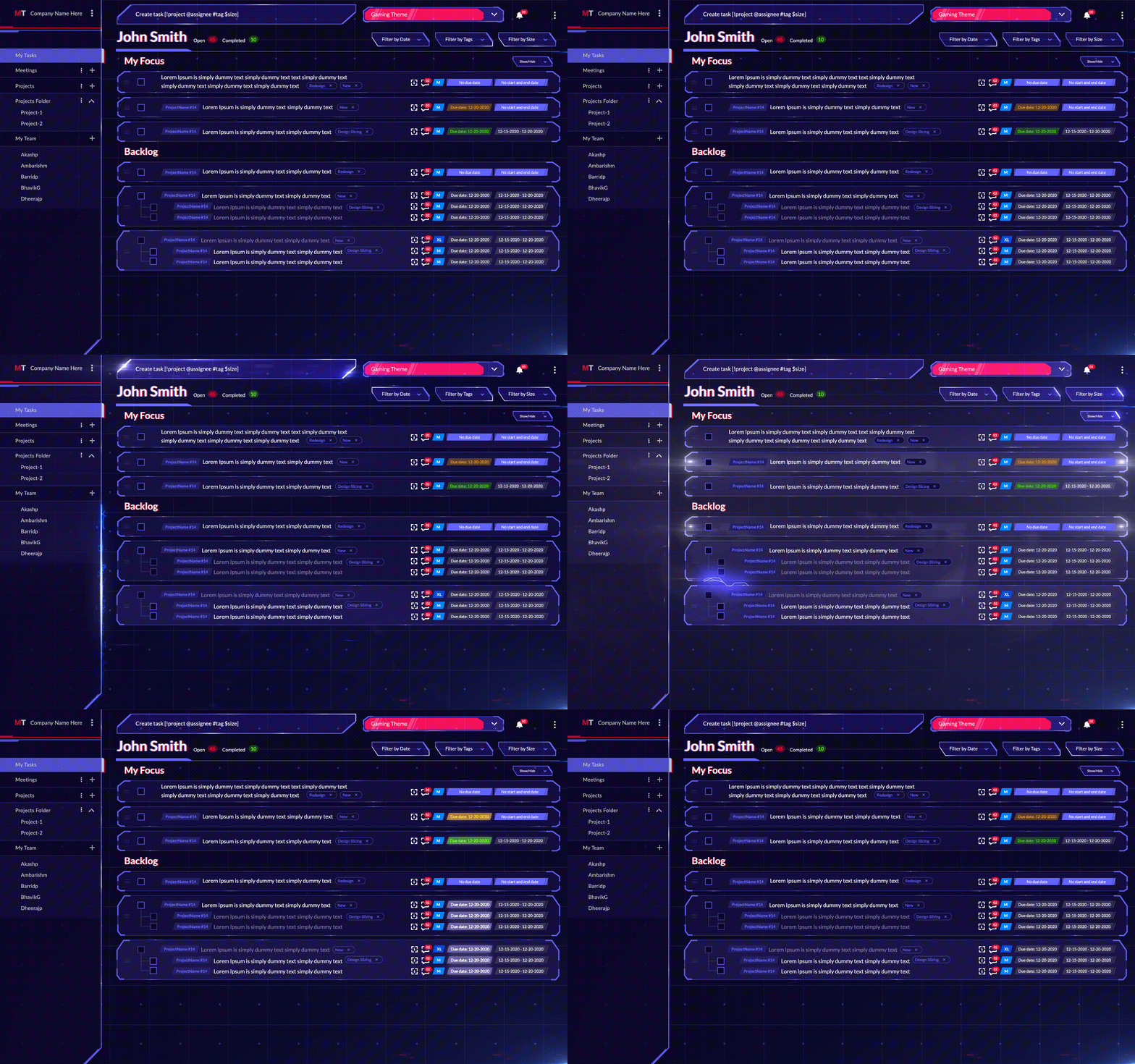
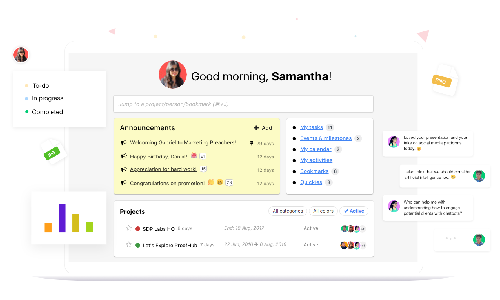
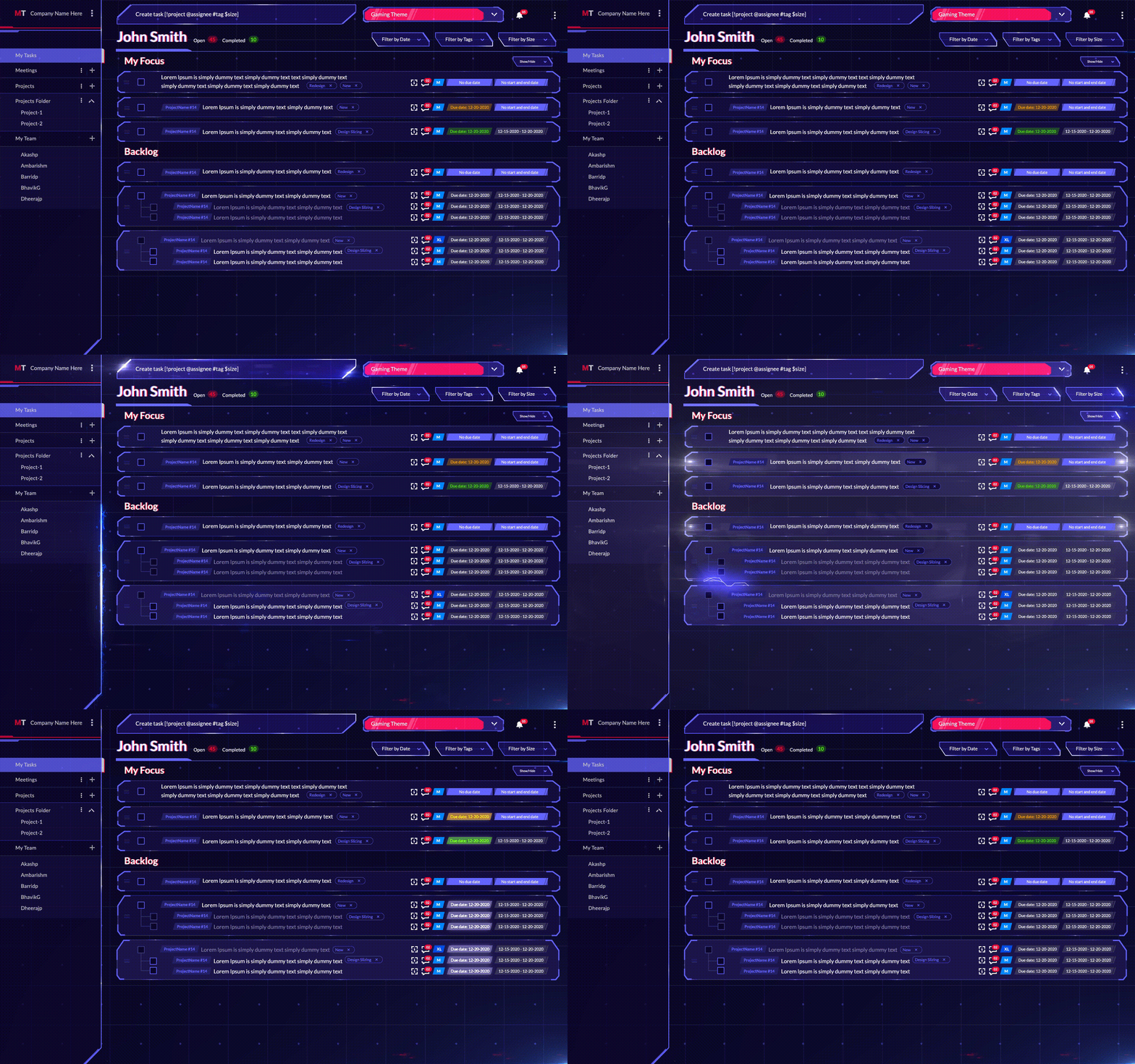
MagicTask Dashboard

When you have a lot of tasks to complete, and you’re keeping them all in your head, odds are they look like bits of paper just floating around with notes on them. To make sure you do them all on time, you need to straighten them out and make sense of it.

When you’re working on a complex project or just doing your day-to-day tasks, you can simplify the whole thing by breaking them down into smaller tasks and prioritizing them. You can arrange them from various smaller tasks to complete bigger tasks or based on their importance.

And with MagicTask, you can do this easily. You can assign importance or priorities to tasks, and when completed, you can check them off. You can drag the tasks that need your immediate focus to the My focus section. It will help you and your team identify the most important task and finish them quickly.

For example, if you have 8 tasks and you need to complete three of them today, just them to the My Focus section. This lets you and your team understand the priorities easily and reduces miscommunication.

MagicTasks also have a backlog section which acts more or less like a to-do list. Here you can add the tasks which don’t require your immediate attention and can be done as and when you’re free.

For example, you may have to reply to your emails, water your plants, or do the laundry. Backlog helps you keep track of these small tasks that don’t have a defined deadline.

3. Assign Tasks to Family Members or Team Members

This is a useful feature when you need your family or team members to do some tasks for you. It’s as simple as creating a task and clicking your team member's name next to it.

MagicTask offers a streamlined method to deliver all the information related to the task with this feature. When you assign a task, they’ll get a notification, and they can visit the board to get all the information they want, such as deadlines, deliverables, and others. If they have any questions or need additional information, they can just leave a comment.

This is a great way to communicate each member's role and responsibilities. Whether it is your family or a work team, everyone knows what they’re supposed to do, which reduces unnecessary back and forth. It won’t be easy to communicate task-related information if you’re working remotely or are in different time zones. MagicTask makes this easy, reduces the risk of miscommunication among team members, and prevents delays.

Also Read: Why is Delegating Tasks Important and How to Do It Effectively?

4. Create Projects/Workspaces for Different Uses

MagicTask is a lot more than a to-do list. It helps you organize your tasks based on priority, deadlines, and status, and helps you collaborate easily with others. And one way of doing this is to organize your tasks into different projects or workspaces.

Workspaces act more or less like different workplaces. For example, if you’re working with two different teams, you can create two different workspaces and make sure all the tasks remain separate. You can then invite your team members to their respective workspaces and assign them the tasks. This makes sure that everyone gets a complete picture of their project, even if they’re not working on all the tasks. Workspaces also let other team members assign tasks to each other.

Projects, as the name suggests, are used to bring all the tasks for a project under a single umbrella. They act pretty much like whiteboards at your office. You can create different projects when your team is working on multiple projects and sort your tasks accordingly. This helps teams understand how their task connect to the projects and makes it easy to collaborate.

Even if you are not working together, it’s still helpful to differentiate tasks between your work and your personal life. It will help you keep track of the tasks and stay focused when completing them.

5. Create Subtasks for the Main Tasks
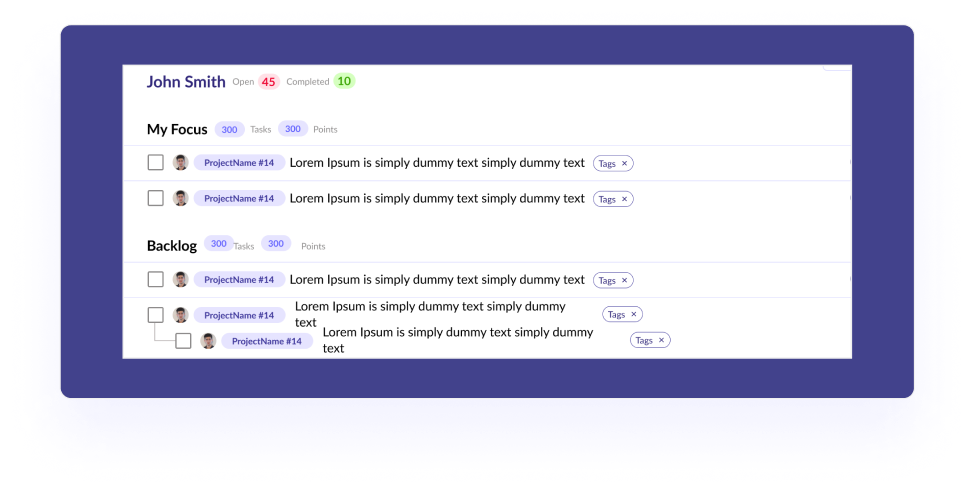
Tasks and Subtasks

Sometimes you may have to divide a single task into multiple smaller tasks. For example, if you need to publish an article, you’ll need to write the content, design the graphics, and optimize it for SEO. Or if you need to cook dinner, you may have to assign different family members to buy groceries and chop the vegetables before you’re free to start cooking.

Here you can create one large task and create smaller subtasks on your MagicTask workspace. This makes it easy to understand what all have to be performed before a task can be completed. And it makes the work more transparent.

The process can also easily improve productivity. When faced with a large task, your team members may find it difficult to get started. But by divvying them up into smaller tasks, it will be much easier to face them and check them off.

6. Themes and Gamification

MagicTask is a platform developed by gamers for gamers. Its unique gamified approach makes it fun and engaging to use. But these features are not limited to just gamers. Anyone looking to organize and manage their life or work will find these useful.

To use different themes, you can just head to the themes tab and make a purchase. You’ll notice that all the themes you have purchased are available there. And you can easily switch between these themes to set your productivity in the right channel.

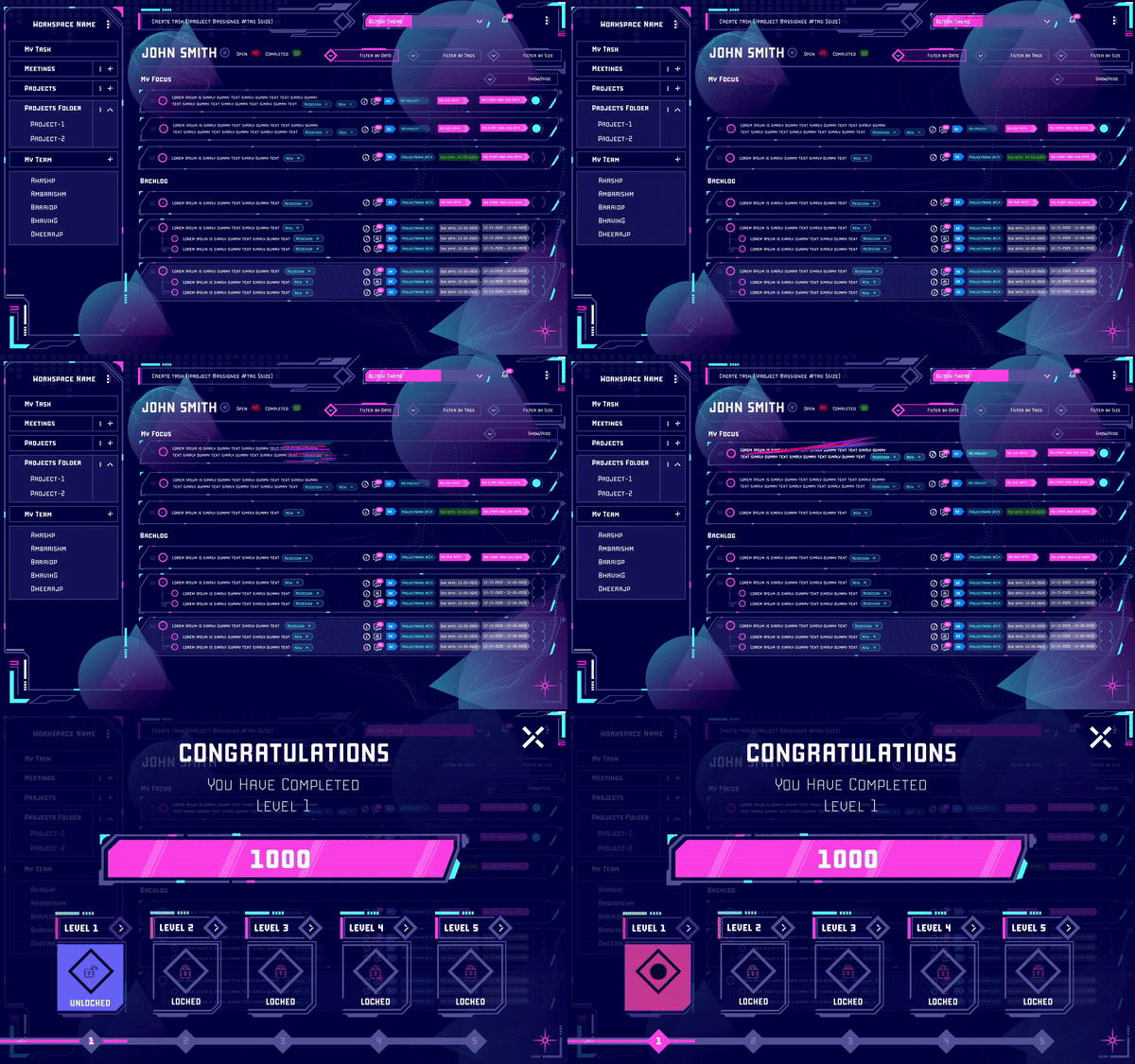
All of these themes have unique interfaces, animations, and even sound effects to make them more engaging, exciting, and personal. As you use MagicTask more often, you get points with which you can level up the themes in your collection. Every time you level up, you can access more animations and sounds. The inbuilt gamification within the platform makes work and task management more exciting.
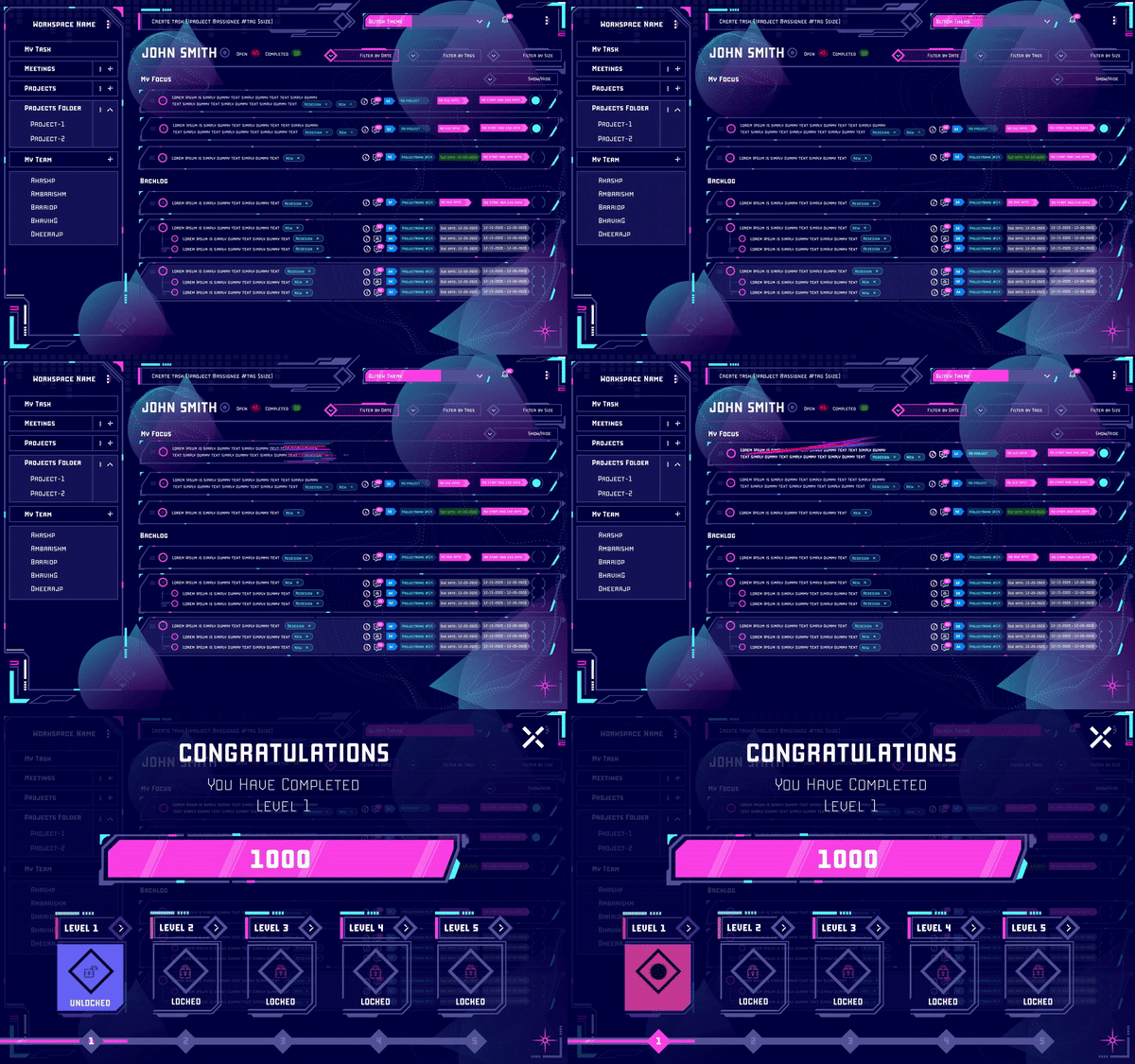
Theme Levels

Besides leveling up with use, MagicTask also lets you compete with your team in your workspace. It lets you collect points and see where you rank among your colleagues, adding friendly competition to your workplace.

These themes and games make otherwise boring task management more fun and enjoyable for the team and reduce stress for them. Many organizations often invest significantly to bring gamification into their workplace. With MagicTask, businesses don’t have to look for third-party solutions.

7. Reminders and Notifications to Improve Task Management

Managing a project or a workplace is not just assigning tasks and waiting for the deliverables. It's about following up regularly, making sure your teammates are on track and that they have all the information they need. And for this, you need to be on top of every activity in your workspace. This is where reminders and notification becomes useful.

When your team member needs more information, or if they mark a task as completed, you need to take the next steps. One must be on the lookout for progress and problems and respond as soon as one can. With this upcoming feature, the app will send you a notification and an email when a team member comments on your task.

This feature will also update you about task progress and alert your teammates about due dates and comments.

Try Out MagicTask – It’s Free, and You’ll Love it

MagicTask is completely built from scratch based on years of research and user feedback. The solution makes task management simple and efficient – both for your work and personal life. It helps you organize your tasks into easily manageable sections. And it helps your team collaborate efficiently.

The gamification and themes make your experience more colorful and exciting. It helps make your team more competitive and productive.

And the best part? MagicTask is free to use. Take it for a spin, and take your productivity to another level.

8 Effective Ways to Make the Most of Your Workday

Make the Most of Your Workday

Most studies indicate that across all industries employees are productive for less than 60% of their working hours. In a typical 8-hour 5 day work week, this means organizations lose out on around 2 days of work in a week per employee. And it is proof that there’s a lot of room for improvement in how we tackle our workdays.

Experts and researchers have been exploring ways to improve productivity for a long time. In this article, we will explore a couple of techniques that have been proven to help you make the most of your workday.

Becoming more productive is more about learning habits and less about learning hard rules. Here are 8 strategies you can make as a part of your work day to get the most out of it.

1. Start the day well

This may seem simple enough and we may have all heard it way too many times. And we know it's true; we know what a well-rested morning can boost our productivity and how a sleepless night can ruin it. So before you sit in front of your desk, make sure you’re charged up for the day ahead. Make sure you’re full of energy, and that you have everything you need right in front of you.

Make sure that you get a full 8 hours of sleep every day to wake up refreshed. It may be a good idea to get a couple of minutes of workout before you begin your day.

Studies have shown that workday exercises make you better at time management by 72% and help you complete your tasks for the day.

Start your work day

It’s also important to have a healthy breakfast before you get started on your day. If you commute daily for work, this may be more difficult but at the same, it makes it even more important. Without proper nutrition, you’re likely to feel tired at work, get headaches, and be unable to focus.

And before you sit down, keep a bottle of water next to you and check if you need anything else for the task ahead. There’s nothing more distracting (and annoying) than having to get up three or four times to get something you forgot.

Start the day well, and ace it.

2. Get the most of your day by moving around

You cannot go through your entire workday sitting in front of your desk. And you shouldn’t. Our jobs often demand that we sit in front of our workstations to get our tasks done. So it may seem a bit counterintuitive to suggest that we move around to improve our productivity. But the fact is, our minds can only focus for so long, and if we don’t take enough breaks, we will be distracted.

Productivity experts often use the Pomodoro technique to complete the tasks for the day. The technique emphasizes the importance of taking breaks. The followers of the technique work on a task for exactly 25 minutes and then take a 5-minute break. After 4 cycles of this, they take a longer 15 to 30 minute break.

The technique makes sure that you’re in the ‘zone’ when you’re working with zero distractions. The breaks help you take care of the distractions and put all your energy into the work when you’re back. While 25 minutes is the prescribed duration, it's best to find a frequency that works for you.

It may also be a good idea to invest in a standing desk. Besides affecting your productivity, sitting for a long time puts you at an increased risk of lifestyle diseases. You can also set timers on your phone so that you take a walk every now and then and step away from the desk. Short walks can help you stay alert, focused, and energetic throughout the day.

3. Make sure you’re physically well

Becoming your most productive self may be a mental exercise but you also need to be physically fit and comfortable. There’s a reason why some Chess Grandmasters load up on carbs before competitive matches and actually lose weight during.

If you’re not comfortable, if you’re feeling hungry, or if you’re sweating, it will be a distraction for you. Make sure your workspace is comfortable for you and that you spend time taking care of yourself. When engrossed in urgent or important work, when you’re in the ‘zone,’ it’s easy to lose track of your time. We often forget to eat or drink water until we’re done with the work or we get a bad headache.

Skipping meals may seem to be improving productivity in the short run, but you’ll become tired or worse later in the day. If this happens a lot to you, it may be a good idea to set reminders and make sure you have enough food and water on time.

Being a place we spend a lot of time at, it’s a good idea to invest in your workspace. Make sure that your screen is at the right height and that you’re not stretching your neck to see clearly. Invest in a keyboard that supports your wrists and helps you type comfortably. And make sure you have a comfortable chair, preferably with lumbar support.

4. Do one thing at a time and do it well

Focus on one thing at a time

While multitasking may be necessary for some situations, it is rarely efficient. It’s best to stick to one task and finish it before moving on to the next. Switching between tasks usually makes you less efficient at all of them. When you move from one task to another, it takes almost 25 minutes to focus on the new one.

Before you set out to do your tasks, prioritize them, and tackle them one after another.

It’s also important to minimize distractions during your workday. Before you sit down for a task, check your messages, your emails, and other notifications.

A good technique would be to make it difficult for you to engage with your distractions. For example, if you get distracted by notifications from your phone, keep the phone on silent, and keep it 10 feet away from you. Since you’ll have to walk over to get your phone, you’re less likely to check your notifications. If you’re using Teams or Slack, set your notifications so that only the important ones alert you.

If you’re working in an office environment, try not to get distracted by your colleagues when you’re in the middle of something. Wearing headphones will signal your colleagues that you don’t want to be disturbed.

As for headphones, for some music can help focus, while for others it can be distracting. If it's distracting, listening to white noise may be a good option to explore.

5. Plan the day before you start the day

Before you start your day, make a list of everything you have to do. Make sure that you have enough time for all of them and then order them according to their priority. Having a plan is similar to setting targets for yourself. As you go through the day, it will help you keep track of your progress and make sure you can complete them on time.

If you’re not completing the tasks on time, it could mean you need to pick up the pace. A plan helps you set the pace for yourself.

When you set the plan, make sure that you’re not overextending yourself and that you leave enough room to take breaks. Leave enough time for you to have food and walk around a bit. And ensure there’s enough flexibility in the plan for any emergencies. Every once in a while you may have to take up a few extra tasks, but it's best if this doesn’t become a pattern. When you don’t get enough time to work on a task, the quality suffers.

It will not be easy to create a plan that works exactly as you designed it. But over time you’ll understand your own performance and get better at it. And you’ll be able to make better use of every workday.

6. Take help – prioritize and delegate tasks

delegate tasks

Sometimes the best way to get your tasks done is to ask someone else to do them. The saying goes “there’s cheap, fast, and good, and you get to pick two of them.” And if you want something done quickly and well, you need to get more people on it.

Delegating the tasks helps you focus on the important ones; it helps you see the big picture. For example, if you’re working on a mobile app, a single person can’t handle the UI design, front end, and back end for it. Even if they could, it will either take a lot of time, or it won’t be good. But by delegating the different tasks, you’ll get the entire project done on time and well.

Delegating tasks also improves communication among your team and helps build a better team. The team learns more skills and becomes more empowered.

7. Stick to asynchronous communication

Communication with colleague

Getting constant calls and taps on your shoulder while working can kill your productivity more than anything. And asynchronous communication is the solution for that. The idea with async communication is that you reduce the number of calls and meetings as much as possible. And instead, you use messaging tools and email for communication.

Getting on a call means two people have to be available at the same time and if they’re in the middle of something they have to drop it. And if it's a meeting with more than two people, it means all of those people need to be available at the same time. Or they have to drop whatever they’re doing to be on the call.

This means all the team members will lose their productivity. And if your team members expect you to immediately respond to their messages, you’ll be interrupted every few minutes.

With async, you can effectively manage your time and stick to your schedule.

8. Use the right tools

It was Abraham Lincoln who said, “if I have five minutes to chop down a tree, I’ll spend the first three sharpening the axe.” This is one of the best principles you can keep in mind to get the most out of your day.

Whatever the task at hand, make sure you have the best tools to do them. And spend the time to learn them. Once you’ve mastered the right tools, you’ll be able to do the tasks much more easily. And many digital workplace tools often offer advanced automation solutions which can help you get more done in a short time.

You can also use task management tools like MagicTask. These tools help you visualize the tasks, prioritize and delegate them, and make sure they are completed on time.

MagicTask Dashboard

Invest in productivity, and make the most of your workday

Invest in the right tools and the right hardware, and invest in yourself to get the most out of your workday. With the right approach, you can save a lot of time, finish more tasks, and get the maximum out of your work day.

25+ Amazing Productivity Statistics and Trends for 2022

Productivity Statistics and Trends

From an employer's perspective, employee productivity is one of the biggest contributors to company profits. Every minute an employee is not working at their peak productivity, it costs the organization.

Because of this, most organizations make significant investments to improve employee productivity. Many organizations offer their employees mental health programs and the latest productivity tools and invest in creating the most productive environments for them.

Improved productivity results in faster deliveries, higher profits, and improved customer retention. and improved employee morale.

Here are 25+ productivity statistics that reiterate why employers should care about it and the key challenges to improving it. Some of these statistics also showcase employee perspectives on productivity and how organizations can work with it.

State of Employee Productivity

The last two years have seen a lot of changes in how and where employees work. The COVID-19 pandemic has brought about a dramatic shift in many companies’ operational styles. And as the pandemic appears to be over in many countries around the globe, organizations are building new modes of operation.

  • 75% of global organizations are planning to invest in technology to improve productivity.
  • 86% of employees prefer to work alone to be most productive compared to 27% that preferred an open office environment. (Source)
  • Six out of ten workers felt more productive working from home than they expected it to be. (Source)

Many are considering new models of work, such as a 4-day work week and easing back into the office. Many organizations are also considering a hybrid model of work, hoping to gap the bridge between employees when working remotely. And to cope with these changes, organizations are investing in tools for improved communication and productivity.

  • Productivity has improved by more than 61.8% from 1979 to 2020. (Source)
  • The top-performing professionals are almost 8 times more productive than the average professional. (Source)
  • The average worker works at the office for around 8 hours but is only productive for around 3 hours. (Source)
  • Employees spend 32% of their time at work on social media. (Source)

Employee Productivity

Over the years, we have seen the average employee becoming more productive. But there’s still a huge gap between the top-performing workers and the average employee.

This showcases that there is room for improvement and that the average employee still spends a lot of time not being productive.

In fact, the average employee spends close to 60% of the time at the office not working. Social media continues to be a major contributor to employee distractions at the workplace.

  • Being physically unwell or under stress can reduce employee productivity by around 77%. (Source)

Employers have understood the correlation between employee well-being and productivity. Many organizations invest in mental health programs and gym packages for their employees. They encourage their teams to take time off as required and be their most productive selves at the workplace.

Many employers offer subscriptions to apps for meditation and workouts and even buy fitness trackers for their employees.

When shifting to remote work, some organizations offered packages for employees to build a home office. They encouraged employees to get the best hardware for their workspaces and asked them to get comfortable desks and chairs to build a productive environment in their homes.

Employee Engagement Statistics

The last year has seen the emergence of the Great Resignation and ‘quite quitting.’ Employees are actively disengaging from their workplaces and often being just present.

Many employees felt they were not being adequately compensated or that they were not being valued. And this made them do just the bare minimum at work, instead of the traditionally seen “going over and beyond for the company” attitude.

  • 15% of employees are actively disengaged at work, up from 14% in 2020. (Source)
  • Only 21% of employees are actively engaged at work (Source)

And employers are losing out on profits because of this. Disengaged employees are costing employers to the tune of hundreds of billions of dollars globally every year. Globally only a very small portion of workers is actively engaged at work.

  • A disengaged employee costs the company annually around 34% of its salary. (Source)
  • Disengaged employees cost companies close to $500bn a year. (Source)

When an employee is actively pursuing organizational goals and putting their energy towards them, it helps the company reach its goals easily. Engaged employees are more productive and make the organization more profitable. Businesses with highly engaged employees are more likely to succeed than those without. They’re also proven to improve customer ratings and sales.

  • A highly engaged workforce improves company profits by 21% and employee productivity by 17%. (Source)
  • The businesses with the highest employee engagement are 2 to 5 times more likely to succeed than those with the lowest engagement rates. (Source)
  • According to Harvard Business Review, 71% of business executives considered employee engagement as an important factor for business success. (Source)
  • Employee engagement improves sales by around 18% and customer ratings by around 10%. (Source)
  • An engaged force is 41% less likely to be absent from work and improves profitability by 23%. (Source)

Organizations need to invest more in solutions and initiatives that improve employee engagement. And researches and surveys have shown that instead of pizza parties or happy hours, employees value organizations that provide more regular benefits and better working conditions.

They value organizations that help them learn more and where they could best utilize their talents. Organizations can look into better benefits, improved communication within the organization, and other initiatives to empower and motivate employees.

When employees put more into their work, they demand more from their organizations – be that in the form of promotions or raises. Companies that recognize this and actively motivate their employees showcase high engagement and productivity.

Productivity Challenges and Its Solutions

Productivity Challenges

Often the biggest challenge to productivity is often the environment. In many organizations, employees don’t have the right tools to do their jobs. Inefficient tools and lack of information slow down the employees and reduce their productivity.

  • Employees spend almost 1.8 hours every day looking for information. (Source)
  • Employees spend a total of 321 minutes at work looking at both their personal and work email. (Source)

In fact, an average employee spends a significant part of their day looking for information. This can be information related to the task at hand, or it could be information about the organization. Simply by making this information available, organizations can improve employee productivity.

For example, if you’re using a project management tool to assign tasks, ensure that every you include all the information they may need to perform that. This includes details regarding the deliverables, due dates, who they can work with, and other information.

  • Executives often spend 23 hours a week in meetings. (Source)
  • 34% of professionals in the US felt that poorly organized meetings are the biggest cost to their organization. (Source)
  • Being interrupted at work costs workers up to 6 hours a day. (Source)

In a survey conducted by Slack, 69% of respondents said they were more productive when working asynchronously.

A common refrain that we hear in almost all organizations is, “this meeting could have been an email.” While meetings are necessary, we can all agree that we’ve all been in one too many unnecessary meetings. They take up time and energy and require everyone to be available at the same time. And it seriously brings down productivity.

  • A 2022 study showed that 81% of employees felt more productive when they had flexibility over their working hours. (Source)

With a lot of organizations working remotely, the number of meetings has gone up significantly. And many organizations and productivity experts have been promoting async communication. The general idea of async communication is that if a meeting can be an email, make sure that it is. This allows employees and organizations more control over their time.

  • According to McKinsey, automation solutions improve productivity by 0.8% to 1.4% annually. (Source)

Companies can also explore automation tools to improve employee productivity. Particularly in software development, IT, and project management, there are plenty of tools that can automate various tasks.

This will let employees focus on more important tasks without affecting the quality of the deliverables.

WFH and Remote Work Statistics

Work from Home

While there were companies that were completely remote even before the pandemic, COVID-19 made it absolutely necessary in many industries. And it completely changed the working environment for many professionals, quite possibly for years to come.

Changes during the pandemic revealed opportunities for improvement – some necessary, some for convenience – for both employees and employers. Many organizations are planning to extend these changes or completely rebuild their organizational culture around them.

  • 16% of companies in the world are currently completely remote.
  • 25% of all workers in the US are expected to be remote by end of 2023. (Source)
  • 90% of employees claimed they were as productive from their homes as they were from the office, if not more. (Source)
  • 55% of workers felt they spend more hours at work when remote. (Source)

Most studies and surveys show that employees were more productive working from home than they were at the office. There were fewer distractions, fewer people interrupting your work, fewer impromptu meetings, and therefore more time to focus on the task at hand. It also meant you could plan your breaks. But this is also often correlated with poor work-life balance when working remotely. Employees often reported being unable to disconnect from work.

  • 70% of remote workers said it was difficult to be a part of the conversation during meetings. (Source)

The most commonly heard difficulty with the shift to remote work was the difficulty in communication. Team members often found it difficult to be on the same page when remote. Many organizations invested in better communication tools to improve this situation. And as mentioned earlier, many trained themselves in async communication.

  • Almost 50% of the workforce would take a 5% pay cut to work part-time. (Source)
  • At least 55% of the workforce wants to work from home at least three days a week. (Source)
  • 70% of the workforce would consider forfeiting benefits like health insurance or PTO to maintain a remote work model. (Source)

This may be why most companies offer a hybrid work model for their employees. Employees get the benefits of working from home and can sync up with their teammates when they’re at the office. That said, a significant number of roles in the US are expected to be completely remote by the end of 2023.

As long as organizations invest in the right tech and empower their employees, productivity should remain at its peak, even when working in a remote or hybrid model.

Productivity is Profitable, but We Have to Work for It

Better productivity delivers better results in better time. From an organization’s perspective, improved productivity leads to better profits, better sales, and improved customer satisfaction. For an individual, it means they can focus on more important tasks and can find more value in their time.

But to be at their most productive selves, organizations must create the best environment for their employees. They must create an environment that motivates and encourages employees to engage more. And individuals have to invest in themselves; they have to figure out what works for them, what empowers them to focus more and use those techniques.

10 Best Todoist Alternatives Worth Considering In 2022

Best Todoist Alternatives

Todoist is a great task management app that has been around for a while. But there are plenty of other options out there.

In this blog post, we’re going to talk about the 10 best Todoist alternatives that are just as good as and often considerably better than the titular app.

Without further ado, let's dive in. 

Why Do You Need a Todoist Alternative?

First things first, in case you’re not familiar with this app, the idea behind it is pretty simple – a digital to-do list. 

The thing is, though, for all of its valuable features such as progress tracking, deadline reminders, and effortless task delegation within a team, Todoist is also lacking in some other regions.

Most crucially, these would be:  

  • No time-tracking feature 
  • There’s no option to make customizable statuses (that would precisely reflect your team’s different work tasks) 
  • The free version only allows five projects. 
  • Two paid versions give you more options: Todoist Business at $5 a month and Todoist Premium at $3 a month.

The problem with Todoist is not so much its price. Instead, it’s the fact that running a growing business can leave you wanting more in terms of its features if you were to opt for this app.  

It’s safe to say at this point that it’s becoming a tad outdated. In a way, it’s the format itself that limits this app. To be fair to Todoist, though, its makers don’t claim it to be anything more than an elaborate digital to-do list maker. 

That said, if you’re running a business or have a need for a more advanced piece of gamified organizational tool – you’ll definitely want to check out some Todoist alternatives. 

10 Best Todoist Alternatives for 2022

Below, we’ve compiled the best Todoist alternatives currently available. 

1. MagicTask

Fancy making your online work environment feature cool-looking hubs and menus reminiscent of such iconic games as Saints Row IV, Minecraft, or some of the latest Call of Duty installments? 

If the answer is a resounding ‘Yes’, have we got an app for you. 

Representing one of the best Todoist free alternatives, MagicTask is undoubtedly the most visually well-rounded productivity tool currently on the market. Its sleek gamified features make running this app a piece of the cake, even if you’re a beginner.

What’s more, if you have any experience in gaming, figuring out the features of this app will come naturally to you. Even if you’ve never played a computer game in your life, the attractive visuals and the simple interface will help you quickly pick up the basics of running this thing.

The good stuff doesn’t end with just the visuals, though. 

MagicTask Dashboard

What makes it different from Todoist: In terms of features you get, Magic Task puts focus on a clean interface, real-time cooperation, and clever and intuitive task organization. Everything in this app is made to make your life as a project manager or an employee easier. Setting goals, tracking progress, and delegating tasks are all a walk in the park with this app on your side. 

Available For: Mobile, tablet, and web

Best Features: 

  • Real-time collaboration – allows you to easily view project updates and new tasks, as they are added and amended by the project manager. This improves the workflow and makes troubleshooting a piece of the cake. 
  • Simple, gamified design – Looks like a game menu and has all the features of an elaborate business app. This app is the world of gaming and the world of business coming together to make tackling projects and earning points fun and efficient. 
  • Theme collection – One of the ‘side-quests’ that you can engage in while using this app is collecting different themes. Switching between these can make you feel like you’re in the Saints Row IV universe one day, and that you’re picking a champ in a Valorant lobby the other. 
  • Advanced workspaces – feature allows you to segment your teams in a way that you can oversee all of the members with ease. Also, it enables you to monitor what they’ve been up to recently and how their projects are going.


Pricing: 

  • Free trial: 14 days with full access
  • After the trial: $10 per user per month, or $100 per user per year


2. Asana

Representing some of the better-known Todoist free alternatives, Asana comes with a host of easy-to-use and cleverly-designed features.

Among other niceties, you can count various options in the category of scheduling tasks according to the carefully-determined timelines of your choice. There is even an option to include task milestones, so you can feel accomplished after you've done your tasks for the day.

That is, you'll get not only a sense of accomplishment – but an actual in-app milestone.

What makes it different from Todoist: Focuses on team projects, and it gives you task accomplishment milestones

Available For: Mobile, tablet, and web

Best Features: 

  • Easily stay on top of all of your tasks and team projects 
  • Sharing information with individuals and groups 
  • Color-coding of projects for easy distinguishing and tracking
  • A clever and dynamic commenting system


Pricing: 

  • Basic: Free 
  • Starter: $13.49 a month/ per person
  • Premium: $30.49 a month/ per person
  • Enterprise: Customizable depending on your business needs

3. Trello

Trello

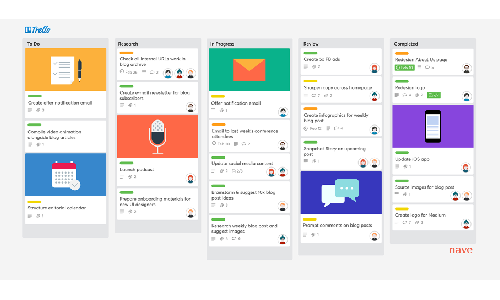
Revolving around a simple but clever design based on Kanban boards, this app can be an excellent option for both novice and advanced users.

Trello is an absolute breeze to get the hang of because of its intuitive drag 'n' drop system.

You can easily customize and create your own online professional dashboard – complete with all your entrepreneurial hopes and dreams.

What makes it different from Todoist: A clever organization system based on kanban, board, and card layouts. 

Available For: Mobile, tablet, and web

Best Features: 

  • Synchronization with various devices 
  • Can be integrated with other apps 
  • Simple layout that makes organizing tasks a breeze

Pricing: 

  • Basic: Free 
  • Starter: $13.49 a month/ per person
  • Premium: $30.49 a month/ per person
  • Enterprise: Pricing options can be requested by a quote


4. Google Keep

Initially developed as a simple note-taking app, GoogleKeep represents one of Todoist alternatives that experienced a couple of upgrades that have made it more attractive as a tool for running a business. Or simply jotting down your grocery list. The beauty of this app is in its simplicity. 

What makes it different from Todoist: Using GoogleKeep, you can take notes, add images, as well as create to-do lists that you can check off after you’ve completed the individual items on the list.

Available For: Mobile, tablet, and web

Best Features: 

  • Simple note-taking application 
  • Works well with other Google apps 
  • Easy to use, even for complete rookies

Pricing: 

  • Basic: Free


5. Any.do

Another fantastic little app that works wonders for organizing an individual’s day, but not so much a small business itinerary, comes in the shape of Any.do. 

As its memorable name suggests, this is one of the Todoist free alternatives based on a fairly straightforward idea. As one of the more prominent Todoist alternatives, this app focuses heavily on the to-do list-making part of the deal. 

What makes it different from Todoist: Advanced calendar as well as planner functions

Available For: Mobile, tablet, smartwatch, and web

Best Features: 

  • Simple task prioritization system
  • Drag ‘n’ drop design 
  • Rescheduling tasks and moving them around is easy and intuitive


Pricing: 

  • Basic: Free 
  • Premium: $5.99 a month/ per person

6. ProofHub

Proofhub

As our entry number six, we’ve got an app that's the polar opposite of Any.do in terms of its target market. 

While Any.do concentrates on helping people make to-do lists, ProofHub is all about teams, sharing files, as well as sharing feedback quickly and seamlessly. If you want to get something done well by your employees and within a specific time frame – getting them on this app can be a great way to track them in a non-intrusive way, so to speak. All in all, certainly one of the more prominent Todoist alternatives. 

What makes it different from Todoist: Elaborate time-tracking and task delegation systems complete with Gantt charts 

Available For: Mobile, tablet, and web

Best Features: 

  • Online proofing and sharing feedback
  • Visual timeline with Gantt charts for easily organizing complex tasks
  • Advanced time-tracking


Pricing: 

  • Trial: Free 
  • Essential: $45 a month/ flat (not per person) 
  • Ultimate Control: $89 a month/ flat


7. Clarizen

Aiming to create an app that can act as a kind of umbrella piece of software for doing business online, the designers behind Clarizen furnished this program with a whole load of features. 

From creating complex online teams that function as smoothly as a greased lightning to creating automated work processes from scratch – Clarizen is one of Todoist alternatives that has it all. 

Thanks to this platform's sheer robustness and stability, sharing data between coworkers can happen in real-time and with zero interruptions or delays. 

What makes it different from Todoist: A complex project management system complete with resource sharing, a flexible interface, and project progression checker 

Available For: Mobile, tablet, and web 

Best Features: 

  • Clever process automation 
  • Sharing resources and data easily with all members of a project
  • Intuitively-made interface


Pricing: 

  • Trial: Free 
  • Enterprise: $45 a month/ per person
  • Unlimited: $60 a month/ per person
  • Clarizen Salesforce Edition: $100 a month/ per person

8. Wrike

If you want to put an accent on workflow and the tempo of your worker’s submissions and achievements – then Wrike might be one of the interesting Todoist-free alternatives for you. 

Using this piece of software, you can view the status of various projects you’ve delegated and get informed of real-time updates. Ease of communication and support also play a significant role in the appeal of this app. 

What makes it different from Todoist: Includes real-time reports and status updates for team projects 

Available For: Mobile, tablet, and web 

Best Features: 

  • Gives you the ability to monitor, control, and support your team members
  • Image and video tagging for easy feedback
  • Gantt charts that allow you precise and detailed project planning

Pricing: 

  • Basic: Free 
  • Professional: $9.80 a month/ per person
  • Business: $24.80 a month/ per person
  • Enterprise: Customizable depending on your business needs

9. Meistertask

Fancy having a sizable virtual dashboard like Homer Simpson has on his job, with plenty of buttons and flashing lights that help you control various essential processes? 

Well, if the answer is ‘yes,’ Meistertask is where it’s at. This app allows you to be the true Meister, as Germans would say it, of your team. 

It allows you to customize your dashboard, so you can easily track the progress and progress of your team members on multiple different projects. Simple to use, and it helps you monitor your workers’ progress in a non-intrusive way – pretty neat. 

What makes it different from Todoist: Comes with task automation capability, as well as time-tracking 

Available For: Mobile, tablet, and web 

Best Features: 

  • Customizable and visually-appealing task panel 
  • Quick and efficient task assignment
  • Integratable with such communication tools as Slack, GitHub, or Zapier

Pricing: 

  • Basic: Free 
  • Professional: $8.25 a month/ per person
  • Business: $20.75 a month/ per person
  • Enterprise: Customizable depending on your business needs

10. Quire

Dream. Plan. Achieve. 

A slogan such as this can give you an idea of what one of the Todoist-free alternatives that are well-developed looks like. The dreaming part, of course, is left to you, but it’s the planning part where this app truly shines. 

If you want to break down an enormous task into a bunch of smaller, bite-sized ones – this app will do the trick. Also, you can easily change the permission roles for different members of your team. Thanks to this feature, you don’t need to worry about having to make separate accounts every time you get a new project manager. 

What makes it different from Todoist: Allows you to create elaborate tasks and subtasks 

Available For: Mobile, tablet, and web 

Best Features: 

  • Customizable permission roles for different members of your team
  • Simple task creation and tracking with a nested-style task list
  • Easy viewing of different projects


Pricing: 

  • Basic: Free 
  • Professional: $8.50 a month/ per person
  • Premium: $14.95 a month/ per person
  • Enterprise: $19.95 a month/ per person,  or -customizable depending on your business needs

Conclusion

All in all, whether you’re trying to build a small business, buy some pears and apricots from a local fruit stand, or assemble a team of workers – using any of the Todoist alternatives can be a great solution. 

Having learned about the different peculiarities of the individual apps we presented, the ball is now in your court to pick the best one for your needs.

7 Reasons Why Gamers Love Using MagicTask

Why gamers love MagicTask

As a gamer, you're always looking for ways to improve yourself and get ahead of the competition.

However, people don't seem to realize that this impulse is pretty transferable to other areas of your life – namely, work, school, and general management of your day. If this sounds strange, then consider MagicTask.

Gamers love this task management tool because of its gamified approach to organizing tasks and projects. You can manage your day using its clean interface and simple functionality.

Thanks to its unique gamification features, it's fun to use. like playing an RPG, gaining experience, and getting gear while working.

Don't believe what we wrote above? Then read on and see why gamers love this tool.

1. Simple and Elegant User Interface

MagicTask Dashboard Interface

Do you know what frustrates gamers to no end? A poorly designed user interface.

When you're in the middle of a game, you must keep an eye on what is happening on two levels. One level is the actual gameplay, whether it's keeping proper trigger discipline and an eye on the enemy team, micromanaging your units and macromanaging your base, or just simply the monster in front of you.

The other part is the game user interface, this includes your health, the amount of ammo you have left, and your inventory. Managing a poorly integrated inventory is incredibly tedious, and losing sight of your characters, parties, or base's condition is frustrating.

The devs behind MagicTask know this, and that's why its user interface is simple, sleek, and straightforward.

All of your information and data are in one spot on the home page. Instead of trudging through multiple folders and subfolders, everything is in front of you, clear as day.

If you're using it to organize your team – you know exactly who does what and when at a glance. Don't know how far a project has come along? Easy – just look at the task and see how many subtasks have been completed.

MagicTask has exceptional user interfaces that are aesthetically pleasing for users to navigate and enjoy the platform.

2. Efficiency

Gamers understand the value of time. On one level, this means the time during a problematic raid or a tense death match. When time is of the essence, you have to make every move count. In a competitive RTS match, you have a set amount of time for every rush, advancement, and upgrade – otherwise, you're done.

On another level, games take a lot of time, especially massive single-player RPGs with 200 hours of gameplay and a story as long as a couple of books. So organizing your work or your studies, your family and friends, as well as gaming time, is not easy.

This app is all about efficiency. First, we already mentioned its simple and user-friendly interface. However, it also saves time and shows how efficient it makes you by its basic usability.

When you're creating a task or assigning a specific job to a particular person, it's all just a couple of clicks away. You can drag and drop items, organizing them quickly and with a wrist flick.

Look at it this way – people memorize tens and hundreds of macros to maximize the chances of winning an RTS game match. When playing a MOBA like Dota2, or League of Legends, you don't move your mouse to skill, do you? No, you memorize its shortcut. Those few extra seconds count.

3. Declutter and Focus

Declutter

Do you know what people dislike? Getting interrupted and distracted. Do you know what people really hate? Things that are getting them out of their flow state.

When you're in the zone, feel like you're dominating a match when everybody is working in tandem, where your keyboard and mouse feel like extensions of yourself, that's peak gaming. And then something makes you snap out of it.

This feeling, of course, does not only pertain to gaming. It also refers to playing an instrument, dancing, working, and studying. Those moments are rare to be super productive with your work and get one job done after the other. However, the titular app of this article can help you with that.

Two vital things are necessary for getting into a flow state – focus and a lack of distractions. We've already mentioned the app's simplicity, but it's also vital for this section.

Due to its clear interface and how teams and projects are set up. You know exactly what you need to do at all times. This creates a vital foundation for focus. Furthermore, since you're not bogged down in minutia and "clutter," the odds of getting distracted by something that isn't important at the moment are minimized.

Also Read: What is Digital Decluttering and How It Helps to Stay Organized and Productive?

4. Leveling Up

Do you know what hooks gamers? The sense of achievement and accomplishment gained from winning a match and good old loot and XP. Sure, defeating an opposing team or a boss is satisfying in and of itself. However, getting something from it, a new skin for your gun, new skills from leveling up, or just a nice set of armor with all the stats you want is the best feeling in the world.

If you're thinking, "a task and project management app can't possibly give me that," you'd be wrong. MagicTask can and does. Why do gamers love MagicTask? — here is the part that's the most fun.

Namely, the app has a strong foundation for utilizing gamification elements. Every activity you do on the platform gets points (or XP). With more points, you get new levels that help unlock new themes that change how the app looks. If you get a good one, you might even match its themes with your WoW character.

Furthermore, you can access the apps' marketplace if you're unhappy with the theme you got (since they are limited in number). You can trade your "gear" with other users and get what you hope to get.

5. A Little Bit of Spice

Like the previous point, let's discuss visuals and sound effects. The most popular games out there have unique, distinct visuals. Maybe these visuals are gritty, realistic, or cartoony and colorful. Perhaps they're a mishmash of a steampunk aesthetic mixed with a little bit of high fantasy. Whatever the case may be, people are drawn to them instantly.

Something is satisfying about being in a unique world with its particular aesthetic. And, of course, the proper use of sound effects, a satisfying thud of a great hammer, a slice of a katana, and the whizzing of bullets all draw a gamer further in.

So, again, you might be wondering how this relates to the task management tool. Simple.

The tool has unique sound effects and special animations. Furthermore, in case they get bored, you can always change your theme and check out some new ones from the MagicTask theme marketplace. All you have to do is level up, and unlock new features. And if you're bored with the ones you already have, you can always go to the marketplace and buy a new theme.

Theme Level Up

6. Competition

And finally, some good, old-fashioned competition. A large part of gamers' satisfaction when playing multiplayer is winning a match or striving to win one. And many multiplayer games have leaderboards, ranks, or hierarchies. Looking at your rankings slowly rising, reaching gold in Hearthstone, Diamond in League, it's positively addictive. 

Yes, you guessed it, MagicTask has this too. 

The tool has leaderboards that track your achievements, your team's achievements, and the achievements of everybody who uses it. It is a lovely boost and a bit of friendly competition with the app's user base and your team. 

7. Cooperation and Teamwork

Let's talk about another thing gamers like, especially those that prefer multiplayer games – teamwork.

Look at games like CSGO or Overwatch – team play is vital if you are supposed to win. You must collaborate, talk nonstop, and know who does what and when. The same goes for MMOs as well – you need your tanks, your healers, and your damage dealers to simplify things. Everybody works in unison toward a shared goal.

And just like how communication becomes muddled and confusing during a push towards a hunkered-down enemy, so does it matter when your company is rushing to deliver a new product—or even squatting to maximize profits during a specific time of the year (like eCommerce stores do during Black Friday).

So, how does MagicTask help here? It's because it operates in real-time. Every update done to a task or project imputed within MagicTask will be shown to everybody with access. All this happens instantly, sharing documents, ideas, and more information. When time is tight, and especially when you're part of a remote team, ensuring everybody is in sync is vital.

Furthermore, by assigning tasks and projects to different team members within the app, you know that people know precisely what their respective roles within a company (or project) are at any given time.

Conclusion

And there you have it, folks – seven reasons why gamers love MagicTask. Hopefully, we have convinced you of just how good this tool is and what makes it unique. 

Whether we are talking about its perfect User Interface, its themes and leveling up system, the collaboration opportunities, or just the flow state it can give you, this tool is a must! If you're a gamer looking for a better system to organize your work, this is it!

Check out this link to sign-up for MagicTask now: https://app.magictask.io/

How Gamers Can Benefit from Task Management Systems

Task Management Systems Benefit for Gamers

Task management systems help individuals or teams keep track of their operations by managing tasks and projects. They can be used to monitor employee performance, optimize workflows, and allocate resources. There are a variety of task management systems available, each with its own features and benefits.

However, what if we were to tell you that these systems are also great for gamers? If you're having trouble finding time for gaming or perhaps trying to improve your skills seriously, this is the blog post for you.

Gamers and Task Management Systems

Gamers can use task management systems to manage and complete their daily chores as well as game-related tasks. They can also help gamers track their games' progress, set goals, and manage their time. 

Furthermore, these systems can provide reminders for upcoming tasks and help gamers stay organized.

Various types of task management apps are already available, each with unique features and benefits. However, all task management systems share some standard features that can be extremely helpful for gamers. These features include the ability to:

  • Create and manage tasks
  • Set goals and deadlines
  • Track progress
  • Collaborate with others

Task management systems can be highly beneficial for gamers, as they can help to improve organization and time management skills. By using a task management system, gamers can plan and track their work, schedule game sessions in advance, and monitor their progress. This can ultimately lead to better performance and results.

7 Key Benefits Gamers Get From Task Management Systems

The following are some of the benefits that gamers get from task management systems:

1. Stay Organized

The ability to organize and keep track of tasks is crucial for gamers, as poor organization can lead to several negative consequences.

For example, if a gamer cannot keep track of their goals, they may play games they don’t enjoy or spend too much time on one game. Furthermore, poor organization can also lead to a loss of motivation, as it can be difficult to stay interested in something when there is no clear plan or structure.

One of the main benefits of using a task management system is that it can help to improve organizational skills. This is because gamers will need to input all gaming-related and non-gaming-related tasks into the system, which will help them to keep track of everything they need to do. This can be highly beneficial for gamers who often forget significant tasks or leave things until the last minute.

So, you can use these tools to organize your day, finish your projects sooner, and create more time for some good old gaming.

2. Keep Track of All Tasks

MagicTask Dashboard

Task management tools provide an overview of what needs to be done, making it easier to prioritize. The ability to see all tasks in one place can help prevent overlap and duplication of effort. 

This can be particularly useful for gamers with multiple responsibilities as they will be juggling between gaming, work, and personal life. So it can also help them stay organized and avoid becoming overwhelmed by their to-do lists.

3. Schedule Game Sessions in Advance

One big issue gamers face is finding time to game with friends. Work, family, kids, basic chores, these big events can really make it challenging to organize a multiplayer game like you once set up LAN parties like when you were a kid.

Keeping track of multiple buddies, and trying to find the time you can play undisturbed for at least a couple of hours, can be a nightmare. Well, task management apps can help you.

A great benefit of using a task management system is that it allows gamers to schedule game sessions in advance. 

If you want to schedule a gaming session in advance, here are the steps you need to follow:

  • Log into your task management system and create a new task for your upcoming gaming session.
  • Give the task a title that accurately describes the game session you are planning to play.
  • Input the date and time that you want to start playing.
  • Add the people you want to play with, and assign them tasks in the apps.
  • Add any other relevant details, such as the duration of the session or the number of players.
  • Save the task and set a reminder for yourself, so you don’t forget about it.

3. Set Reminders

Set Reminders

It's no secret that gamers can get pretty wrapped up in their hobby. Whether it's spending hours upon hours perfecting their skills in their favorite game or simply relaxing and enjoying a few rounds with friends, gaming can be pretty all-consuming.

This can often lead to gamers forgetting about other important things in their lives – like practice sessions, busy friends, or even steam sales.

This is where reminders come in handy. By setting up a few reminder notes, gamers can ensure that they don't miss out on anything significant. Here are a few ideas for things to remind oneself of:

  • Upcoming practice sessions: If you're part of a competitive gaming team, it's essential to make sure you're attending all of your practice sessions. A reminder note can help you keep track of when these are so you don't miss any and end up falling behind your teammates.
  • Busy friends: It's easy to get so caught up in gaming that you forget about your friends, who might not be as into it as you are. A reminder to check in with them every once in a while can help you stay in touch and keep your friendships strong.
  • Steam sales: Everyone loves a good deal, and gamers are no exception. If a big steam sale is coming up, be sure to set a reminder so you don't miss out on any great deals on games.

4. Share Tasks With Others

Task management apps also allow gamers to share tasks with other people. This can be extremely helpful for gamers who are part of a gaming group or guild. By sharing tasks, gamers can ensure that everyone is on the same page and knows what needs to be done.

Imagine organizing a match and wanting all your college buddies to be involved and on time.

When organizing a gaming match, a number of tasks need to be completed for the match to run smoothly. These tasks can include:

  • Creating a game session on the relevant platform.
  • Advertising the game session online.
  • Choosing a map and game mode.
  • Balancing the teams.
  • Make sure everyone is ready to play.
  • Keep track of in-game events.

You can assign tasks to people you share a task management app project with, place reminders, and keep all the other relevant info from above there.

5. Boost Productivity

Task management tools are designed to help users be more productive and creative. The system can provide a variety of features that allow users to manage their tasks more effectively. In addition, the tool can also offer tips and tricks on how to be more productive and creative in general.

There are a number of benefits that task management system can offer to gamers or any individuals in general. One of the essential benefits is that it can help users manage their time more effectively.

6. Stay Focused and Avoid Distractions

Stay Focused

As a gamer, you are most likely to have a to-do list that's a mile long. And as a gamer, you juggle multiple things, so it is so hard to stay focused and avoid distractions. That's where task management tools come in.

Task management tools help you stay organized by keeping track of your to-do list and reminding you of what needs to be done. It helps you stay focused by allowing you to set priorities and deadlines.

7. Reduces Stress and Anxiety Levels

Gamers or normal people don't really think about their mental health benefits when it comes to task management tools like this. They can substantially reduce stress and anxiety by providing a clear overview of what needs to be done, when it needs to be done, and who is responsible for doing it. 

Tracking progress and seeing what has been accomplished can provide a sense of accomplishment and help keep motivation high. Furthermore, it gives you a sense of safety and not missing anything.

Task management systems can help gamers to stay more organized and less stressed. For example, if you have a lot of work to do and feel overwhelmed, you can use this system to break everything down into smaller, more manageable tasks. 

This can help reduce stress because you'll know exactly what needs to be done and when, and you won't have to worry about forgetting something or letting something fall through the cracks.

Conclusion: Make Work Feel Like Play with MagicTask

And there you have it, folks, the benefits gamers can get from using a task management app. So, if you are looking for the best task management tool for gamers, then you won't go wrong with getting MagicTask.

It is a gamified task management system that helps you organize your tasks. It has an evident and easy-to-use interface that contains everything for your organizational needs in one place. You can assign tasks, subtasks, and projects, as well as keep track of everything that needs to be done for a job.

20 Productivity Hacks to Get More Done in Less Time

20 Productivity Hacks

In today's world, it is essential to be productive. The competition is fierce, and the economy is uncertain.

To stand out from the crowd, you need to be able to get things done quickly and efficiently.

This blog post is a compilation of some of the best productivity hacks that are guaranteed to help you get more done in less time.

From establishing a clear and achievable routine to taking care of your physical health, these easy tips and tricks will help you become the most productive version of yourself.

1. Plan Your Day

The first step to being productive is to plan your entire day ahead of time. You should be on top of everything you want to finish on that day and ensure you don't miss anything.

A task management tool can help you stay on top of your commitments and ensure you don’t forget any important tasks.

There are all sorts of task management tools available, so find one that works best for you and your needs.

2. Simplify Your To-do List

A never-ending to-do list can be overwhelming and make it seem like you’ll never get anything done.

To simplify your to-do list, start by brainstorming everything that you need to do. Then, prioritize the items on your list and only keep the most important ones. As you complete tasks, cross them off your list so that you can see your progress.

Task management apps and tools are very useful options for creating clear and simple to-do lists. Here, we would recommend MagicTask.

For example, Apps like MagicTask help you track all projects, tasks, and subtasks in one place.

MagicTask

Good task management tools allow you to easily and quickly jot down reminders and tasks and should also have a clear and simple interface that doesn't make things feel cluttered.

3. Keep Your Workspace Tidy

A cluttered and chaotic workspace can be very distracting and can lead to a decrease in productivity. Here are a few tips on how to keep your workspace clean and organized:

  • Make a habit of putting away all your belongings when you finish using them. It includes pens, paper, folders, etc.
  • Create designated storage spaces for everything, and make sure to put everything back in its place after use.
  • Invest in good-quality storage containers or organizers – this will help you better track things and take up less space.
  • Keep only the essentials on your desk – this will help minimize distractions and allow you to focus on the task.
  • Dust and vacuum your workspace regularly – this will help keep it looking neat and tidy.

4. Break Down Big Tasks

Big projects can seem daunting, but they’re much easier to tackle when you break them down into smaller tasks.

For example, if you need to write a paper, start by brainstorming ideas, then outline your main points, and finally write the body of the paper.

Taking it one step at a time and applying all the proper productivity hacks will make the process less overwhelming and more manageable.

5. Take Breaks

Working non-stop can actually be counterproductive. When you take breaks, you’re giving your mind a chance to rest and rejuvenate so that you can come back to your work refreshed and ready to focus.

Try to step away from your desk for a few minutes every hour or so, even if it’s just to stretch your legs or grab a quick snack.

6. Eliminate Distractions

All sorts of things can distract you from your work, including social media, emails, phone calls, and even people walking by your desk. If you want to be productive, it’s essential to eliminate as many distractions as possible.

If you’re struggling to focus, try working in a quiet place where you won’t be interrupted. Turn off your phone and close any tabs that aren’t related to what you’re working on. If you need to, put on headphones to block out any external noise.

7. Set Achievable Goals

Set Goals

Setting realistic goals is essential, so you don’t get discouraged. If you place your sights too high, you may find yourself feeling overwhelmed and struggling to make progress.

Start by setting small, achievable goals you can complete within a reasonable timeframe. As you check items off your list, you’ll start to feel more motivated and confident in your ability to accomplish more significant tasks.

8. Delegate Tasks

In many cases, it’s better to delegate tasks than to try to do everything yourself. If you have team members or employees, assign tasks based on each person’s strengths and capabilities.

This will free up your time and ensure that the task is handled by someone best suited for it.

9. Learn to Say "No"

It’s easy to get overwhelmed when you’re constantly saying yes to things. Whether it’s taking on additional projects at work or agreeing to volunteer for a local event, sometimes you need to know when to say no.

Saying no doesn’t make you a bad person. It just means that you’re prioritizing your time and energy. If you feel stressed or overworked, take a step back and evaluate your commitments. From there, you can start to say no to the things that aren’t truly necessary.

10. Set Deadlines

Setting deadlines for yourself can help you stay on track and avoid procrastination. When you know that you need to complete a task by a specific date, you’re more likely to focus on it and get it done in a timely manner.

When it comes to setting deadlines, it’s important to be realistic. Don’t set yourself up for failure by giving yourself an impossible deadline. However, you also don’t want to give yourself too much time, as this can lead to procrastination.

There are a few different ways to set effective deadlines:

  • Deadline by task: This is where you put a deadline for each individual task. For example, you might give yourself one day to finish a project.
  • Deadline by date: This is where you set a deadline for a project as a whole. For example, you might give yourself one week to finish a project.
  • Goal deadline: This is where you set a deadline for a goal that you want to achieve. For example, you might give yourself six months to save up for a vacation.
  • Be specific: Don’t just say, “I want to finish this project by the end of the month.” Say, “I want to finish this project by June 30th.” This will help ensure that you stay on track.

11. Set Goals

Staying on track and productive is easier when you have specific goals in mind. Otherwise, it can be easy to get sidetracked or become unfocused. To set goals:

  1. Start by brainstorming a list of things you’d like to accomplish.
  2. Narrow down the list and choose 1-2 goals you’d like to focus on now.
  3. Once you have your goals, create a plan of action for how you’ll achieve them.

12. Avoid Multitasking

Avoid Multitasking

Human brains perform efficiently when we concentrate on one task at a time; in most cases, multitasking reduces efficiency and performance.

Multitasking can also leads to mistakes, so it is always better to focus on one task or one thing at a time.

13. Do Digital Decluttering

Like physical clutter, digital clutter can harm our productivity and sense of well-being. Studies have shown that a cluttered work environment can lead to stress and anxiety.

Digital decluttering is getting rid of excess files, emails, and apps on our screens and devices. By decluttering our digital spaces, we can improve our productivity, focus, and sense of well-being.

14. Automate Tasks

If some regular tasks are time-consuming and can be automated using templates or automation tools, please do it.

Automating such tasks can save a lot of time which you can utilize for other important work.

15. Use a Calendar

A calendar can help you keep track of your commitments and ensure you don’t overbook yourself. All sorts of calendar apps are available, so find one that works best for you.

Some people prefer digital calendars, while others prefer physical ones. Experiment with different options until you find what works best for you.

16. Listen to Productive Music

Studies show that music is an excellent therapy to help maintain focus and stay productive.

The type of music can differ from person to person. For example. some people might like upbeat music, while some people might like slow lofi soundtracks.

Choose music of your taste that helps you focus while working and then work on your tasks.

17. Batch Tasks

You can be more productive by batching similar tasks together.

For example, if you need to make phone calls, try to make them all at once rather than spreading them throughout the day. This will help you save time and avoid having to switch gears constantly.

18. Take Time For Yourself

It’s important to take time for yourself so you don’t burn out. When you’re constantly working, it can be easy to forget about taking care of yourself.

Make sure to schedule in some “me” time each week, even if it’s just for an hour or two. During this time, you can do something that you enjoy, such as reading, taking a walk, or listening to music.

19. Get Enough Sleep

It’s important to get enough sleep so that you can function at your best. Most adults need between 7 and 8 hours of sleep per night. If you’re not getting enough rest, you’re likely to feel tired and groggy during the day, which can make it difficult to focus on your work.

  • Establish a regular sleep schedule – Try to go to bed and wake up at the same time each day. This will help your body get into a routine and make it easier to fall asleep.
  • Avoid caffeine and alcohol before bed – Caffeine can keep you awake, while alcohol can disrupt your sleep cycle. Try to avoid drinking anything with caffeine or alcohol in the hours leading up to bedtime.
  • Avoid watching TV or using electronic devices before bed – The blue light from screens can interfere with your ability to fall asleep. Try reading or winding down before bed instead.
  • Get some exercise during the day – Exercise can help you sleep better at night. Try to get at least 30 minutes of exercise each day.

20. Eat Healthy

Eat Healthy

What you eat can also impact your productivity. When you’re feeling sluggish, reaching for unhealthy snacks like candy or chips may be tempting. However, these foods will only give you a temporary energy boost before causing you to crash.

Try to eat foods that will give you sustained energy throughout the day, such as fruits, vegetables, whole grains, and lean protein.

Conclusion

There are a lot of things to consider when it comes to productivity. But by using the hacks we've talked about in this blog post, you can start getting more done in less time.

Whether you're looking for ways to manage your time better or strategies for staying focused, these tips will help you get more out of your day.

So what are you waiting for? Start hacking your productivity today!

How to Choose A Task Management Tool: A Complete Guide

Choosing A Task Management Tool

It can be tough to manage all the tasks you need to do in a day. You may feel like you’re always behind and never caught up.

This can be especially true if you have many work-related tasks or are trying to get organized for the first time. A task management tool can help take some of the pressure off by giving you a clear overview of what needs to be done and when.

Task Management tools help you to plan, track, and manage your tasks more effectively. They usually allow you to create a list of tasks, set deadlines, and assign priorities. They may also provide other features such as reminders, notes, and tags.

Some Task Management apps are designed for specific purposes, such as project management or team collaboration. Others are more general-purpose and can be used for any type of task.

This blog post will walk you through everything you need to consider when choosing a Task Management app.

Benefits of Using a Task Management Tool

Let's start with the “why” of it all. Why go through all this trouble and find a Task Management app? Are they worth the effort? Let's see some of the benefits of using task management tools.

Stay Organized Using Task Management Tools

Keeps Track of What Needs to Be Done

A task management tool can help you keep track of everything that needs to be done, both big and small. This can be extremely helpful when you are working on a large project with many moving parts.

Makes You More Organized

It can help you keep your work organized and ensure that nothing falls through the cracks. This is especially helpful if you are working on a team where different people are responsible for various tasks.

Helps You Prioritize Your Work

Another important aspect is that it assists in prioritizing your work so that you can focus on the most critical tasks first. This is helpful when you have a lot of tasks to complete and need to ensure that you are making progress on the most significant ones.

Keeps You Accountable

Staying accountable for your work is also a big part of Task Management apps. So if you are working on a project with a deadline or need to ensure that you are making progress on your goal, this software can be a lifesaver.

Gets You to Stay On Track

It can also improve your work and daily routine by providing reminders and due dates for your tasks. These tools do wonders if you tend to forget about your tasks or if you need a little extra motivation to complete them.

Tracks Your Progress

Task management tools can also help you track your progress on a project so that you can see how close you are to completing it. This is helpful when you are working on a long-term project or when you need to report your progress to your boss or client.

Provides Better Communication With Your Team

You can also communicate with your team more efficiently by providing a central place to store messages and files. So if you're working on a project with multiple people and need to ensure that everyone is on the same page, tools like these can help.

Grants More Focus

If you tend to get sidetracked or if you need to focus on a specific task, tools like this really help. A task management app can help you stay focused on your work by keeping all of your tasks in one place.

Helpful With Procrastination

Good old procrastination – the bane of many a white-collar professional. A task management tool can help you avoid procrastination by keeping your tasks organized and visible. This is helpful if you tend to put off your work or if you need a little extra motivation to get started.

Great For Time Management

Another thing Task Management tools can help you with is to assist you in managing your time by providing reminders and due dates for your tasks. Great for moments when you need to ensure that you use your time wisely on a tight deadline.

What Factors to Consider When Selecting a Task Management Tool?

When it comes to task management, you need to consider many different factors to ensure that you're using the best tool for your needs. Want to know how to choose a Task Management app? Here are just a few of the things you should consider: 

1. Ease of Use

Ease of Use

One important factor to consider is the ease of use. A tool that is easy to use will save you time and frustration in the long run. Here are some things to look for when evaluating the ease of use of a task management tool:

  • Intuitive interface: The best software has an intuitive interface that is easy to navigate. You should be able to find what you're looking for quickly and easily.
  • Easy to use features: The features of task management software should be easy to use. They should be self-explanatory and logical.
  • Flexibility: A good tool should be flexible enough to meet your needs. It should allow you to customize it to fit the way you work.

2. Features

When looking for a task management tool, it's important to consider the tool's features and how it can help you get your work done.

Features are important because they can help you save time and be more productive. A good bit of tool like this will have features that make it easy to track your tasks and get them done quickly.

Some of the features you may want to look for include:

  • The ability to create and manage tasks easily
  • A way to track your progress on tasks
  • Reminders or alerts to help you stay on track

3. Integration

Integration is important for selecting a task management tool because it allows different software applications to communicate with each other and share data. This is important when you are trying to manage tasks because you may need to use different software applications to complete them. 

For example, you may need to use a project management application to create a task list and then use a calendar application to schedule when you will complete each task.

If the two applications are not integrated, you will have to manually enter the information from one application into the other, which can be time-consuming and error-prone. By selecting a task management tool that offers integration with other software applications, you can save time.

4. Cost

There are a few different ways to think about cost when choosing a task management tool. The first is the initial cost of the tool itself. This is the amount of money you'll need to pay upfront in order to use the tool.

The second is the ongoing cost of using the tool. This includes things like monthly subscription fees, per-user fees, or fees for additional storage or features.

Finally, there's the opportunity cost of using a particular tool. This is the cost of not using another tool that might be better suited for your needs.

5. Support

If you have any questions or problems with the Task Management app you choose, you'll want to be sure that there's someone you can contact for help. Make sure the company offers some form of customer support so that you can get the assistance you need.

Some tools offer very little support, which can be frustrating if you run into problems. Other tools offer extensive support, with plenty of documentation and helpful staff available to assist you. The level of support that's offered should be one of your main considerations when selecting a task management tool.

6. Security

Security

Security is really important in task management tools. The first and perhaps most obvious reason why security is important is that it helps protect data.

These tools often contain sensitive information, such as project details, deadlines, and client contact information. If this data were to fall into the wrong hands, it could be used for malicious purposes, such as identity theft or fraud.

Another reason why security is important is that it helps ensure that only authorized users have access to specific resources.

For example, if a company uses a task management tool to store sensitive information, it is important that only authorized personnel have access to this data. Otherwise, it could be leaked or used for fraudulent purposes.

Try MagicTask – Your Go-To Task Management Tool

MagicTask is a gamified Task Management tool with a clear and sleek interface that lets you easily organize your tasks, projects, subtasks, and the team handling them.

It makes work feel like play. It gives you all the advantages of a regular task management system, but its theme marketplace and gamification features really make it stand out.

So, if you want a fun and innovative task management tool that gives all (and more) of the features a regular task management application has, check it out now – https://app.magictask.io/

30+ Remarkable Gaming Industry Statistics and Trends for 2022

Gaming Statistics and Trends

The gaming industry has been growing steadily over the past few years and shows no signs of slowing down anytime soon. Everyone from children to adults is playing video games, and the industry is now worth an estimated $159 billion.

Gaming has become so popular that there are now professional gamers who make living playing video games. They compete in tournaments worldwide, some of which make millions of dollars a year.

This industry is only going to continue to grow in the coming years. Here are 30+ statistics and trends that you need to know about the gaming industry for 2022.

Gaming Industry Overview

Gaming has been popular for many years, but it has only recently become a significant industry. In the early days of gaming, only a few companies made games, most of which were based in Japan.

The first video game console was the Atari 2600, released in 1977. This was followed by the Nintendo Entertainment System (NES) in 1985. These two consoles were responsible for starting the video game craze.

The gaming industry started to take off in the early 2000s with the PlayStation 2 and the Xbox release. These two console systems brought gaming to a new level and introduced many people to online gaming.

The industry has continued to grow since then. In 2009, the gaming industry was worth an estimated $41 billion. This number has been increasing steadily and is expected to reach $159 billion by 2022.

This growth is caused by several different factors.

The increasing popularity of mobile gaming is the most significant factor. Today's smartphones and tablets are much more powerful than the early consoles like the NES.

The second factor is the rise of the esports industry. Esports is a form of competitive gaming, where players compete against each other for prizes. This industry has grown exponentially in recent years and is now worth an estimated $1 billion.

The third factor is the increasing number of women playing video games. In the past, gaming has been seen as a hobby for teenage boys and young men. However, more and more women are playing games, and the industry is starting to cater to them more.

The fourth factor is the growth of the Chinese gaming market. China has the most significant number of gamers worldwide and is expected to account for half of all global gaming revenue by 2022.

These are just a few of the reasons why the gaming industry is growing so rapidly. With so much growth potential, it's no wonder that everyone from major corporations to start-ups is trying to get a piece of the action

Gaming

Here is how the gaming industry has been expanding.

  • The global gaming industry is expected to grow at a CAGR of 12% from 2020 to 2025. This Is due to the increase in the popularity of VR games, mobile gaming, video consoles, and blockchain tools on games, among other things.
  • Before 2026, the mobile game industry's worth could reach $173.4 billion. (Source)
  • Over 2.7 billion gamers exist today. By 2023, this number will be 3 million. (Source)

Video games are getting more recognition all over the world. Let’s take a look at some of the most popular games.

  • In the international gaming markets, China and US are the leads. Japan, South Korea, and Germany follow, with drastically lower numbers. (Source)
  • The best-selling video game of all time is Wii Sports. Wii Sports, Super Mario Bros., Mario Kart Wii, and Wii Sports Resort are some of the games with the most units sold. (Source)
  • The most streamed video game on Twitch is Grand Auto Theft V. Not only that, but Grand Auto Theft has also been the most financially successful game. It earned $1 billion just in 2020. (Source)
  • Video game subscriptions were worth $7.5 billion last year. Most of the revenue was generated from video game subscriptions. For instance, Xbox Game Pass, PlayStation Plus, and Apple Arcade were the most significant platforms. (Source)

When it comes to the demographics, the situation is rather interesting.

  • Out of 5 gamers, 3 are male. Today, 41% of gamers are female.
  • Men over 65 are less likely to be gamers than women of the same age. Most online gamers fall into the age group 46-60 (29%).
  • 30% of gamers are younger than 18 years. The average age of a gamer is 34.

Growth of PC and Mobile Gaming

PC and Mobile Gaming

Regarding gaming, PC and mobile are the two most popular platforms. PC gaming has been around for many years and is still going strong. Mobile gaming, on the other hand, is a relatively new phenomenon.

Despite being the newer platform, mobile gaming is growing much faster than PC gaming. In 2019, mobile gaming was worth an estimated $68.5 billion. This is expected to grow to $152.1 billion by 2022.

On the other hand, PC gaming was worth an estimated $32.9 billion in 2019. This is expected to grow to $45.2 billion by 2022.

This discrepancy is simple: mobile gaming is more accessible than PC gaming. Mobile games can be played anywhere, at any time. They are also generally cheaper and less complex than PC games.

This is not to say that PC gaming is in decline. In fact, the opposite is true. The PC gaming market is still growing, just not as fast as the mobile gaming market.

  • PC gaming has generated annual revenue of $35.9 billion. The decline in annual revenue occurred due to the pandemic. (Source)
  • Mobile gaming is the largest sector in the industry, and console and PC gaming follow. Mobile gaming generated $90.7 billion, while console generated $49.2, and PC $35.9. (Source)
  • Half of the total gaming revenue comes from mobile gaming. Just in North America, mobile gaming content has surpassed $25 billion. (Source)
  • The Honor of Kings was the highest-grossing mobile game in April this year, with $274.5 million in player spending. PlayerUnknown's Battlegrounds is the second-grossing mobile game with approximately $218 million in gross revenue. (Source)

The statistics show clearly how popular PC and mobile games are among users.

  • The largest digital PC game distribution platform is Steam. Just in 2020, the platform released 9609 games. (Source)
  • 48% of global gamers play on PCs. Of almost 3 billion gamers in the world, virtually half prefer PC.
  • 21% of mobile gamers prefer matching puzzle games. The second on the list are so-called casino games. (Source)
  • Strategy games are the third most popular option, with 17% of gamers. Bad North is one of the most popular strategy games.
  • Free Fire was the mobile game with the most significant number of downloads in 2021. Nearly 250 million downloads made this game so popular. (Source)
  • 45% of mobile gamers are male. Unexpectedly, most gamers are female – 55%.

Console Gaming Statistics

Console Gaming

Console gaming is a type of gaming that is done on a console, such as the Xbox, PlayStation, or Nintendo. Console gaming has been around for many years and is still going strong.

Gamers who play on consoles are generally older than those who play on other platforms. In fact, the average age of a console gamer is 35.

Console gaming is also more popular with men than with women.

  • In 2019, 65% of console gamers were male. Interestingly, 65 is the percentage of American adults who are gamers too. 
  • In 2020, LGBTQ+ households were 25% more likely to own a game console in the US than the general population. These households are also 91% more likely to buy a game console in the next year.

The game console has had its ups and downs in the last couple of years.

  • The global console gaming market was worth $45.2 billion in 2020. Sony, Nintendo, and Microsoft are primarily responsible for these numbers. (Source)
  • The largest console game market is the Asia-Pacific one. Just in China, the annual video gaming revenue is 296.5 billion CNY. (Source)
  • By 2025, global console gaming content should reach $70.6 billion. By 2025, gaming’s live-streaming audience is expected to reach 1.4 billion. (Source)
  • The game console revenue in 2021 was at a 10% growth. In 2020, there was a growth of 19%.
  • In 2022, the expected revenue is at a -6.6% decline. In 2023, however, it is expected that the revenue generated will be 7.2%.

Some companies stay at the top of the gaming market. 

  • The most popular console game in the world is 'Fortnite.' Minecraft is the second, while GTA V is the third by popularity. (Source)
  • Sony’s PlayStation holds the highest console sales record. Top-selling consoles of all time are Game Boy Advance, PSP, and Xbox 360. (Source)

Growth of eSports

eSports

Esports is a form of competitive gaming where players compete against each other for prizes. This industry has grown exponentially in recent years and is now worth an estimated $1 billion.

There are many reasons for the growth of eSports. One of the most important is the increasing popularity of streaming services like Twitch. Twitch allows gamers to stream their gameplay to a live audience. This has made eSports more accessible to viewers and has helped to create a more engaged community around competitive gaming.

Another factor is the increasing prize money available in eSports tournaments. The largest tournament in 2018 had a prize pool of $25 million. This is an incentive for the best gamers in the world to compete against each other.

As well as being popular with viewers, eSports is also popular with sponsors. Many brands see eSports as a way to reach a young, male audience. This has resulted in large investments from companies like Coca-Cola and Red Bull.

  • Global eSports has a global revenue of over $1 billion. In 2020, it generated revenue of $947.1 million. (Source)
  • The eSports organization of the highest value was TSM in 2020. Cloud9, Team Liquid, and FazeClan are all worth over $300 million. (Source)
  • By 2023, the US is expected to have the leading eSports market. China and Russia are also competing for the first spot. (Source)

The prize pool is one of the most interesting parts of eSports. 

  • The largest cumulative eSports prize pool in 2021 was  Counter-Strike. The prize pool equated to an impressive $47.76 million. (Source)
  • Over $40 million was the prize pool of the largest eSports tournament. The International dominated this area, even with the 2020 cancelation. (Source)
  • The top-earning female player is Sasha Hostyn. Hostyn, also known as Scarlett, earned $430,000 and became the most successful female player in July this year. (Source)
  • Over 234 million people view eSports. It is expected that over 280 million people will become eSports enthusiasts by 2024. (Source)

Final Thoughts

That’s all from our side for gaming industry statistics and trends for 2022.

It is clear that the gaming industry is rapidly growing with new opportunities. More and more people are becoming gamers, and the numbers are only going to keep rising.

The industry is always evolving, and we can expect to see some dramatic shifts in how people play games in the future.

If you enjoy gaming and want to boost your productivity, check out MagicTask. It is a next-generation gamified task management platform built with hyper-simplicity. It is created by gamers, built for gamers and entrepreneurs with a game-themed approach.

9 Effective Ways to Plan Your Day While Working Remotely

Plan Your Day While Working Remotely

Working remotely can be a great way to have more flexibility in your work schedule, but staying focused and organized can also be challenging when you're not in an office environment.

Not organizing your day properly can have two dire consequences: burnout and loss of productivity. Both keep you away from your goals in different ways.

In this blog post, we have listed nine pieces of advice on how to plan your day while working remotely.

1. Get Dressed For Work

It can be tempting to work in your pajamas, but getting dressed for work will help you get into the right frame of mind. Choose comfortable clothing that you would feel good wearing in an office setting, which is vital when learning how to plan your day.

There are a few reasons why getting dressed for work is essential when working from home. First, it can help you get into the right frame of mind to focus on your work. It can also help you stay motivated and productive throughout the day. Additionally, dressing for work can make you feel more professional and connected to your colleagues.

2. Set Up a Dedicated Workspace

When you work from home, it’s crucial to have a dedicated workspace separate from your personal space.

A dedicated workspace doesn’t have to be a separate room in your house. It can be a corner of your living room or bedroom that you clear off for work. Make sure your workspace is comfortable and has everything you need to be productive, such as a laptop, printer, and supplies. 

There are a few reasons why having a dedicated workspace is helpful when you work from home. First, having a designated space for work will help you stay focused and avoid distractions. Second, having a separate area for work can help you stay organized and productive.

3. Set Regular Hours and Stick to Them

Set Regular Work Hours

One of the benefits of working from home is having a flexible schedule. However, it’s important to set regular hours and stick to them as much as possible. This will help you stay focused and avoid burnout. 

How to set regular hours:

  • Decide what time you want to start and end your workday. 
  • Make sure to consider any commitments you have outside of work, such as childcare or errands.
  • Build-in time for breaks throughout the day. 
  • Stick to your regular hours as much as possible.

4. Take Breaks Throughout The Day

Most of us have been in a situation where we can't seem to break away from work. We're so focused on our tasks that we don't even realize how much time has passed. Or, we're so busy that we feel like we can't possibly take a break.

It may seem counterintuitive, but taking breaks can help you be more productive. When you take a break, you're giving your mind and body a chance to rest and rejuvenate. This can help you return to work feeling refreshed and ready to tackle your tasks.

Remember a few things when you're taking a break from work. First, make sure that your break is a break. This means that you shouldn't be doing work-related activities during your break. Instead, use this time to do something that you enjoy, such as reading, taking a walk, or listening to music.

Second, don't feel guilty about taking a break. It's important to remember that everyone needs a break from time to time. If you're feeling overwhelmed or stressed, then taking a vacation can be a great way to relieve some of that pressure.

Finally, make sure that you get back to work after your break. Once you've had a chance to relax and rejuvenate, it's time to get back to business. Please give yourself a set amount of time for your break, and then stick to it. This will help you stay on track and avoid getting too far behind.

5. Eat Healthy and Stay Hydrated

Eat Healthy and Stay Hydrated

When you work from home, it’s easy to forget to eat healthy and stay hydrated, even when you plan your day correctly. However, eating healthy meals and staying hydrated will help you stay focused and productive.

Prepare healthy meals in advance, and ensure plenty of water and snacks on hand. Avoid sugary drinks, which can lead to a sugar crash, and instead opt for water or unsweetened tea. Also, if you have the time and energy, meal prep makes life so much easier in the long term.

How to meal prep:

  1. Decide on the meals you want to prepare. 
  2. Get all of the ingredients you need. 
  3. Set aside time to cook and include time for cleanup.
  4. Store the meals in containers, so they’re easy to grab and go.

6. Avoid Distractions

There are several potential distractions when you work from home, such as the TV, household chores, and browsing the internet. It’s essential to avoid these distractions so you can stay focused on your work.

How to avoid distractions when working:

  • Turn off the TV and put away any household items that could tempt you to take a break from work. 
  • If you need to be online for work, use a tool like Freedom to block distracting websites. 
  • Take breaks in between tasks to avoid getting overwhelmed or burned out. 
  • Get up and move around every few hours to avoid getting stuck in one position. 
  • Make sure your workspace is comfortable and has everything you need to be productive.


7. Stay Connected with Your Colleagues

Video Call with Colleagues

Working from home can be isolating, so staying connected with your colleagues is important. Set up regular check-ins via video chat or phone call, and make an effort to socialize outside of work.

If you live near any of your colleagues, arrange to have lunch or coffee together once in a while. You can also join professional networking groups or online forums related to your industry. 

8. Make Time For Exercise

Exercise is vital for both your physical and mental health. When you work from home, it’s easy to forget to make time for training. However, even a short workout can help you stay energized and productive.

If possible, schedule a time for exercise in your day. If you can’t fit in a full workout, try to do some quick exercises throughout the day or take a brisk walk during your lunch break. 

Some possible home workouts you can do:

  • HIIT workouts: High-intensity interval training (HIIT) is a type of exercise that alternates between short bursts of intense activity and periods of rest. HIIT workouts can be done using bodyweight exercises, resistance bands, or even household items like buckets of water.  
  • Yoga: Yoga is a great way to stretch and relax your muscles, and it can be done in the comfort of your home. There are a variety of yoga apps and online classes available so that you can find one that's for your level.
  • Pilates: Pilates is a type of exercise that focuses on strengthening the core muscles. Like yoga, there are a variety of Pilates apps and online classes available. 
  • Weightlifting: You don’t need a gym membership to lift weights. Several at-home workouts use bodyweight exercises or household items like soup cans to provide resistance.

9. Take Time For Yourself

Working from home can be stressful, so taking time for yourself is essential. Make sure to schedule some leisure time into your day and do something you enjoy outside.

This could be taking a yoga class, reading a book, or spending time with family and friends. Taking time for yourself will help you relax and recharge, so you can be productive when working. 

Not doing this, you risk severe burnout. If you feel the symptoms of burnout, that's an obvious sign you should take a break.

One of the most challenging things about burnout is that it can be hard to identify. Unlike other mental health conditions, no definitive set of symptoms exists. However, some common signs and symptoms may indicate that you're struggling with burnout.

If you're experiencing any of the following, it's worth considering whether burnout might be a factor:

  • Feeling exhausted and depleted of energy, both mentally and physically
  • Feeling like you're not able to accomplish anything or meet your goals
  • Feeling disconnected from your work or feeling unable to find meaning in it
  • Experiencing high levels of stress and anxiety
  • Having difficulty concentrating or focusing on tasks
  • Experiencing changes in sleep patterns, such as insomnia or sleeping too much
  • Changes in appetite or eating habits
  • Isolating yourself from others or withdrawing from social activities
  • Feeling hopeless, helpless, or cynical

Bonus Tip: Use MagicTask

While working, it is really important to have a clear view of what you want to achieve on that particular day, so it is important to use a task management tool.

MagicTask is a task management platform that lets you organize your projects and tasks on multiple levels. It will declutter your mind and will help you stay focused. Once you’ve organized all your professional (and even personal) tasks in the MagicTask, you don’t have to think of them again.

You will have a clear and distinct view of all the activities you need to complete, which you can neatly organize into tasks, projects, and sub-tasks with respective due dates.

What makes it stand out is how it gamify your task management experience. It has multiple gamified themes, and each theme has different levels. After gaining a certain amount of points, you level up and unlock new features and sound effects of that theme.

Conclusion

Working from home can be a great way to have more flexibility in your work schedule, but staying focused and organized can also be challenging when you're not in an office environment. These nine tips for staying productive while working from home will help you stay on track and avoid distractions.