Change Realm Skip to main content

Still Managing Your Work in Spreadsheets? Here’s What You’re Missing

Somewhere in your Drive there’s a file called Tasks_Final_v2. It has a column for owner, one for status, one for due date, and a conditional formatting rule that turns a cell green when someone types “Done.” You built it in about ten minutes on a Tuesday and it solved a real problem.

Then the rows piled up. Now there are 180 of them, three people edit it, two of them forget to, and nobody is sure whether the sheet reflects what’s actually happening or what was happening two weeks ago.

Spreadsheets are excellent at holding information. They were never designed to help you finish work. That gap is small when you’re tracking twelve things and impossible to ignore by the time you’re tracking two hundred.

Why spreadsheets feel like the right place to start

There’s a reason almost every team lands here first, and it isn’t laziness.

You can open a blank sheet and have a working tracker before your coffee cools. No demo call, no admin setup, no asking anyone for a license. If the structure is wrong, you add a column. If a column is useless, you delete it.

Everyone already knows how to use one. You don’t have to teach a new hire what a cell is. Drop them a link and they can contribute within a minute.

And for simple tracking, it genuinely works. A list of 20 items with an owner and a date is a list of 20 items with an owner and a date. A spreadsheet handles that beautifully.

The problem shows up later, and it shows up gradually enough that most teams don’t notice until they’re already buried.

Where spreadsheets start to break down

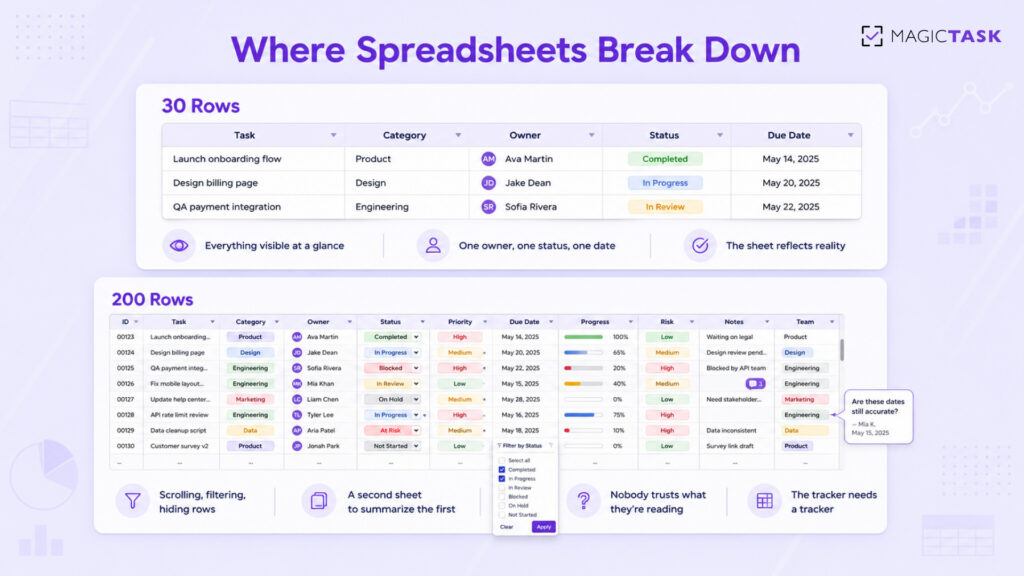
Volume. At 30 rows you can see everything. At 200 you’re scrolling, filtering, hiding rows, and building a second sheet that summarizes the first one. The tracker now needs a tracker.

No real prioritization. You add a Priority column. Within three weeks every row says High, because everyone marks their own work as High. The column stops carrying information and becomes decoration.

Messy collaboration. Two people open the sheet at once. One sorts by due date without selecting the full range and quietly scrambles the row alignment. Someone leaves a comment that nobody sees for four days. There’s no notification when the row you care about changes, so you check manually, or you don’t check at all.

Everything is manual. A status cell is only accurate if a human remembers to update it. People finish work and forget to mark it. Others mark things done in advance because they intend to finish. The sheet drifts from reality a little more each week.

No consistency across teams. Marketing has a sheet. Design has a different sheet. One writes “In Progress,” another writes “WIP,” a third writes “ongoing.” When a manager tries to see all of it together, they end up copying and pasting on a Friday afternoon.

What you’re actually missing

The friction above is visible. What’s missing is harder to spot, because you can’t miss what was never there.

Clarity about the next step. A row that says “Website revamp, In Progress” tells you nothing about what to do tomorrow morning. Big blurry items sit in the sheet for months because nobody knows where to grab them.

Honest progress visibility. A cell that reads 60% is someone’s guess. There’s no underlying data behind it. You can’t tell whether the work is moving or whether one person is quietly stuck.

Any sense of momentum. You finish something hard, you type “Done,” and the cell turns green. That’s it. Nothing acknowledges the effort. Compare that with any game you’ve played, where progress is visible, immediate, and worth chasing. Motivation isn’t a soft concern here. It’s the reason your sheet is abandoned by week three.

Consistency over time. Spreadsheet systems rely entirely on discipline. The moment things get busy, updating the tracker is the first thing to go, and once it’s a week stale people stop trusting it. A tool that only works when you’re on top of things is useless exactly when you need it.

Execution, not record-keeping. Add up the time your team spends maintaining the sheet: formatting, chasing updates, reconciling versions. That’s time spent describing work instead of doing it.

What a better system looks like

The fix isn’t a fancier spreadsheet. It’s a shift in what the tool is for.

Tasks should arrive clear enough to start. Progress should be visible without anyone typing a percentage. The system should give you something back when you finish, so opening it tomorrow feels appealing rather than like homework. And it should hold up when the workload doubles, which is the exact moment a spreadsheet folds.

Most project management tools solve the first half of that and ignore the second. Jira and Asana will happily hold ten thousand tasks. Neither does much to make you want to open them on a Wednesday morning when you’re tired. Asana gives you a unicorn animation. That’s roughly where the motivation design ends.

How MagicTask approaches it

MagicTask was built by people who noticed that games are very good at keeping humans engaged with repetitive effort, and productivity tools are very bad at it.

Work is structured as quests, not rows. Instead of a flat list, your work lives in Realms, with larger pieces broken into Dungeons and individual quests. The structure does the thing your Priority column was supposed to do and never managed: it tells you where something sits and what it belongs to.

Tasks are sized S, M, L, or XL. This sounds minor and changes everything. You have 40 minutes before a call, so you pick an S or an M. You have a clear Thursday, so you take the XL you’ve been avoiding. No more staring at a row called “Q3 planning” and deciding to answer email instead. Sizing also stops the classic spreadsheet failure where one row secretly contains three weeks of work.

Finishing produces a real signal. Completing a quest earns XP. XP builds levels. Levels unlock themes you can equip. The points themselves don’t matter; what matters is that effort now has feedback attached to it. In a spreadsheet, the reward for finishing a hard task is that the cell turns green and you move on. That’s not enough to keep anyone coming back for six months.

Streaks reward consistency, not heroics. The XP system is built around daily effort rather than distant outcomes, so showing up on an average day counts. This matters because the point of a productivity system is surviving the ordinary weeks, not the ambitious ones.

The interface stays out of the way. Clean layout, minimal chrome, no seventeen-panel dashboard. Part of the reason spreadsheets exhaust people is visual noise, and most tools that replace spreadsheets replace it with a different kind of noise.

For teams, this changes what a manager sees. Instead of chasing status updates over Slack and reconciling three sheets, progress is generated by the work itself. And because the system is designed around motivation rather than compliance, people update it, which is the whole problem a spreadsheet never solves.

Making the shift

Moving off spreadsheets fails when people try to recreate their sheet inside a new tool. Here’s what works better.

Start by cutting, not migrating. Don’t import 200 rows. Take the work you’re doing this week, put that in, and see how it feels. Most of what’s sitting in your old tracker was never going to get done anyway.

Shift the question from “is this tracked?” to “is this finished?” Those two questions produce very different work habits.

Choose clarity over customization. The pull toward building custom fields and elaborate views is strong for anyone who has spent years in spreadsheets. Resist it for the first month. You’ll find you needed far less structure than you thought.

Let the sizing do the deciding. When you sit down, don’t scan everything and pick what feels urgent. Look at how much time you have, pick a quest that fits, and finish it. Decision fatigue is a bigger drag on most people’s week than the work itself.

Spreadsheets earned their place. They’re fast, familiar, and free, and for a small list they’re hard to beat. They just weren’t built to carry a growing workload, and pretending otherwise costs your team hours every week.

If your sheet has stopped telling you the truth, run two weeks of work through MagicTask instead. Fourteen days are enough to see the difference between work that’s tracked and work that’s actually finished.

Why Tools Like Asana and ClickUp Break Down Under Real Workloads

Nobody signs up for Asana or ClickUp expecting to abandon it.

The demo looks incredible. The setup weekend feels productive. Boards get built, custom fields get configured, automations get wired up, and for about two weeks the team feels more organized than it has ever been.
Then real work shows up. Three projects become nine. A launch slips. Two urgent requests land on a Tuesday afternoon. And the tool that promised structure, visibility, and control starts producing the opposite: confusion, overload, and a slow, quiet retreat back to Slack messages and sticky notes.

Here is the uncomfortable part. This is not a user error. In Asana’s own Anatomy of Work research, knowledge workers reported spending roughly 60% of their time on “work about work,” which covers coordination, status chasing, and tool upkeep instead of the tasks that actually move projects forward. The friction is measurable, and it comes from how these systems behave once workloads get real.

Quick answer: Tools like Asana and ClickUp break down under real workloads because their structure grows faster than the work itself. As tasks, projects, and views multiply, teams spend more time maintaining the system than executing inside it. Tools built for clarity and fast execution hold up better as volume increases.
This post breaks down exactly where that breakdown happens, why it is structural rather than accidental, and what a productivity system actually needs to survive contact with a real week of work.

Why Asana and ClickUp Feel Great at the Start

Let us be fair, because both of these tools earn their popularity honestly.

Asana and ClickUp are genuinely well-built platforms. In the early days of adoption, they deliver real value.

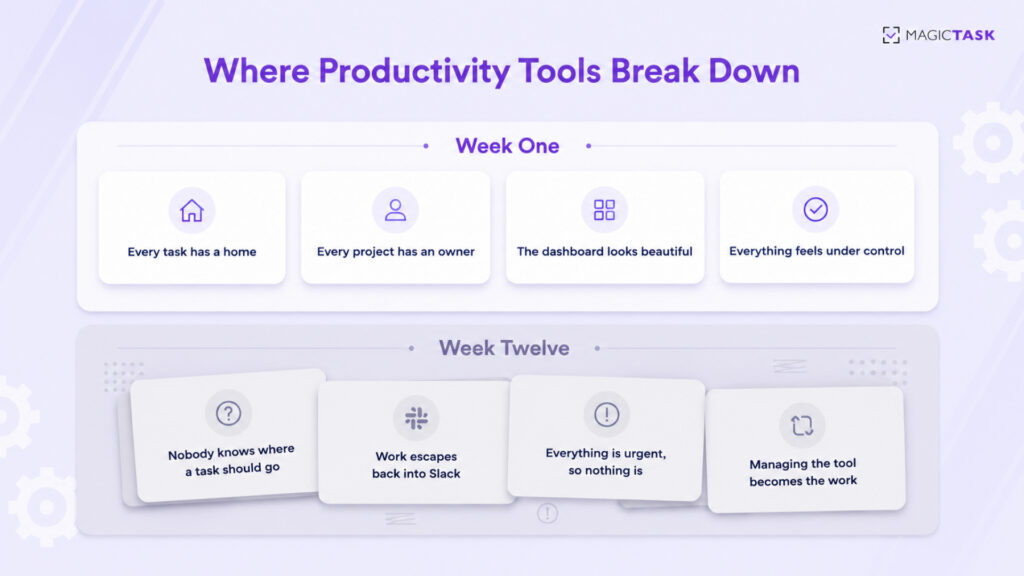
Structured workflows create instant clarity. After months of scattered requests and untracked to-dos, seeing everything laid out in boards, lists, and timelines feels like turning the lights on. Every task has a home. Every project has an owner.

Features create a sense of control. Custom fields, dependencies, automations, dashboards, sprints, goals, portfolios. Each feature answers a real question a manager has asked at some point. Having them available feels like insurance against future chaos.

Setup itself feels productive. Building the workspace is satisfying. Naming projects, designing templates, and color-coding priorities gives teams a genuine sense of momentum before a single task is completed.

Early adoption looks like success. For the first few weeks, usage is high, updates are current, and leadership sees clean dashboards. Everything suggests the rollout worked.

None of this is an illusion. These tools do work at low volume. The problem is that low volume is a temporary condition, and the honeymoon phase is quietly building the exact structure that will cause trouble later.

What Changes When Real Workloads Hit

A productivity tool is never tested by the work you set it up for. It is tested by everything that arrives afterward.

Here is what a real workload actually looks like for most teams.

Task volume compounds fast. A team of eight generating five tasks per person per day creates 200 tasks a week. Within a quarter, the workspace holds thousands of items, most of them half-open, partially updated, or quietly stale.

Projects start competing for attention. Work rarely arrives one project at a time. Client deliverables, internal initiatives, bug fixes, and ad hoc requests all run simultaneously, and each one lives in a different board with its own structure and rules.

Context switching becomes the default. ClickUp alone offers more than a dozen view types. Multiply views by projects by custom configurations, and simply finding out what to do next requires navigating between screens. Research on task switching consistently shows this carries a real cognitive cost, with the American Psychological Association noting that even brief mental shifts between tasks eat significant productive time.

Maintenance becomes its own job. Someone has to groom the backlog, fix broken automations, archive dead projects, and retrain new hires on how the team uses the tool. In many organizations, this silently becomes a several-hours-per-week responsibility that nobody was hired to do.

This is the breaking point. The tool has not changed. The workload has, and the structure that felt protective at low volume now has to be dragged along with every piece of work.

Where the Breakdown Actually Happens

The failure is rarely one dramatic moment. It is four smaller failures compounding.

1. Over-Complex Structures Create Confusion

Flexibility is the selling point of tools like ClickUp, and flexibility is also the trap. When a tool can be configured a hundred ways, every team configures it differently, and often every department within the same company does too. New members inherit a structure they do not understand. Nobody is sure whether something belongs in a subtask, a checklist item, or a linked task in another space. The system stops being a shared language and becomes a private dialect only the admin speaks fluently.

2. Tasks Become Too Detailed or Too Scattered

Heavy tools push work toward two bad extremes. Some tasks become bloated with required fields, estimates, tags, and dependencies before anyone can start them, which is why creating the ticket becomes a task in itself. Other work never enters the system at all, because the entry cost is too high, so it lives in direct messages and memory instead. Either way, the tool no longer reflects reality.

3. Prioritization Goes Blurry

When everything is tracked, tagged, and flagged, nothing stands out. A workspace with 40 high-priority items across six boards gives a team no actual answer to the only question that matters at 9 a.m., which is what to work on right now. Dashboards show volume. They do not show the next step.

4. Managing the System Overtakes Doing the Work

This is the terminal stage. Standups become tool audits. Updates get logged for the sake of the dashboard rather than the work. One project manager put it plainly in a conversation that stuck with the Imaginovation team: “I used to spend more time managing tasks than doing them.” When a team reaches that point, adoption collapses, not because people are lazy, but because the tool is now producing friction instead of removing it.

Breakdown at a Glance

Symptom

What It Looks Like Day to Day

Root Cause

Structure sprawl

Nobody knows where a task should go

Too many configuration options

Entry friction

Work lives in Slack instead of the tool

Task creation takes minutes, not seconds

Priority fog

Dozens of items marked urgent

Volume displayed instead of next steps

Maintenance tax

Weekly hours spent grooming the system

Structure grows faster than the work

Silent abandonment

Dashboards go stale, updates stop

All of the above, compounding

Why Simplicity and Clarity Scale Better Than Features

Here is the counterintuitive truth this whole topic points to. Under pressure, less structure outperforms more structure.

That sounds backwards until you look at what pressure actually does to a team. When workloads spike, every decision the tool forces becomes a tax. Which board? Which field? Which view? A system that demands ten micro-decisions per task might be manageable at 20 tasks a week and is crushing at 200.

Systems that scale share a few traits.

They reduce decision-making instead of adding it. The best tools answer the question of what comes next instantly. Every additional option, view, and field moves the tool in the wrong direction unless it directly serves execution.

They keep tasks clear and actionable. A task like “Send invoice to Bob” with a small size marker beats a fully specified ticket with nine fields, because the first one gets done and the second one gets postponed.

They treat constraint as a feature. Fewer views and fewer pages mean everyone looks at the same picture of the work. Shared visibility is what actually keeps distributed teams aligned, not per-person custom dashboards.

They stay fast under load. If adding a task takes seconds, the system stays current. If it takes minutes, the system drifts away from reality precisely when accuracy matters most.

This is not an argument against power. It is an argument that in a productivity tool, usability under pressure is the power. A feature that goes unused because the team is too busy to use it has negative value. It still adds visual noise, onboarding cost, and maintenance weight.

What Teams Actually Need From a Productivity System

Strip away the feature comparisons and teams need four things from any system that has to survive a real workload.

1. Clear next steps, not just organized lists. Organization is a means, not the goal. The system should surface a short, ordered answer to the question of what to do now, every single day. In MagicTask, this is exactly what the split between the Backlog and My Focus does. Everything gets captured, but only today’s committed priorities sit in front of you, ordered by drag and drop.

2. Visibility into progress, not just task volume. Seeing 400 open tasks is demoralizing. Seeing that you completed 12 today and your project moved measurably forward is motivating. Progress needs to be visible and, ideally, feel rewarding. This is where MagicTask’s gamification stops being decoration. Every completed task earns XP, streaks build visibly, and momentum becomes something you can actually see instead of vaguely sense.

3. Flexibility for how work actually arrives. Real weeks include surprises. A system should absorb an urgent Tuesday-afternoon request in seconds. Capture it, size it (S, M, L, or XL), decide whether it displaces today’s plan, and move on. If handling a disruption requires restructuring a board, the tool is working against you.

4. Consistency support, because systems fail in week three, not week one. Most tools bet everything on setup and offer nothing for the long grind of daily use. The tools that last give people a reason to come back: visible streaks, small rewards, a workspace that is genuinely pleasant to open. MagicTask V3 was built around this insight, with Realms, Dungeons, chests, and leaderboards layered on top of a deliberately minimal task core, so that showing up daily is the path of least resistance rather than an act of discipline.

Notice what is not on this list. More views, more fields, more automation recipes. Those things are fine at low volume. They are what breaks first at high volume.

Frequently Asked Questions

Why do teams stop using Asana and ClickUp?

Teams typically abandon these tools when maintenance overhead exceeds the value delivered. As task volume grows, complex structures require constant grooming, prioritization becomes unclear across boards, and task creation takes too long, so work quietly migrates back to chat messages and memory.

Is ClickUp too complicated for small teams?

For many small teams, yes. ClickUp’s flexibility, with its many view types, custom fields, and hierarchy levels, is designed to serve large, varied organizations. Small teams often spend disproportionate time configuring and maintaining that flexibility instead of benefiting from it. Simpler execution-focused tools usually deliver faster adoption.

What is the difference between a tool working at setup and working at scale?

At setup, a tool handles a small, planned set of projects, and structure feels helpful. At scale, hundreds of tasks, competing projects, and constant interruptions test whether the tool stays fast and clear. Tools that add decisions per task break down. Tools that reduce decisions hold up.

What should I look for in an Asana or ClickUp alternative?

Look for four things: instant task capture measured in seconds, a clear daily priority view rather than sprawling boards, visible progress that motivates continued use, and a near-zero learning curve so the whole team actually adopts it. MagicTask was built around exactly these criteria, with gamified progress layered on a deliberately simple core.

Does gamification actually help with heavy workloads?

Yes, when it is tied to real work rather than bolted on. Visible Magictokens, streaks, and rewards convert completed tasks into felt progress, which sustains engagement during high-volume periods when motivation normally collapses. Research on gamification and psychological need satisfaction supports this effect on sustained task engagement.

Can MagicTask handle multiple projects and teams?

Yes. MagicTask organizes work into Folders and Projects with team assignment and real-time sync across devices, so every update appears instantly for everyone. The difference is that this structure stays flat and visible on a single main view instead of splintering into per-project configurations.

The Tool Should Survive Your Worst Week, Not Just Your First One

Productivity tools do not fail because they lack features. They fail because they cannot stay usable when work gets heavy, and heavy is the normal condition of real work.

So here is the question worth asking about your current setup. Does your tool still give you a clear next step on your busiest day? Or has managing the system become one more thing on the list?

If your team is spending more time organizing work than executing it, the tool is not scaling with you. It is scaling against you.

MagicTask takes the opposite bet: a task system simple enough to stay fast under any workload, with Magictokens, Realms, and visible momentum that make showing up every day the easy choice.

Try MagicTask

Gamified Productivity: How MagicTask Helps You Win the Workday

Have you ever noticed how you can lose track of time playing a game, but struggle to stay focused on a simple work task? I used to wonder why checking off a to-do felt flat, but leveling up in a game felt electric. Then I realized that productivity isn’t a discipline problem, but rather a feedback problem.

Traditional systems expect you to grind through tasks and somehow stay motivated. But our brains don’t work that way. We respond to progress we can see, effort that feels rewarded. Research shows that frequent, immediate rewards fuel sustained engagement far better than delayed ones.

Gamified productivity taps into clear goals, tiny wins, and points that help you progress. That’s the philosophy behind MagicTask: turning everyday work into wins you can feel, not just tasks you’re relieved to finish.

The Problem with Conventional Productivity Tools

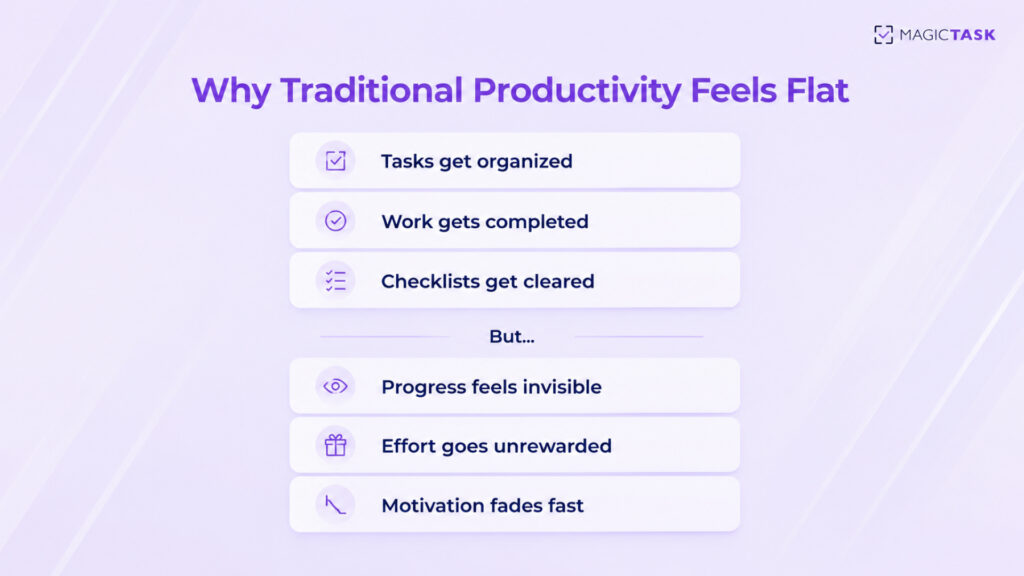
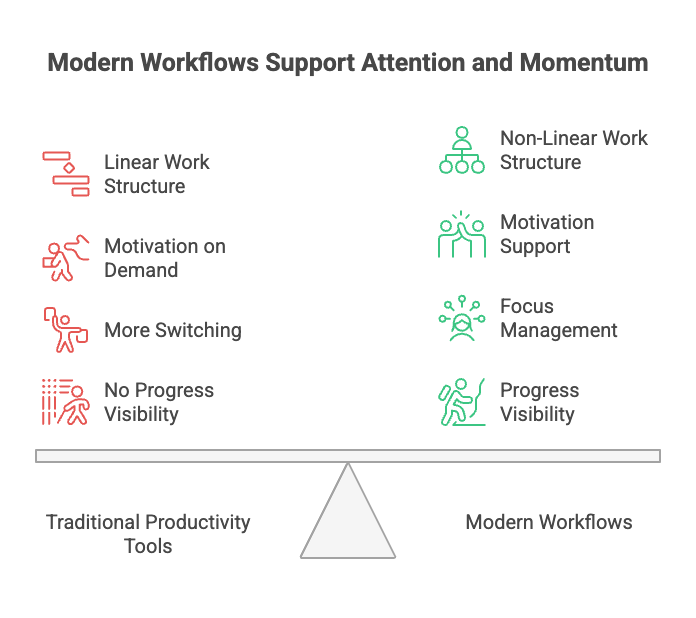
Most productivity tools are built around organizing lists, labels, due dates, and dashboards. They help you see your work, but they don’t help you want to do it.

Common issues show up fast:

  • You stay busy, but don’t feel like you’re actually progressing
  • Tasks feel like obligations, not achievements
  • Checking a box brings relief, not satisfaction
  • The workday becomes repetitive and draining

You might feel structured, but not motivated, because there’s no sense of progress. Over time, productivity starts to feel like a grind, something you power through instead of something that energizes you.

That gap between being organized and feeling motivated is what traditional tools fail to solve.

And that’s where gamification turns effort into achievement.

The Psychology Behind Gamified Workdays

Keeping yourself productive can be difficult. When your environment gives you small bursts of achievement, your brain leans in instead of fighting the process. Gamified productivity taps into that wiring.

Dopamine and Instant Rewards Shape Behavior

Every time you complete a task and see progress, maybe a streak, a point increase, or a level up, your brain releases a small dopamine reward. That’s the same motivation system behind why people enjoy leveling up in games or finishing a workout rather than just planning one.

Researchers have shown that immediate rewards increase motivation to complete tasks, even when the task itself doesn’t change. The brain simply enjoys visible progress.

Gamified systems give you a reason to return.

Visible Progress Beats Willpower

Most productivity tools stop at the checklist. Gamification builds feedback loops that make your effort feel meaningful in the moment, not just when a big outcome lands weeks later.

For example, you finish a task at 10:15 AM. In a normal tool, you’d check it off and move on. Maybe you feel good about it… Maybe you don’t. The moment passes, and so does your momentum.
But inside a gamified system, that task completion triggers a tiny celebration. And suddenly, instead of closing the tab or wandering off to Slack, you’re thinking: “Okay… what can I finish next?”
That micro-win nudges your brain into forward motion. Not because the work changed, but because how it felt changed. Gamified momentum relies on progress, and progress drives behavior far more reliably than willpower ever will.

Systems > Motivation (Atomic Habits Insight)

James Clear said it best:
“You don’t rise to the level of your goals, you fall to the level of your systems.”
Gamification gives you a built-in system that you do not have to remember to use. And when completing tasks feels meaningful in real-time, consistency becomes natural. The friction disappears. The start-stop cycle breaks. Work becomes something you win at.

How MagicTask Turns Tasks into Wins


I’ve used pretty much every productivity tool you can name. Some looked beautiful. Some were packed with features. Some felt like I needed a training manual just to write a to-do list.

MagicTask is built to chase productivity for its own sake. It’s like I’m interacting with the system, and the system responds. There’s a rhythm to it. You finish one thing, and suddenly the next one doesn’t feel like friction.

Let me show you how MagicTask actually does that, step by step.

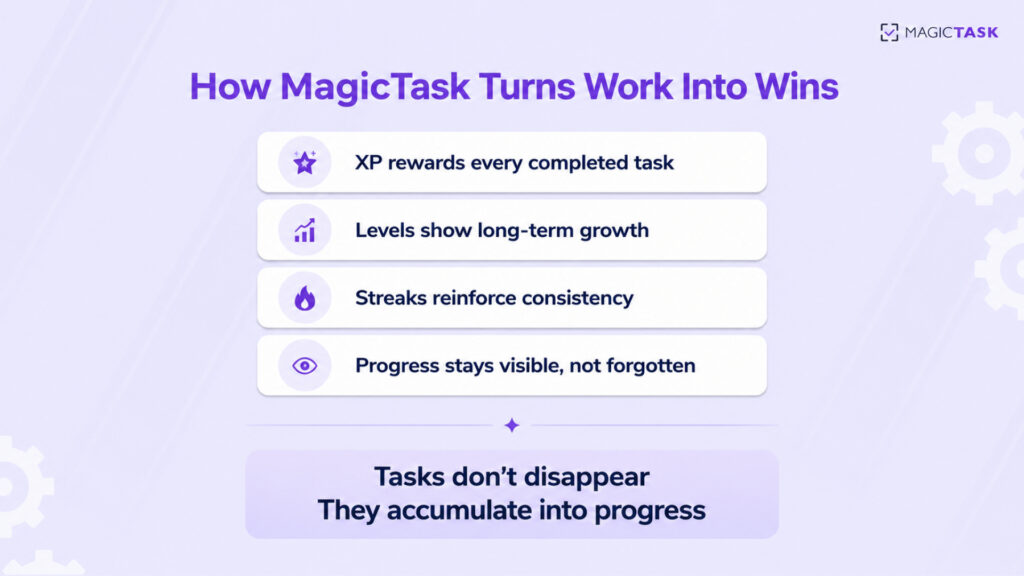
1. XP + Levels = Your Progress Comes to Life

MagicTask makes productivity tangible. Instead of completing a task and watching it disappear into a list, progress accumulates and becomes part of your growth system. Each action contributes to something visible and lasting, not just a checked box that vanishes.
This structure turns daily work into measurable advancement:
XP: Completing tasks earns experience points, reinforcing every action taken.

Levels: Progress unlocks milestones, creating natural checkpoints and achievement moments.

Streaks: Consistency is rewarded, encouraging a steady daily rhythm instead of sporadic effort.

Visible Progress: Finished tasks fuel a record of momentum, making progress feel real and motivating.
Teams and individuals stay engaged because every task has an impact, and every day moves them a level higher.

2. Task Sizes Give Every Effort Clear Weight

Big projects fall apart when everything seems like a huge mountain. In MagicTask, every task has a weight (S, M, L, or XL) so effort becomes visible and planning becomes realistic.

Instead of staring at a wall of identical checkboxes, your team sees which tasks are tiny momentum-boosters and which ones need deep focus. That clarity reduces overwhelm, prevents over-stacking heavy work, and helps build steady progress instead of burnout.

Here’s how task sizing breaks work down in a way your brain can actually follow:

Task Size Description Time Required Points
S Quick, low-effort task >15 min 10
M Moderate effort 15–30 min 25
L High-effort task 1–2 hours 50
XL Complex, multi-step project More than 2 hours 100

By visually framing tasks and tying them to points, MagicTask turns everyday work into achievable milestones.

3. Themes & Animations Reward Follow-Through

Consistency gets boring when there’s nothing to look forward to. MagicTask keeps the experience fresh by rewarding follow-through with visual upgrades and subtle animation cues that make progress feel exciting instead of routine.
As themes level up, your workspace evolves with you, a quiet signal that you’re building momentum and staying disciplined over time. It’s positive reinforcement that feels earned, not forced.
Some ways this plays out in daily use:
Theme unlocks: each level gives your setup a fresh aesthetic twist
Micro-animations: task completion triggers satisfying visual feedback
Sound cues: gentle audio rewards add personality to completed actions
Personalization: users shape their workspace as they improve
Skill-curve motivation: progress encourages continued check-ins
These visual incentives strengthen habit loops and turn everyday planning into something people want to return to. It’s simple, subtle, and designed to fuel consistent engagement without gimmicks or noise.

4. The Interface Helps You Focus

Clean design = fewer decisions, more doing
A productivity tool shouldn’t feel like a dashboard in a Fortune 500 boardroom. It should feel like a space where your brain can breathe. MagicTask’s interface strips away the clutter and gives you only what you need: your tasks, your progress, and your flow.

You open MagicTask, see your plan, and start clicking into action. The mind dump feature helps you get everything out of your brain and into an organized to-do list.

This simplicity is engineered for execution. When the environment feels light, the work feels lighter. And when teams aren’t wrestling with a complicated interface just to update a task, they’re more likely to stick with the system, show up daily, and finish what they set out to do.

Staying Consistent and Motivated All Day Long

tems collapse, and the afternoon slump hits. And suddenly, the beautifully planned day starts drifting. That’s where micro-rewards change the game.

Instead of waiting for a big achievement at the end of the week, you get little bursts of progress all day. Each tiny win says, “Keep going, you’re getting somewhere.” Behavioral psychology calls this reward proximity. The closer the reward is to the action, the more likely you are to repeat the behavior.

MagicTask builds these feedback loops into your day so you don’t have to rely on hype, caffeine, or sheer discipline. Your tasks turn into quests. Your workflow becomes a level-up runway. Progress isn’t invisible anymore; it’s right there, unfolding with every click.

A Sample “Winning Workday” Quest Flow

Start Day → Capture Tasks → Pick Top 3 → Complete S Task (XP Boost)
↓
Deep Work Block → Finish M Task (Theme Progress)
↓
Break → Quick S Task (Streak Continues)
↓
Afternoon Push → Tackle L Task (Big XP Jump)
↓
Review → Carry Forward → End Day Reward Hit

As a result, you stop thinking in terms of “Ugh, so much to do” and start thinking in terms of “What’s my next quest?” And that subtle shift keeps you moving even when motivation flickers.

Turning Productivity into a Habit with MagicTask

Most tools help you plan your day. MagicTask helps you rewire how you work, so productivity becomes automatic instead of effortful. This is about building a rhythm your brain learns to trust.
Daily engagement isn’t a checkbox here. Every login, every task you clear, and every smooth hand-off builds a mental pattern. Over time, that familiarity becomes habit, the same way you instinctively open your favorite app when you have a spare moment. You’re training your mind to associate work with progress instead of pressure.
Here’s how that shift starts to lock in day after day:

You see progress instead of a pile of tasks: Forward motion feels real and satisfying.

You return naturally, not forcefully: The system pulls you back rather than you pushing yourself into it.

You build trust with your workflow: The more consistent the loop, the less doubt and hesitation creep in.

You unlock growth quietly over time: Not dramatic bursts, but steady improvement you can feel.

This approach works for individuals who crave structure without rigidity, and for teams who thrive when everyone’s moving in sync. Shared boards and visible momentum create gentle accountability. People stay aligned because progress lives in motion.

Conclusion

Gamified productivity isn’t about piling more onto your plate or squeezing extra hours out of your day. It’s about making the hours you do spend feel energizing, meaningful, and yes, rewarding.
MagicTask takes your daily workflow and turns it into something that feels human again. Instead of grinding through silent checkboxes, you move through visible progress, momentum loops, and tiny wins that build into real achievement.
If you’re curious what that shift looks like in real life, don’t overthink it. Try MagicTask for one week. Clear tasks. Watch your XP rise. Notice how much lighter your day feels when progress is something you experience, not just record.
Show up, take small steps, and watch how winning your workday starts to feel natural.

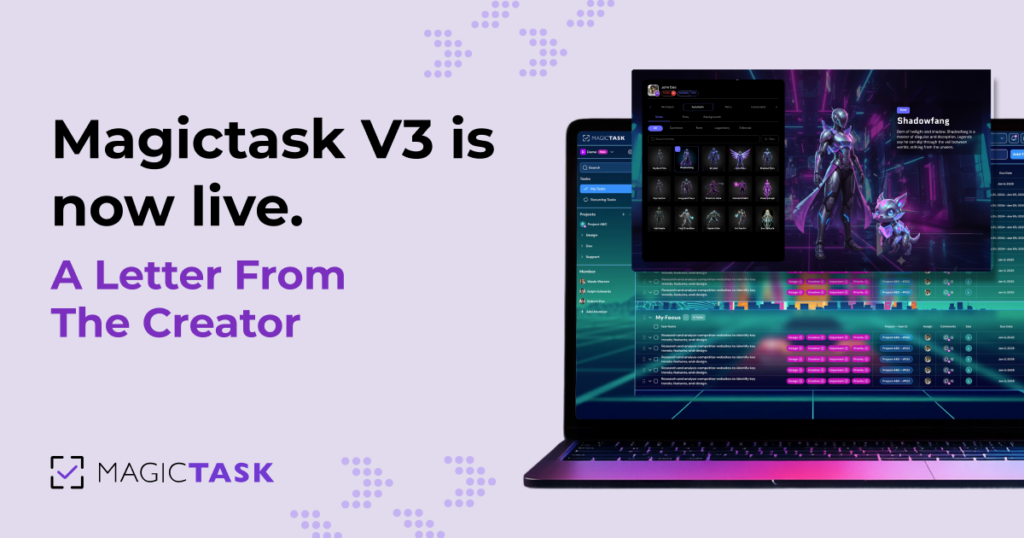
MagicTask V3 Is Now Live: A Letter from the Creator

It is here. MagicTask V3 is officially live and open for early access. After nearly two years of building, designing, and rebuilding from the ground up, we are finally ready to share what we have been working on. If you have been with us since V2, or even V1, this one is for you. I wanted to take a moment before you dive in to share the story behind V3, what we set out to solve, and what we are building toward next. Because this is not just a product update. It is a new chapter

Where it all started

  • MagicTask started because I was using Notepad++. Every morning I would open a new tab, type out my tasks for the day, and put an X next to each one when it was done. It worked, but it was not web-based, it did not save history, and it definitely did not scale for a team.
  • So we built V1. Essentially a web-based Notepad++ that kept your progress and could be accessed anywhere. Simple. Focused. No bloat. That was the whole point.
  • The problem? No one was using it.
  • “We looked inward and realized: this needs to be fun. People are not going to use a system just because it is well-designed. They need to actually want to come back to it.”
  • That realization gave us MagicTask V2, built around 2020, with the gamification layer. Themes, rewards, a little bit of magic. The concept was right, but the implementation was not where it needed to be. We knew it, even if we did not always say it out loud.

Why we went back to the drawing board

  • Around 2025, right as AI tools were becoming genuinely powerful, I made a decision: I am going into the lab and redesigning this from scratch. It took about four to five months just on the architecture. Then we started building it.
  • V1  Simple, web-based task list 
  • V2  Themes and customization introduced 
  • V3  Rebuilt from the ground up with a full gamification layer
  • V3 is V2 rebuilt properly. A completely revamped tech stack, a redesigned gamification layer built to grow with us, and a foundation we can rapidly build upon. We are not patching a legacy system anymore. We are adding to something we are proud of.

The real problem with most productivity tools

  • Here is something I genuinely believe: consistency is productivity. You can have the most powerful task manager in the world, but if you are not using it consistently, it is useless. Most tools do not solve for that. They get you through day one, maybe day three, and then you drift.
  • “Sustained productivity over a long period of time, that is the real goal. And you only get there if the system actually motivates you to come back.”
  • Think about why social media works. It is not because it is useful. It keeps giving you a reason to return. We want MagicTask to do the same thing, but instead of endless scrolling, you are actually making progress on things that matter.
  • Our mission is to save people time. Help them get organized, get things done, and have more hours left for the things they actually love doing.
  • Realms, dungeons, and why it all makes sense
  • In V2, themes were a great idea in theory. Pick one, use it forever, rarely think about it again. There was no path, no objective, no sense of progress within the experience itself.
  • V3 changes that entirely. When you start your day, you enter a realm, go through a portal, and find yourself inside a dungeon, which is essentially your  interface. Your tasks become your path through the dungeon. Complete enough of them and you earn a chest at the end.
  • Every day brings a new realm, a new dungeon, and a completely different experience. Animations, sound effects, boss fights, entry videos, and rewards that are unique to each run. No two days feel exactly the same.
  • There is also an exploratory factor we are excited about. We are planning to release new realms regularly. When we reach 200 realms, your team of 50 people will likely encounter different ones. “You have to try the Elemental realm…It’s awesome” becomes a real conversation at work.

Who is MagicTask V3 built for?

  • Technically, it was built for Imaginovation, our own team. That has always been user number one. But we have had two people in mind as we build.
  • The first is someone we call Culture Chris. A business owner who wants to give their team a better experience at work. Happy workers are better workers. If you can introduce a little bit of fun into a repetitive or tedious workday, you get more engagement, more motivation, and more output. MagicTask is the system that makes that possible, Then there is Gamer George. Anyone who has played games, understands how realms and items and chests work, and would find a productivity tool built around those concepts immediately intuitive. And honestly, that is most people now. Games are everywhere.

What does V4 look like? And V5?

  • We are already thinking beyond V3. In V4, we want to give the items you earn actual utility. Maybe certain combinations of skins and equipment unlock hidden realms, or unlock unique video experiences tied to what you have equipped. The things you collect start to mean something beyond looking cool.
  • Further out, in V5 and beyond, we want the character you have built inside MagicTask to travel with you. Use it in a real game, an arena, something that makes the time you have invested in your productivity carry forward into something playful and social.
  • It took six years to go from V2 to V3. With the AI tools we are working with now, I do not think it will take anywhere near that long to reach V4/V5

A word on simplicity

  • Even with all of this, we have not abandoned the original principle: keep it simple. Adding gamification to a cluttered, bloated system does not work. The system has to be clean first. Simplicity is not just a design choice. It is what makes the fun parts actually fun.

A note to our V2 users

  • If you have been with us on V2, you are getting migrated to V3 Your loyalty matters to us, and we want you to experience what we have built without any barrier.
  • If you believe in what we are doing, sharing MagicTask with a friend, a colleague, or your team is the single biggest thing you can do to help us grow this community. We are building something together.
  • “It is better to release good software today than wait for perfect software tomorrow.”
  • V3 is live, it is in the early access phase, and we are actively building it. The best time to join is now. Before the slots fill up, before everyone has been everywhere, and while you can still be one of the first through the system.

Ready to see what your workday could feel like? MagicTask V3 is open for early access.

Try MagicTask V3

Sudo Innominate,
Creator of MagicTask

Questions, thoughts, or feedback? We want to hear from you.

Why Small, Visible Wins Keep People Engaged After Motivation Fades

Motivation often feels powerful at the beginning of something new. A fresh project, a new productivity system, or a habit meant to improve daily life usually begins with strong energy. People feel focused and optimistic. Tasks seem manageable, and progress appears exciting.

During this early phase, productivity often feels effortless. Plans come together quickly. Goals feel achievable. The sense of possibility makes work enjoyable and engaging.

Then something slowly changes.

The excitement that fueled the beginning begins to fade. Tasks that once felt easy now require more effort. The project still matters, yet the emotional drive that helped you start begins to weaken.

This experience happens to almost everyone. Many people assume the issue lies in discipline. They believe they simply need stronger willpower or better habits to continue.

However, motivation rarely remains constant over long periods. Human behavior does not run on endless enthusiasm.

Long-term engagement depends on something more stable. People stay consistent when progress feels visible and achievable. Small wins provide reinforcement that motivation alone cannot sustain.

When progress becomes easy to see, effort begins to feel meaningful again. Even on slower days, completing small actions creates a sense of movement. Over time, those small steps build momentum and help people stay connected to their work.

Understanding the role of small, visible wins can change how individuals and teams approach productivity. Instead of chasing constant motivation, they build systems that reinforce progress every day.

Why Motivation Naturally Fades Over Time

Motivation usually begins with excitement. Starting something new creates curiosity and anticipation. The brain responds strongly to novelty, which produces emotional energy that makes early effort feel lighter.

At the beginning of a project or productivity system, several positive effects often appear.

  • Novelty effect: New systems feel exciting because they break routine and stimulate curiosity.
  • Initial optimism: People often believe progress will come quickly, which increases confidence and energy.
  • Clear direction: Goals and plans feel fresh, making it easier to take action.
  • Emotional momentum: Early progress produces enthusiasm that encourages further work.

During this stage, productivity systems often appear extremely effective. People organize tasks, create ambitious plans, and move quickly through their work.

However, novelty does not last forever.

Once routine replaces excitement, the brain stops producing the same emotional boost. Tasks become familiar. Effort begins to feel heavier. The project still matters, yet the emotional reward becomes weaker. This shift reflects how human psychology works rather than a failure of discipline.

Research published in Harvard Business Review explains that people feel most motivated when they experience consistent progress in meaningful work. When progress becomes difficult to recognize, motivation declines even if the work itself remains important.

When effort continues without visible signals of advancement, people begin to question their productivity system.

Several patterns usually appear during this stage.

  • Growing procrastination: Tasks feel harder to start because the emotional reward of progress becomes less visible.
  • Increased mental resistance: Work that once felt manageable begins to feel heavier and more demanding.
  • Reduced engagement: People start disconnecting emotionally from projects that previously felt exciting.
  • System abandonment: Productivity systems often get replaced because they no longer feel motivating.

Many productivity approaches struggle because they depend heavily on motivation. Emotional energy can help people start something new, yet it rarely sustains long periods of consistent effort.

Consistency requires reinforcement. People continue showing up when their effort produces visible evidence that progress is happening. Small wins provide that reinforcement.

The Psychology Behind Small Wins

Small wins influence behavior because they shorten the distance between effort and reward. Large goals often feel distant and overwhelming. When people focus only on the final outcome, the brain struggles to stay engaged because the reward feels too far away. Small wins solve this problem by creating frequent signals of progress.

Each completed action tells the brain that effort is working. That signal produces a small sense of satisfaction, which increases confidence and encourages repetition. Over time, this process creates a progress loop that strengthens engagement.

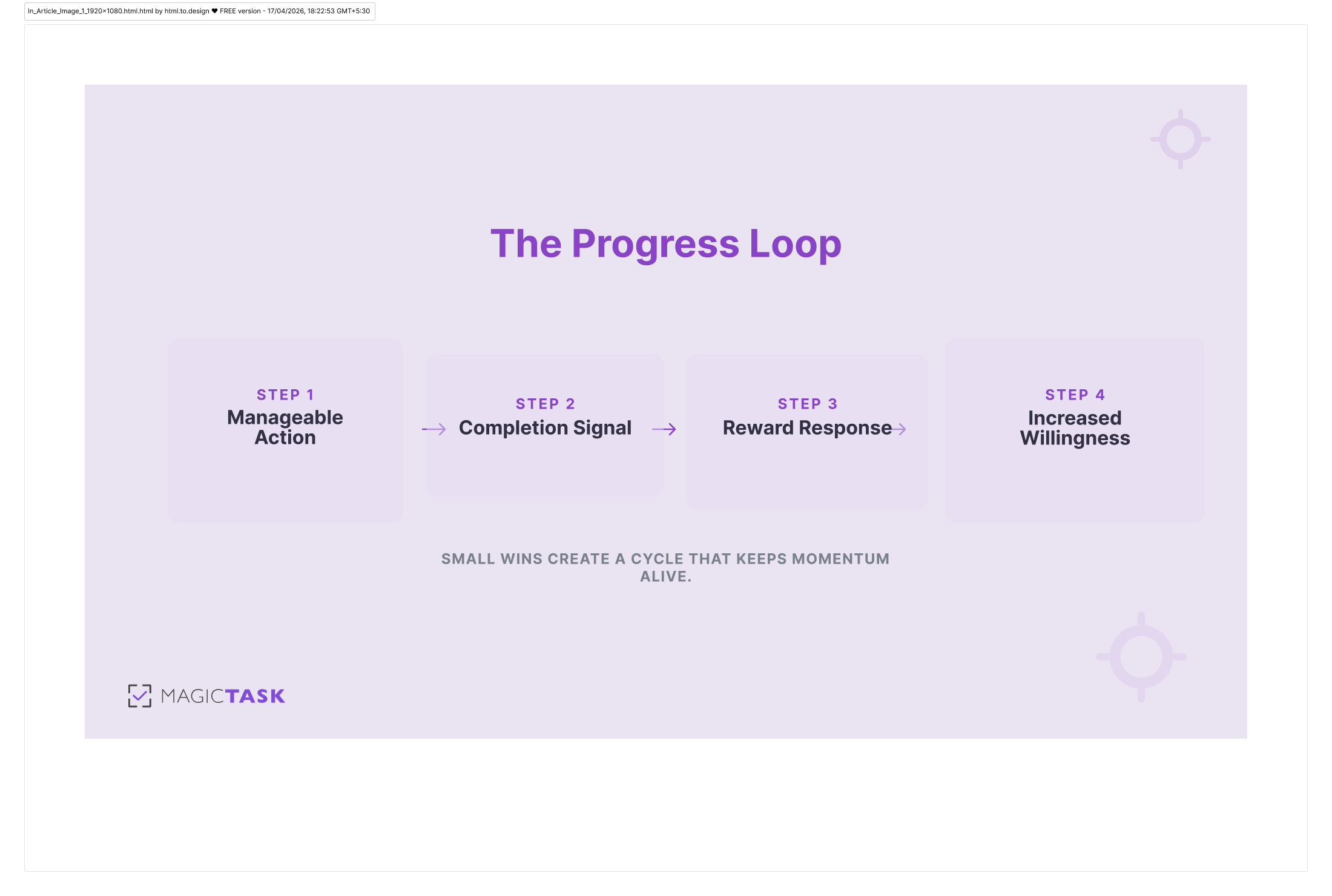
The Progress Loop

A typical progress loop follows a simple pattern.

  • Manageable action: A task small enough to complete without significant resistance.
  • Completion signal: The brain recognizes that progress has occurred.
  • Reward response: A small feeling of accomplishment reinforces the action.
  • Increased willingness: Starting the next task becomes easier because confidence grows.

Research by Teresa Amabile and Steven Kramer explored this idea through thousands of workplace diary entries. Their findings showed that progress in meaningful work was the strongest factor influencing positive emotions and engagement at work.

Even small steps forward produced measurable improvements in motivation. This insight changes how productivity should be understood. Many people assume motivation creates progress. In reality, progress often creates motivation.

When people see that their effort leads to results, they feel encouraged to continue.

Small wins also reduce psychological resistance. A large project may appear intimidating when viewed as a single objective. Breaking that project into smaller actions changes the experience completely.

Examples of small wins may include:

  • Task completion: Finishing one clearly defined task within a larger project.
  • Section progress: Completing a specific section of a report, presentation, or design.
  • Communication progress: Sending important emails or messages that move work forward.
  • Organizational progress: Sorting tasks, updating plans, or reviewing priorities.
  • Progress review: Recognizing completed work during a daily or weekly review.

These actions may appear simple, yet they create reinforcement that keeps people engaged.

Small wins also help people remain productive on low-energy days. Motivation naturally rises and falls, and no one operates at peak energy every day. When tasks remain manageable, people can still move forward even when they feel tired or distracted.

Instead of waiting for motivation to return, they rely on little progress to rebuild momentum.

Why Visibility of Progress Changes Behavior

Progress only influences behavior when people can clearly see it. Invisible effort often feels unrewarded. Someone may work for hours yet remain uncertain about how much progress has actually occurred.

When this situation repeats over time, motivation begins to fade.

Visible progress changes this experience in a powerful way. Clear signals allow the brain to connect effort with results. Each completed action produces visual confirmation that advancement has occurred.

Several types of visual signals reinforce engagement.

  • Completed tasks: Finished items remain visible so people can see accumulated progress.
  • Visual boards: Tasks move across stages such as pending, active, and completed.
  • Progress indicators: Visual markers show advancement toward a goal or milestone.
  • Consistency tracking: Streak counters highlight repeated actions over time.
  • Milestone recognition: Larger accomplishments become visible checkpoints within longer projects.

These signals turn abstract effort into something tangible.

Instead of feeling like work disappears into the background, people can observe the accumulation of completed actions. Each visible signal reinforces the idea that effort leads to progress.

Psychological research supports the importance of feedback in maintaining engagement. A report by ScienceDirect explains that immediate feedback improves performance and motivation because people can clearly see how their actions influence outcomes.

Feedback works as reinforcement. When someone finishes a task and sees visible confirmation, the brain registers completion as a reward.

Without that signal, effort can feel disconnected from progress.

Signs That Progress Is Too Invisible

Many productivity systems struggle because progress remains difficult to see. Work happens, yet the system provides little reinforcement.

Several warning signs indicate that progress may be too hidden.

  • Large undefined tasks: Work remains grouped into broad goals that feel overwhelming.
  • Delayed results: Progress becomes visible only after long periods of effort.
  • Disappearing achievements: Completed work quickly disappears without recognition.
  • Lack of feedback: People receive little confirmation that their actions create progress.

When progress remains invisible, motivation gradually declines even if people continue working hard.

Making progress visible solves this problem by reinforcing effort consistently.

Designing Systems That Reinforce Small Wins

Productivity systems become more effective when they reinforce progress regularly. Instead of relying on motivation alone, they create structures that make advancement visible and achievable.

Several principles help build these systems.

Break Work Into Manageable Actions

Large projects often appear overwhelming when viewed as single objectives. Breaking work into smaller steps makes progress easier to achieve.

For example:

  • Large project goal: Launch a new product.
  • Research stage: Collect user insights and define requirements.
  • Planning stage: Create feature outlines and development priorities.
  • Development stage: Complete individual tasks related to product functionality.
  • Review stage: Evaluate progress and refine the launch plan.

Each completed action becomes a small win that builds momentum.

Make Progress Easy to Track

People remain engaged when they can clearly see what has been accomplished. Systems should allow progress to remain visible instead of disappearing.

Helpful tracking methods include:

  • Task boards: Visual structures that display tasks across different stages of completion.
  • Completion sections: Dedicated areas where finished tasks remain visible.
  • Daily reviews: Short reflections that highlight progress made during the day.
  • Milestone markers: Clear checkpoints that represent meaningful progress.

Visible progress reinforces the sense that effort produces results.

Reinforce Consistency Instead of Perfection

Many people lose momentum because they believe productivity requires perfect performance. Missing a single day or falling behind schedule often creates discouragement.

Systems that reward consistency prevent this problem.

  • Consistency recognition: Systems highlight repeated actions rather than isolated achievements.
  • Small progress tracking: Even minor steps count as meaningful advancement.
  • Flexible expectations: Progress remains possible even during busy periods.

This approach helps people stay engaged even when energy levels fluctuate.

Keep Tasks Achievable on Low Energy Days

Productivity systems often assume people operate at peak energy every day. In reality, energy levels change constantly.

Smaller actions allow people to continue making progress even when energy is limited.

  • Low effort tasks: Simple actions that move work forward during slower days.
  • Progress continuation: Completing one small step helps restore momentum.
  • Momentum recovery: Small wins help people return to productive flow.

When tasks remain achievable, consistency becomes easier to maintain.

Conclusion

Motivation often sparks the beginning of a new project, habit, or productivity system. The excitement of starting something new creates the energy needed to take the first steps.

However, motivation rarely lasts forever.

Emotional energy naturally rises and falls. When productivity depends entirely on motivation, engagement eventually begins to fade.

Small wins provide a more reliable foundation for sustained progress.

Each completed action creates visible evidence that advancement is happening. These signals reinforce effort, strengthen confidence, and encourage consistency.

When systems reinforce small wins and make progress easy to see, people remain engaged with their work long after the initial motivation fades.

Gamified Productivity: Supporting Mental Well-Being Without Burnout

The Dopamine Trap

You don’t clock out of your mind when you log into work. Your mental health walks right in with you into meetings, into deadlines, into that ever-growing task list. And yet, most productivity systems behave as if none of that exists. They treat people like machines. Just input, output, repeat. So what happens next? Output goes up. Expectations quietly climb. And somewhere along the way, the human side of work gets pushed aside. And that’s affecting businesses all over the world.

According to the World Health Organization, 12 billion workdays are lost every year due to depression and anxiety, costing businesses more than US $1 trillion in lost productivity. Work has started to feel heavier than it should. This is something many people feel but don’t always say out loud. 

And here’s the part we don’t talk about enough. Productivity systems often add to that weight. They focus on output but do not consider how it feels to move through the work itself and how much pressure that creates on one’s mental health.

So the question is how to make productivity feel sustainable.

Work can feel structured, manageable, and even engaging when systems support mental well-being. Gamified productivity builds on that idea. It introduces a different way to approach progress, using reinforcement and visible progress to make small steps feel meaningful and worth continuing.

Why Traditional Productivity Systems Lead to Burnout

We didn’t always think productivity systems were a problem. At one point, they actually felt like the solution that helped you make a list, set deadlines, stay disciplined, and stick to the plan. It sounds simple, and honestly, it works for a while. You feel organized, in control, maybe even a little ahead of things.

Then the list gets longer, and you see deadlines popping up one by one. You finish one thing, and instead of feeling done, your brain immediately jumps to what’s still pending. You’re wondering why this feels harder than it should. Why does getting things done feel draining?

Most productivity systems keep you going without accounting for how that feels over time. So you end up stuck in this quiet loop. 

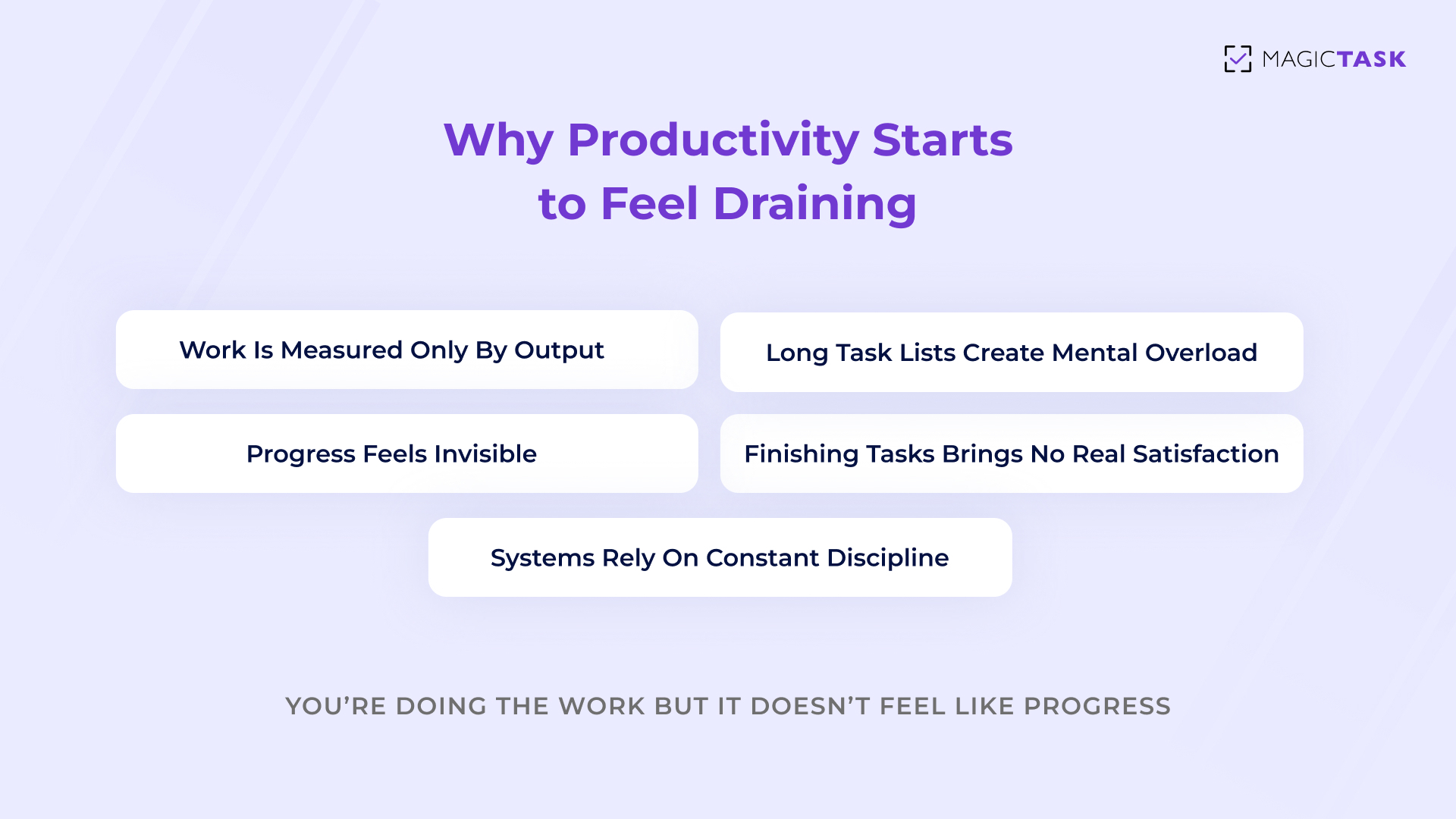
Why productivity starts to feel draining

Overemphasis On Output and Deadlines

Do you know the feeling when you finish something and instead of feeling relieved, your mind immediately jumps to what’s next?

You close one task, and before you even register that it’s done, you’re already thinking about the next deadline, the next item, the next thing waiting for you.

That’s how most productivity systems are set up. They focus heavily on output. 

  • How much did you get done? 
  • How quickly did you do it? 
  • What’s still pending?


It creates this quiet pressure to keep moving, even when you’ve already done enough for the day. It feels like there’s no real finish line.

The pressure builds on:

  • Output focus: Your day starts getting measured by how much you completed, not how manageable or sustainable it felt.
  • Deadline pressure: Tasks begin to feel urgent all the time, even when they don’t actually need to be.
  • Sense of completion: Finishing something doesn’t feel satisfying because your attention shifts immediately to what’s next.

When everything is about keeping up, it becomes hard to feel like you’re actually making progress. Instead, it starts to feel like you’re constantly catching up.

Long Task Lists Create Overwhelm

Do you know that moment when you open your task list and just stare at it for a few seconds? Everything is written down. It’s all organized. And somehow, it still feels like too much.

Nothing has even started yet, but you already feel a bit drained just looking at it. Long lists tend to do that to people. In fact, three in five people say they’ve taken on more tasks than they can realistically complete

When too many tasks sit in front of you at once, your brain doesn’t see structure. It sees pressure and starts trying to process everything at the same time. So instead of starting, you hesitate. And before you know it, you’ve spent more time looking at the work than actually doing it.

That results in:

  • Task overload: Seeing too many items at once makes the work feel bigger than it actually is.
  • Mental clutter: Your attention keeps jumping between tasks instead of settling on one.
  • Slow starts: When everything feels important, it becomes harder to begin anything.

What’s meant to help you move forward ends up creating friction. And the more often that happens, the easier it becomes to avoid the list altogether, even when you know exactly what needs to get done.

Lack of Positive Feedback or Reinforcement

Have you ever finished a task… and then just moved on like it didn’t really count?

You tick it off, maybe feel a brief second of relief, and then your attention goes straight back to everything that’s still left. No pause. No real sense of “I did something.”

That’s how most productivity systems are set up. They’re great at showing you what’s pending. They’re not great at showing you what you’ve already done. So even when you’re making progress, it doesn’t always feel like it.

Over time, that starts to wear you down. When effort doesn’t get acknowledged, your brain doesn’t get that small reward signal that says, “this is working.” And without that, it becomes harder to stay engaged.

  • Invisible progress: Completed tasks fade quickly as your focus shifts to what’s still pending.
  • No reward signal: Your brain doesn’t register progress in a meaningful way, so motivation starts to drop.
  • Emotional disconnect: Work begins to feel repetitive because nothing feels finished or recognized.

You’re still doing the work. You’re still moving forward. But it doesn’t feel satisfying.

Systems Rely Heavily on Discipline and Pressure

Every night I end up saying, “I just need to be more disciplined”. But the minute I wake up the next morning, I fall back on when things start slipping. If we’re not keeping up, the assumption is to try harder. And to be fair, discipline does help getting things started. It helps you show up even when you don’t feel like it.

But most productivity systems don’t just rely on discipline. They lean on it heavily.

They assume you’ll have the same level of focus every day. The same energy. The same ability to push through, no matter what else is going on. Real life doesn’t work like that.

Some days feel lighter. Some days feel heavier. Focus comes and goes. Energy shifts. And when a system doesn’t account for that, it starts to feel rigid.

You end up with:

  • High expectations: You feel like you should perform the same way every day, regardless of how you feel.
  • Low flexibility: The system doesn’t adjust when your energy, workload, or mental state changes.
  • Pressure build-up: Falling behind starts to feel like failure instead of something normal.

So what do most people do? They double down on the same system that’s already draining them.

And that’s where it starts to backfire. Instead of supporting your work, the system turns into something you’re constantly trying to keep up with.

How Gamification Can Support Mental Well-Being

Traditional productivity systems often make work feel like something you have to push through. Gamification shifts that experience in a subtle but powerful way.

Instead of looking at everything you need to do and feeling pressure, your focus narrows down to one simple question.

What’s the next small step I can complete?

That shift reduces resistance. Work starts to feel more approachable, and progress becomes easier to build.

Gamification is not about turning work into a game for the sake of it. It’s about adding structure that helps your brain stay engaged. When progress is visible and actions feel achievable, you don’t have to rely on willpower alone.

  • Smaller actions: Tasks are broken into steps that feel easier to begin and complete.
  • Visible progress: You can clearly see movement instead of wondering if you’re getting anywhere.
  • Positive reinforcement: Completing something gives you a sense of progress that feels real.
  • Lower mental friction: Starting feels lighter, which makes it easier to continue.

When work feels manageable, consistency becomes natural instead of forced.

A Simple Daily Reset You Can Try

Start your day without looking at your full task list.
Pick just three small tasks that you know you can complete without stress.
Finish those first before moving on to anything else.

This creates early momentum. Instead of starting your day feeling behind,
you start with progress. That shift alone can change how the rest of your day unfolds.

The Difference Between Healthy and Unhealthy Gamification

Gamification can either support you or add more pressure. The difference lies in how it’s designed.

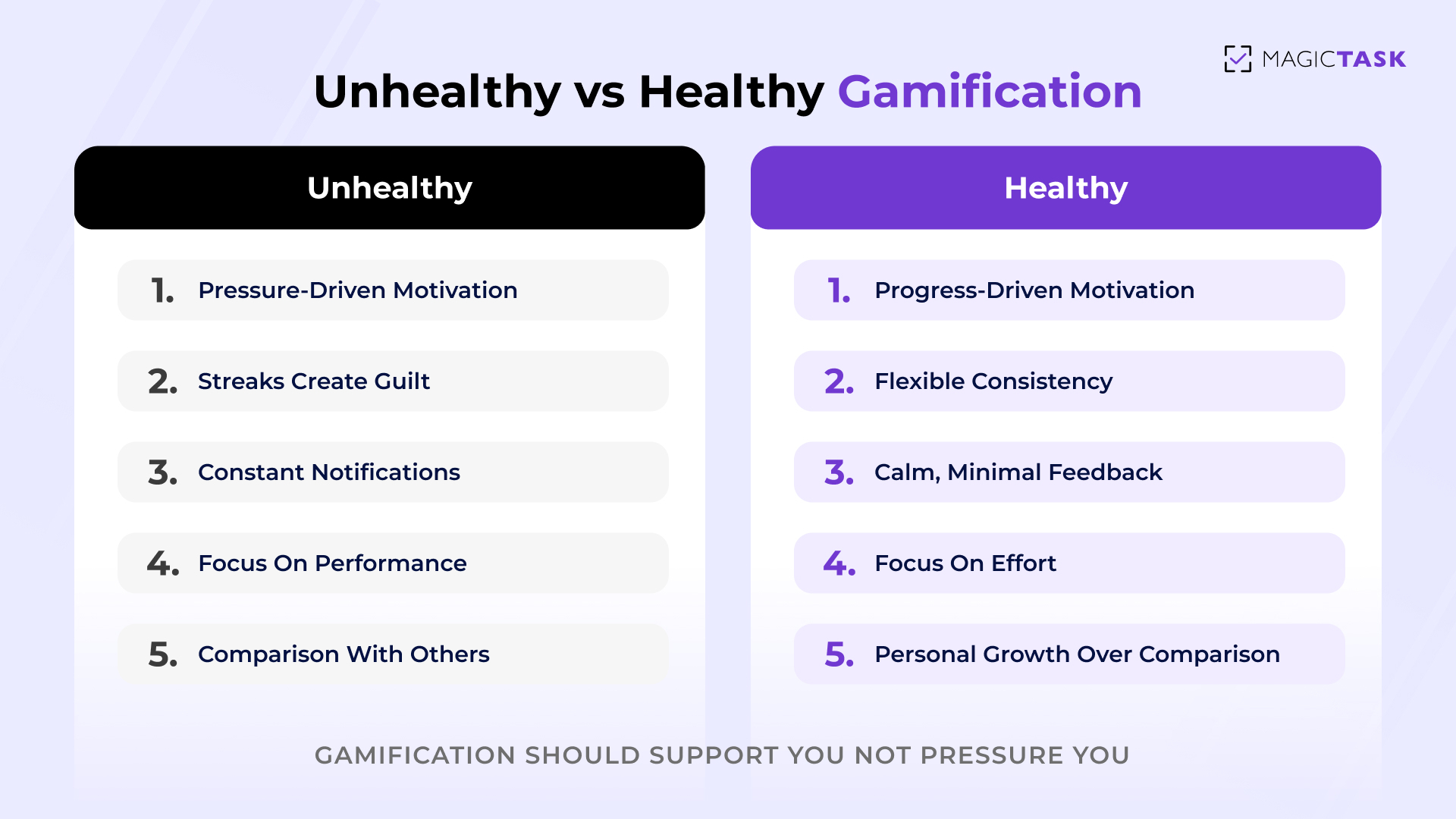
Some systems use gamification in a way that increases stress. They push streaks, constant notifications, and comparison with others. It may look engaging, but it often creates anxiety.

Aspect Unhealthy Gamification Healthy Gamification
Motivation style Relies on pressure and urgency to push action Encourages progress through positive reinforcement
Streaks Creates guilt when you miss a day Allows breaks without losing your sense of progress
Focus Performance and outcomes Effort and consistency
Comparison Encourages competition with others Keeps attention on personal progress
Notifications Uses frequent alerts that interrupt and overwhelm Provides feedback without constant interruption
Progress tracking Highlights what’s missing or incomplete Shows what has been achieved clearly
Emotional impact Increases stress and pressure over time Supports a calmer, more sustainable workflow
Flexibility Rigid structure with little room for off days Adapts to changing energy and workload

Designing Systems That Balance Productivity and Well-Being

Unhealthy vs healthy gamification

Once you start looking at productivity through this lens, it becomes clear that the system matters more than the effort.

You don’t need to do less work. You need a system that makes it easier to stay consistent without feeling drained.

That starts with how your work is structured.

Break Work Into Small, Achievable Steps

Large tasks often create hesitation. Smaller steps create movement.

When work is broken down properly, it becomes easier to start and easier to continue.

Take something simple like “finish a presentation.”

That sounds straightforward, but when you actually sit down to do it, it feels like a lot. Where do you even begin?

Now compare that to breaking it down:

  • Open slides and write the title
  • Outline the main points
  • Add content to the first slide

Suddenly, starting feels easier. You’re not trying to “finish everything.” You’re just taking the first step.

Reward Effort

Most systems only acknowledge finished work. That creates pressure to perform at a high level all the time.

Effort deserves recognition too.

  • Effort recognition: Progress counts even if the task is not fully complete.
  • Consistency support: Regular small actions are valued more than occasional bursts.
  • Reduced pressure: Work feels lighter when perfection is not the only measure.

This helps you stay engaged even on days when energy is low.

Make progress visible without pressure

Seeing progress helps you stay motivated. Feeling pressured by it does the opposite.

The goal is to make progress clear without turning it into something stressful.

  • Visible tracking: Completed work remains visible so you can see what you’ve done.
  • Gentle feedback: Progress is shown without creating urgency.
  • Momentum awareness: You can see consistency building over time.

This creates encouragement instead of pressure.

Allow Flexibility for Real-life Energy Levels

Energy is not the same every day. Some days feel focused. Some days feel slower.

A system that works with you adapts to that.

  • Flexible pacing: You can adjust your workload based on your energy.
  • No penalty for breaks: Missing a day doesn’t undo your progress.
  • Sustainable rhythm: Work fits into your life instead of taking it over.

This is what makes productivity feel sustainable over time.

A Simple End-of-day Practice That Changes Everything

Before you end your day, take two minutes to write down three things you completed.
Only completed tasks. Nothing pending.

This small habit shifts your focus. Instead of ending the day thinking about what’s left,
you end it seeing what you actually got done. Over time, this builds a stronger sense of
progress and reduces mental fatigue.

Conclusion

Productivity should not come at the cost of mental well-being. A system that helps you get things done should also support how you feel while doing the work. When that balance is missing, even the most organized setup can start to feel exhausting over time.

Gamification offers a different approach. When used thoughtfully, it brings structure, visibility, and reinforcement into your workflow in a way that feels lighter. It helps you focus on progress instead of pressure, and consistency instead of perfection.

Over time, that changes your relationship with work. It becomes something you can stay connected to without feeling drained. You need to keep going in a way that feels sustainable.

If your current system feels overwhelming, it might be worth stepping back and asking a simple question: Does this help me move forward, or does it make the process harder than it needs to be?

Choose systems that make progress feel clear, manageable, and worth continuing.

The Gap Between Planning and Doing: Why Tasks Don’t Get Finished

You’ve been there. You open your planner, load up your to-dos, and feel confident you’re finally getting organized. Hours later, the list barely budges, and that sense of productivity you expected feels flat.

This is a widely observed phenomenon in how people work. Research shows that even when people plan realistically, they often underestimate how long tasks will take and overestimate how much they’ll accomplish. In one classic experiment, only around 13 % of participants completed their projects by the time they estimated a 50 % likelihood of finishing, and even at a 99 % estimated probability, fewer than half were done on time.

That gap between planning and doing, where intentions fail to translate into action, is a behavioral pattern rooted in how our minds forecast effort and manage execution. Understanding this breakdown is the first step toward closing it.

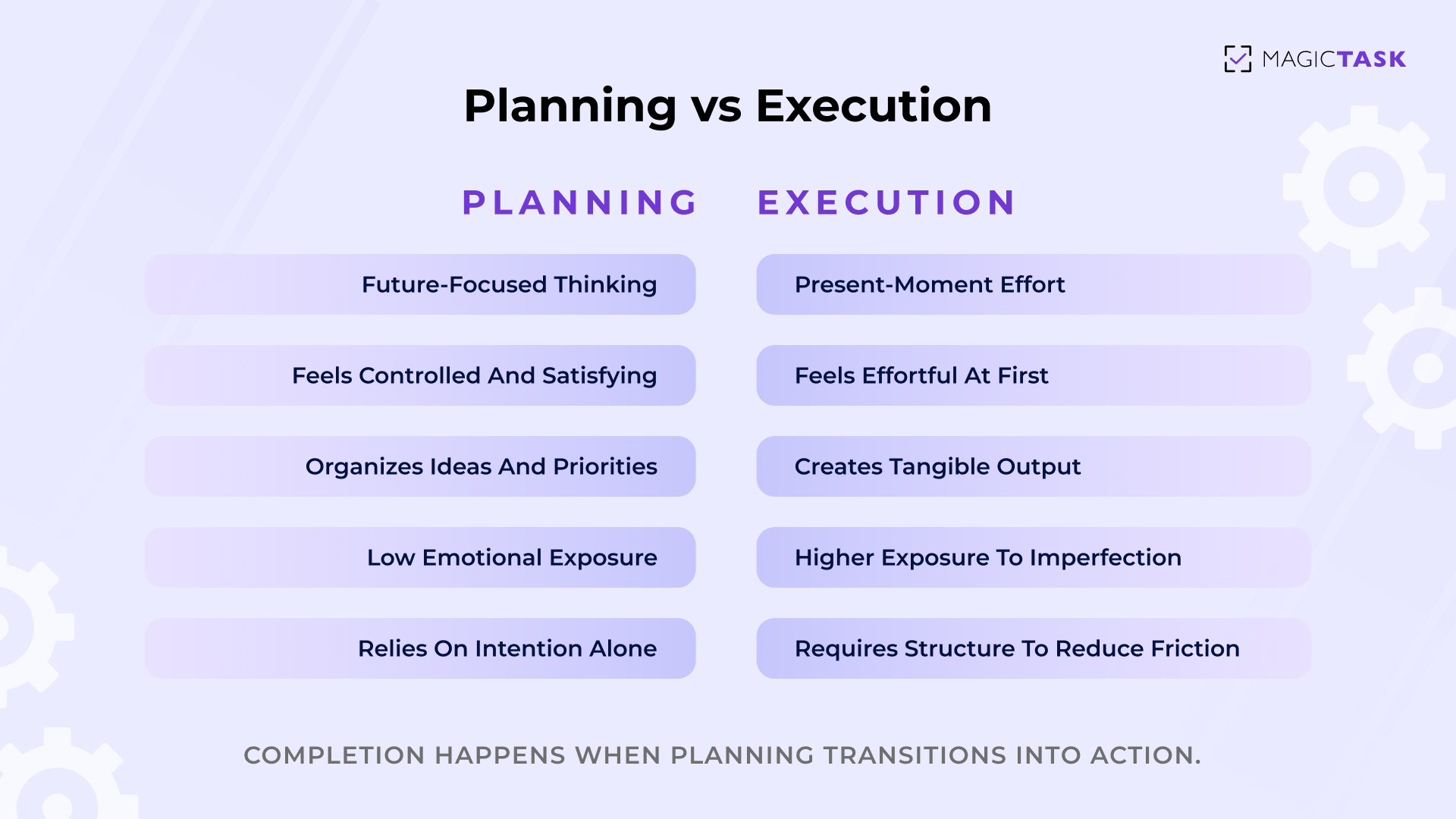
What Is the “Planning vs Doing Gap”?

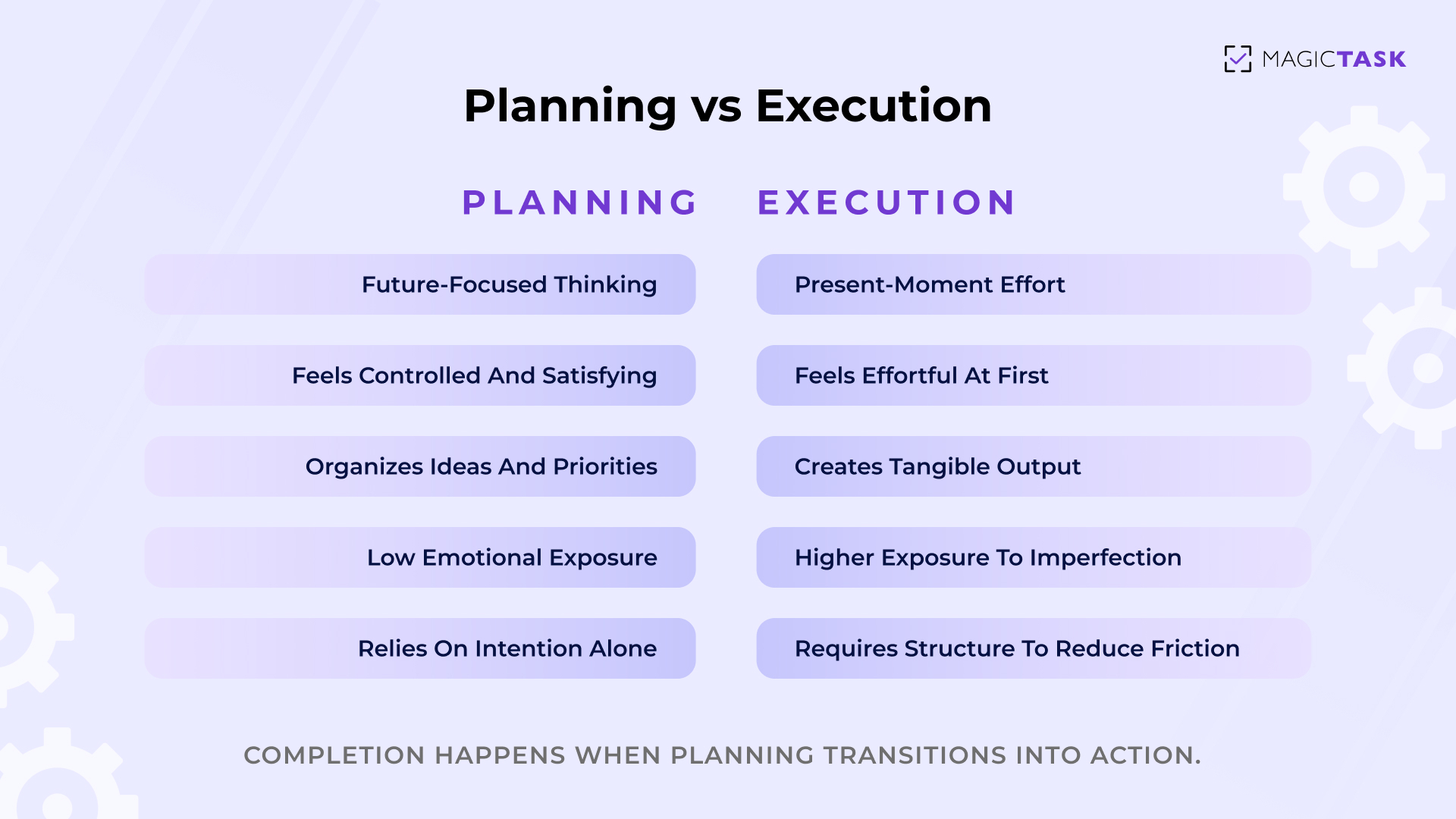
Planning vs Execution Gap

The gap between planning and execution is the breakdown that occurs when
intentions are organized but not translated into consistent, physical action.

Planning feels productive because it gives you structure. You sort tasks, prioritize them, and maybe even color-code your week. Your brain experiences a sense of control and clarity. That feeling can mimic progress, even when no real output has happened yet.

Execution is different. Execution requires:

  • A defined next action
  • Energy in the present moment
  • A decision to start
  • Sustained attention until completion

Planning operates in the realm of ideas. Execution operates in the realm of effort. That distinction matters.

When you plan, you’re imagining the work. You’re mapping it out, visualizing how it will unfold. That mental simulation can create a subtle illusion of movement. The list looks organized. The calendar looks full. The system feels complete.

But thinking about work is not the same as advancing it.

The planning vs doing gap appears when:

  • Tasks are defined at a high level but not broken into actions
  • Lists grow longer, but output stays flat
  • Time is spent organizing instead of executing

It’s the difference between “Work on marketing,” and“Draft the first three headlines for the landing page.”

One lives in abstraction. The other lives in motion.

The gap isn’t a failure of ambition. It’s a mismatch between intention and structure. Without a system that converts ideas into clear, executable steps, planning can quietly become a substitute for progress rather than a pathway to it.

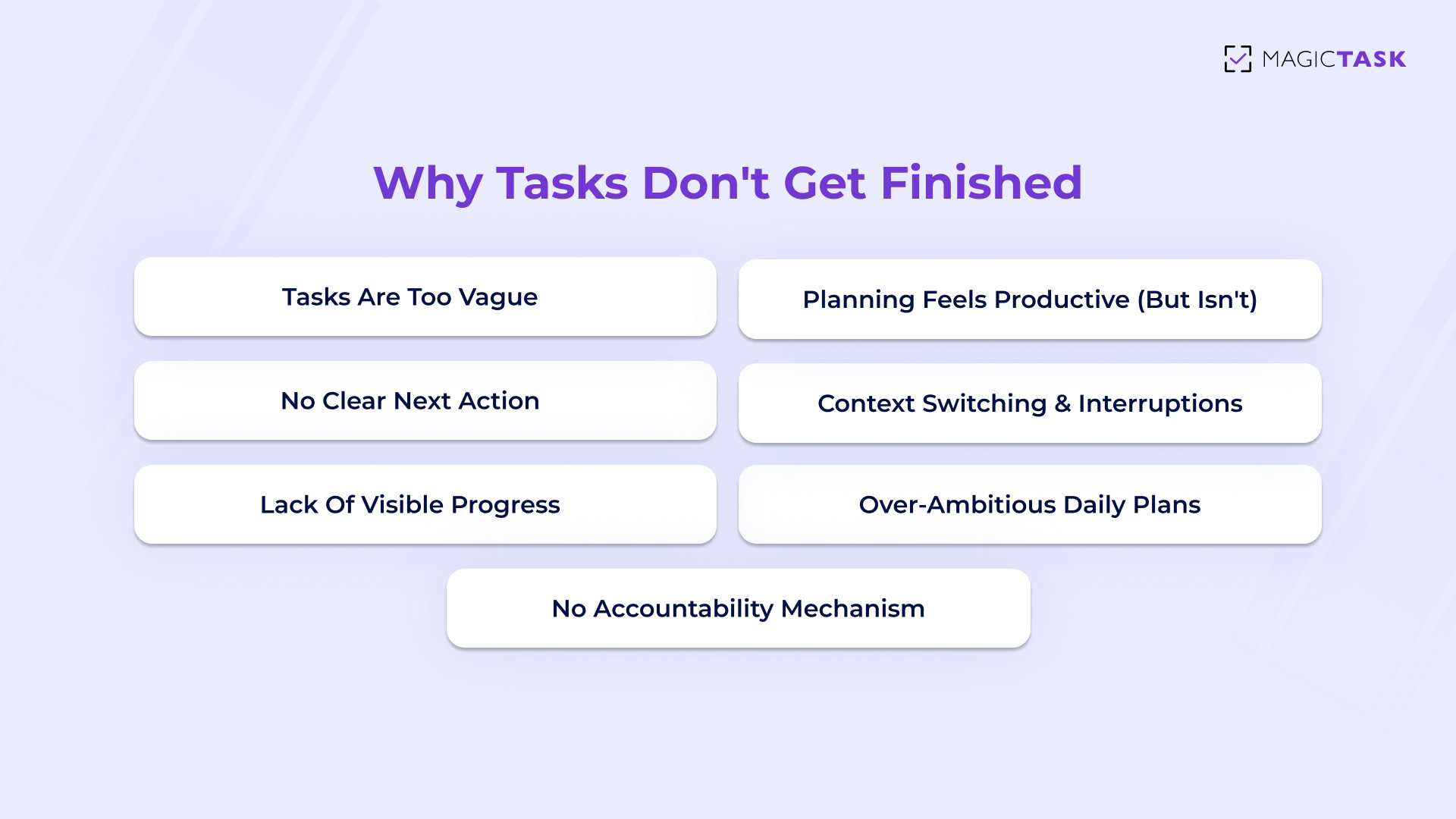
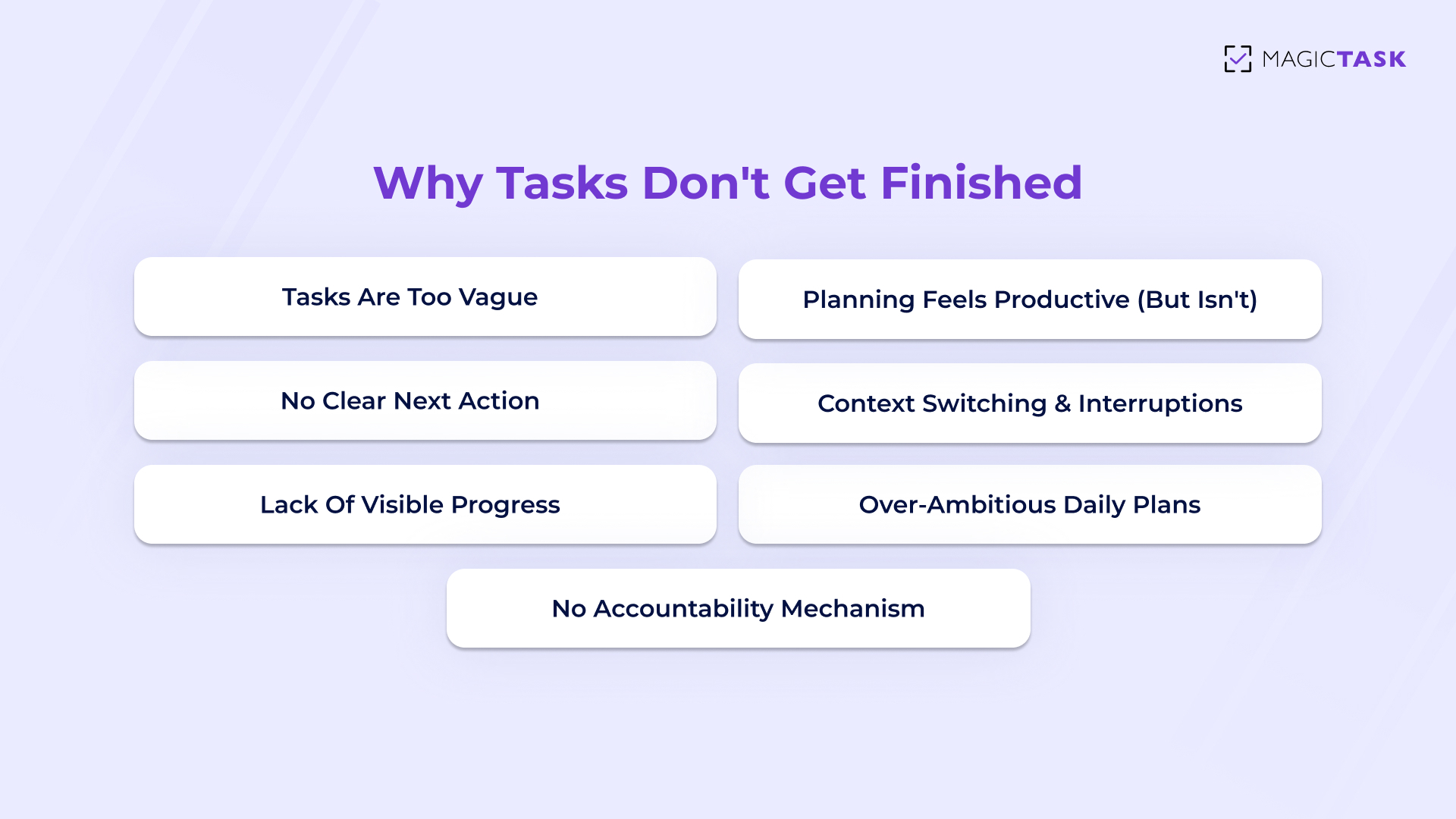
The 7 Most Common Reasons Tasks Don’t Get Finished

Illustration showing common reasons tasks don’t get finished, including vague tasks, lack of clear next action, interruptions, lack of progress, over-ambitious plans, and no accountability.

Most unfinished tasks stall because something in the structure breaks down. A task looks simple on paper, but once the moment to act arrives, friction appears.

The reasons are rarely dramatic. They’re small, repeatable blockers that quietly drain momentum. Understanding them makes it easier to spot where execution is slipping and why a full plan doesn’t always turn into finished work.

1. Tasks Are Too Vague

A task can sit on your list all week simply because it isn’t actionable.

When something says “Improve onboarding” or “Get finances in order,” your brain doesn’t see a clear starting line. It sees a cloud. And clouds are easy to postpone.

Vague tasks create hidden decision points. The moment you try to begin, you’re forced to define the scope, choose a direction, estimate the effort, and decide what “done” even means. That thinking phase feels heavier than the task might actually be.

So you delay it.

Specific tasks remove that mental negotiation. Compare:

  • “Update client strategy”
  • “Outline three bullet points for Q1 client strategy revision”

The second one lowers the activation energy. You know what to open. You know what to type. You know when you’re finished.

Execution depends on clarity at the moment of action. When tasks are defined at the outcome level instead of the action level, they create friction disguised as ambition. And friction, even small amounts, is often enough to keep something perpetually unfinished.

2. Planning Feels Productive (But Isn’t)

Planning delivers a subtle emotional reward. You sort tasks. You reorganize your week. You clean up your dashboard. Everything looks aligned. For a moment, you feel ahead. That feeling is real, but it isn’t the same as output.

Organizing activates the brain’s reward system because it creates order and perceived control. You experience a small dopamine lift simply from structuring your work. The list looks sharper. The calendar looks intentional. The system feels optimized. Nothing has actually moved forward.

This is where false progress creeps in. Planning can mimic productivity because it reduces uncertainty. It gives closure to open loops at a cognitive level, even though the physical work remains untouched.

Execution requires effort and sustained attention. Planning requires arrangement. Both feel active. Only one creates results.

3. No Clear Next Action

Even well-defined tasks can stall when the very first step isn’t obvious. Execution depends on immediacy. If you sit down and still have to figure out how to begin, your brain experiences friction, and friction quietly kills momentum.

That hesitation might only last a few seconds, but it creates just enough resistance to push you toward something easier. Email. Slack. A “quick” scroll. Momentum disappears before it starts.

Common signs that a task has no clear next action:

  • Multiple decisions required: You must choose a direction before you can begin, which delays starting.
  • Unspecified materials: You need files, data, or resources but haven’t defined exactly what to gather.
  • Undefined finish line: You’re unsure what “done” actually looks like, so beginning feels risky.
  • Re-orientation time: You have to reread notes or reconstruct context just to restart the work.
  • Ambiguous first move: The task describes an outcome, not the first physical action.

When the next step is visible and concrete, action feels automatic. When it isn’t, your brain defaults to avoidance. Clarity at the starting point is often the difference between momentum and another unfinished task lingering on tomorrow’s list.

4. Context Switching and Interruptions

Every time you jump between tasks, like replying to a message, checking email, and attending a quick meeting, your brain has to reorient. That reset isn’t instant. Cognitive research shows attention residue lingers, meaning part of your focus stays attached to the previous task even after you’ve moved on.

Shallow work thrives in this environment.

Quick replies, minor updates, and small administrative tasks feel manageable and satisfying because they resolve fast. You can complete them in minutes. They offer immediate closure. Deep tasks don’t.

Meaningful work often requires:

  • Rebuilding context
  • Holding multiple variables in working memory
  • Tolerating temporary uncertainty
  • Staying with discomfort before clarity emerges

When interruptions dominate the day, shallow tasks crowd out deeper execution. You remain busy, but large, important tasks sit untouched because they demand uninterrupted time blocks.

The result isn’t laziness. It’s fragmentation.

Execution struggles not because you lack intention, but because attention keeps getting sliced into pieces too small to carry complex work forward.

5. Lack of Visible Progress

Humans need evidence that movement is happening. When progress is invisible, motivation fades. You might be working hard, but if there’s no clear signal that effort is accumulating, your brain struggles to justify continuing. Feedback loops are what sustain behavior. Without them, momentum feels abstract.

Visible progress creates reinforcement.

That reinforcement can take many forms:

  • A checklist shrinking
  • A milestone reached
  • A streak continuing
  • A measurable indicator moving forward

Without these signals, effort feels like it’s disappearing into a void. Large projects are especially vulnerable to this. You invest time, but the finish line still looks distant. The brain interprets that distance as stagnation.

Progress doesn’t have to be dramatic. It simply has to be seen. When the system makes advancement visible, even small steps feel meaningful. When progress stays hidden, tasks begin to feel endless, and endless tasks rarely get finished.

6. Over-Ambitious Daily Plans

Daily plans often reflect ideal conditions: perfect focus, uninterrupted hours, high energy. Real days rarely look like that. Meetings run long. Energy dips mid-afternoon. Unexpected requests appear.

When a schedule assumes optimal performance all day, it quietly sets you up for carry-over.

Common patterns include:

  • Stacking multiple high-effort tasks in one day
  • Ignoring transition time between activities
  • Underestimating how long deep work actually takes
  • Planning with morning energy in mind but executing in afternoon reality

An overloaded list creates pressure instead of clarity. Once it becomes obvious that everything won’t get done, motivation drops across the board.

Completion thrives on constraint. Fewer commitments increase follow-through. Planning for realistic capacity is what keeps tasks moving to “done” instead of rolling forward indefinitely.

7. No Accountability Mechanism

“I’ll remember” feels reassuring in the moment. It rarely works.

Without some form of external visibility or tracking, tasks rely entirely on internal memory and fluctuating motivation. That’s fragile.

Accountability doesn’t have to mean public pressure. It simply means the task exists somewhere outside your head, in a form that invites follow-through.

When there’s no accountability:

  • Tasks get mentally postponed
  • Deadlines become flexible
  • Priorities shift quietly
  • Important items sink under urgent ones

The human brain is designed to conserve energy. If no system is prompting, tracking, or reflecting your commitments back to you, avoidance becomes easy.

Lightweight accountability, even simple tracking, creates gentle tension. It keeps tasks present. It increases the likelihood that intention turns into action.

Without it, plans stay private. And private plans are the easiest ones to abandon.

The Psychology Behind Not Taking Action

Planning often acts as a form of anxiety avoidance. Organizing tasks, outlining projects, and refining systems create a sense of control. That control feels productive because it reduces discomfort. Starting the actual task, however, introduces exposure. Your work becomes visible. It might be imperfect. It might require revision. The brain subtly prefers preparation because it feels safer than performance.

Fear of imperfection reinforces this delay. Large tasks carry imagined standards. You picture the finished result before typing the first sentence. That gap between expectation and current ability can make beginning feel risky. Waiting for the “right” time or energy becomes a protective strategy. Smaller, contained actions lower that barrier because they shift the focus from delivering excellence to simply moving forward.

Decision fatigue adds another layer. Every task requires choices: where to start, how to approach it, and how long to spend on it. As the day progresses, cognitive energy declines. When mental bandwidth is low, the brain gravitates toward easier, shallower activities that provide quick resolution. Complex tasks remain untouched because they demand sustained attention and multiple decisions.

Unfinished tasks also linger in memory due to what psychologists call the Zeigarnik Effect, the tendency for incomplete work to stay mentally active. Open loops create background tension. A few unfinished items can motivate action. Too many create overwhelm. That overwhelm often pushes people back toward planning and organizing as a way to manage stress instead of completing the task itself.

Planning vs Execution: What Actually Drives Completion

Planning and execution are often treated as two stages of the same process. In reality, they operate on different psychological mechanics.

Planning organizes intention. Execution converts intention into completed action. The gap appears when the structure ends at the planning phase and never extends into behavior.

Here’s how they differ:

Aspect Planning Execution
Primary Focus Organizing ideas and priorities Taking concrete, physical action
Time Orientation Future-focused thinking Present-moment effort
Emotional Experience Feels controlled and satisfying Often feels effortful at first
Cognitive Demand Strategy and decision-making Sustained attention and follow-through
Output Clarity about what should happen Tangible progress and completed work
Motivation Source Boost from organizing and structuring Momentum from visible progress
Risk Level Low emotional exposure Higher exposure to imperfection
Dependency Can rely on intention alone Requires structure to reduce friction
Energy Pattern Can be done in short bursts Requires sustained energy blocks

Execution answers: What am I doing right now?

Completion depends on designing work so that the transition from thought to action is smooth. When structure supports sustained attention and reduces starting friction, execution becomes consistent rather than occasional.

How to Close the Gap Between Planning and Doing

Closing the execution gap isn’t about trying harder. It’s about reducing friction at the moment of action. When tasks are structured to be clear, finite, and visible, completion becomes far more predictable.

Here’s how to design your workflow for follow-through.

Step 1: Convert Every Task Into a Physical Action

If a task can’t be done in one focused sitting, it is a project.

Projects create hesitation because they contain multiple hidden steps. The brain resists starting something undefined. Converting each item into a single, observable action lowers the barrier to entry.

Instead of listing outcomes, define movements:

  • Open the document and draft the outline
  • Review slides 1–5 for clarity
  • Send follow-up email to client

Physical actions create immediacy. When the next step is concrete, starting feels automatic rather than negotiable.

Step 2: Make Progress Visible

Humans continue behaviors that provide feedback.

If effort disappears into a void, motivation fades. Visible progress, no matter how small, reinforces continuation. That visibility can come in many forms:

  • Checklists that shrink
  • Streak counters that track consistency
  • Points or progress indicators
  • Milestones that mark advancement

The goal is feedback. When the brain sees advancement, it’s more willing to keep going. Invisible effort rarely sustains momentum.

Step 3: Limit Daily Commitments

Overloading a day guarantees carry-over.

Planning for ideal energy levels leads to unfinished lists. Completion rates increase when daily commitments decrease. Fewer tasks create focus. Focus increases follow-through.

A simple rule: prioritize what must move forward today, not everything that could move forward.

When the list is shorter, the finish line feels reachable. That psychological shift alone increases the likelihood of completion.

Step 4: Add Time Boundaries

Open-ended tasks expand. Time-bound tasks move.

Without a defined time container, work stretches indefinitely or gets postponed. Time-boxing assigns a start and end window, reducing ambiguity.

For example:

  • 30 minutes to draft
  • 45 minutes to review
  • 20 minutes to outline

Time limits reduce perfection pressure. They shift the goal from “finish flawlessly” to “make progress within this window.” That shift encourages starting, which is often the hardest part.

Step 5: Introduce Lightweight Accountability

Intentions are fragile when they live only in your head.

Light accountability increases follow-through without adding pressure. This might include:

  • Tracking daily completion
  • Sharing task visibility with a team
  • Reviewing progress at the end of the day
  • Using systems that reward consistency

Accountability works because it creates reflection. 

Why Traditional To-Do Lists Often Fail

To-do lists create clarity at the planning stage. They capture everything that needs attention. Most lists stop at recording tasks and never guide them toward completion.

Common problems with traditional to-do lists include:

  • No guidance on when to act: Tasks sit in a column without time boundaries, leaving you to decide in the moment what deserves attention.
  • No clarity on how to start: Items describe outcomes rather than first actions, forcing extra thinking before execution begins.
  • Weak prioritization under pressure: Urgent, low-effort tasks rise to the top while important, complex work keeps getting postponed.
  • Equal visual weight: A five-minute task looks the same as a two-hour task, making planning unrealistic and energy management difficult.
  • Zero engagement mechanics: Checking a box provides brief relief but no sustained feedback loop to encourage continued momentum.
  • Easy rollover behavior: Unfinished tasks quietly move to tomorrow without structural consequences, reducing urgency.

A list can be perfectly organized and still produce minimal output. It tells you what exists. It doesn’t reduce friction at the moment of action.

How Better Task Systems Turn Plans Into Action

Execution improves when the system is designed for action, not organization alone. A strong task system does more than collect items. It shapes behavior at the moment of starting and finishing.

Better systems convert intention into movement by addressing the friction points that cause tasks to stall.

They do this in several ways:

  • Force task clarity: Tasks must be defined as concrete, startable actions. Ambiguous outcomes are broken down into steps that can be completed in one sitting. This removes hesitation at the starting line.
  • Reduce decision friction: Clear prioritization, visible task weight, or structured sequencing minimizes the number of choices required throughout the day. Fewer decisions preserve cognitive energy for actual work.
  • Reward completion, not planning: Progress indicators, streaks, or milestones reinforce finished actions rather than time spent organizing. The system celebrates output instead of preparation.
  • Create visible momentum: Each completed task contributes to measurable forward movement. That visibility encourages continuation because effort feels cumulative.
  • Support realistic workload limits: By making capacity obvious, better systems prevent overload and increase follow-through.

Features alone don’t drive execution. A tool can have tags, folders, filters, and dashboards, yet still fail to produce completion. What matters more are the mechanics that guide behavior: clarity at the start, structure during effort, and reinforcement at the finish.

When engagement is built into execution, finishing tasks becomes a natural outcome of the system rather than a constant test of willpower.

Conclusion

Most unfinished work isn’t a motivation issue. It’s a structure issue.

The problem begins when the organization never turns into action. Lists alone don’t create progress. Systems that reduce friction and reward completion do.

When tasks are clear, limited, and visibly moving forward, momentum builds naturally. Small, consistent actions outperform perfectly crafted plans that never leave the page.

If you want to close the gap between planning and doing, try a system designed for execution. Test MagicTask for a week and see how visible progress and built-in momentum change the way you work.

FAQ: Planning vs Doing

Q1. Why do I plan a lot but never finish tasks?

Planning feels productive because it creates clarity and control, but it doesn’t guarantee action. Tasks often stall when they aren’t broken into concrete next steps or when too many are scheduled at once. The gap appears when the structure supports organizing but not execution.

Q2. Is over-planning a form of procrastination?

Yes, it can be. Over-planning often becomes a socially acceptable way to delay starting, especially when a task feels uncomfortable or uncertain. Organizing reduces anxiety, but it doesn’t move the work forward.

Q3. How many tasks should I plan per day?

Aim for 3 to 5 meaningful tasks per day, depending on their size. Fewer, clearly defined actions increase completion rates and reduce rollover. Overloading the list almost always lowers follow-through.

Q4. What’s the fastest way to start executing tasks?

Define the next physical action and commit to five focused minutes. Starting removes most resistance, and momentum often carries you beyond the initial time block.

Q5. How do teams reduce execution gaps?

Teams reduce execution gaps by making tasks visible and progress trackable. Shared boards, clear ownership, and lightweight accountability create alignment and increase follow-through across the group.

The Dopamine Trap: Why Some Gamified Apps Fail Users (and What Actually Works)

The Dopamine Trap

Gamified apps promise motivation. They promise streaks, badges, XP, and momentum. At first, it feels exciting. You open the app, complete a task, see points pop up, and think, This is actually kind of fun.

And then something shifts.

The notifications feel louder. The streak feels stressful. The rewards start to feel automatic, almost meaningless. What once felt motivating now feels like pressure. Eventually, you stop opening the app altogether.

This is what I call the dopamine trap.

It happens when gamified apps rely on short-term reward spikes instead of meaningful progress. They optimize for stimulation. The result is early excitement followed by fatigue, disengagement, and sometimes even guilt.

This blog isn’t about dismissing gamification. Gamification can work incredibly well. The problem isn’t dopamine itself. The problem is shallow design reward systems that prioritize novelty over growth.

Let’s unpack why some gamified apps fail users and what actually sustains motivation over the long term.

What the Dopamine Trap Looks Like in Gamified Apps

The dopamine trap doesn’t look obvious at first. In fact, it usually looks exciting.

You download an app. You complete a few actions. Points pop up. It feels rewarding… almost energizing. You feel productive, engaged, maybe even a little competitive with yourself.

Then, slowly, the excitement fades.

The core issue isn’t that rewards exist. It’s that they become disconnected from meaningful effort. The stimulation continues, but the sense of progress doesn’t.

Here’s what the dopamine trap typically looks like:

Signs of the Dopamine Trap

  • Rewards disconnected from real effort: You receive points or badges for trivial actions that don’t meaningfully move work forward. The feedback feels inflated rather than earned.
  • Novelty-driven engagement: The app introduces constant new visuals, animations, or achievements to keep you stimulated, but none of them reflect deeper growth or mastery.
  • Streak pressure instead of support: Missing a day feels like failure. Instead of encouraging consistency, the system creates anxiety around maintaining perfection.
  • Constant notification loops: Alerts are designed to pull you back in, not because your work progressed, but because the app wants engagement.
  • Early excitement followed by fatigue: The first few weeks feel motivating. After that, rewards feel predictable and repetitive, and engagement drops sharply.

When rewards become noise instead of feedback, users start to feel manipulated rather than supported.

The trap isn’t that dopamine is involved. It’s that dopamine is being triggered without reinforcing real progress. And over time, your brain learns the difference.

Why Dopamine-Only Rewards Stop Working

Dopamine is critical for how the brain responds to reward, learning, and motivation, but its role isn’t static. 

Research shows that dopamine neurons respond especially strongly to novel and unexpected rewards, not to predictable ones. As stimuli become familiar, the dopamine response naturally habituates, meaning the signal weakens over time if the reward remains the same or predictable. This phenomenon helps explain why the thrill of a new app feature or random point popup feels motivating at first but gradually loses its impact with repetition.

Here’s what’s going on under the surface:

  • Dopamine rewards novelty, not repetition: Novel experiences trigger stronger dopamine responses. Once a reward becomes expected or familiar, dopamine neurons show reduced activity, a basic form of habituation that’s been observed across species.
  • Predictable rewards lose impact quickly: When users know what to expect, the reward stops surprising them. The brain doesn’t signal “more value here” anymore, so motivation drops.
  • Constant stimulation leads to burnout: Gamified loops that rely on frequent, similar rewards create temporary spikes but don’t build sustained engagement because the brain stops responding to predictable signals.
  • Motivation fades without meaningful growth: Rewards disconnected from real effort or progress might feel fun briefly, but they don’t reinforce the behaviors that actually matter, the ones tied to growth, competence, and mastery.

In short, dopamine alone can’t sustain motivation when the reward becomes predictable or shallow. That’s why “dopamine-only” gamification often fizzles: it delivers quick hits without meaningful reinforcement, and the brain adapts, reducing the very signal that once felt motivating.

What Actually Sustains Motivation Over Time

What Actually Sustains Motivation Over Time

If shallow rewards are the problem, the solution isn’t to remove rewards altogether. It’s to design them differently.

Motivation doesn’t last because something is flashy. It lasts because it feels meaningful. When rewards reinforce real effort and visible progress, they stop being stimulation and start becoming feedback.

Here’s the shift.

Reinforce Effort

When a system only celebrates big wins, most days feel invisible. That creates inconsistency. Sustainable motivation comes from acknowledging effort along the way, showing up, working steadily, finishing small steps.

When effort is recognized:

  • Consistency feels worthwhile.
  • Progress feels earned.
  • Momentum builds naturally.

The reward doesn’t need to be dramatic. It just needs to reflect something real.

Make Progress Visible

Humans are wired to respond to progress cues. When we see ourselves moving forward, confidence increases. That confidence becomes identity.

Instead of thinking: “I’m trying to be productive.”

You start thinking: “I’m someone who follows through.”

That shift happens when progress accumulates visibly. When tasks are completed that contribute to something larger, growth, levels, experience, and mastery, the work stops feeling isolated. It feels connected.

Visible progress turns repetition into reinforcement.

Create Small Wins Without Pressure

Small wins are powerful because they lower resistance. When tasks are manageable and completion feels achievable, starting becomes easier.

Unlike high-pressure streak systems, meaningful small wins:

  • Encourage showing up without demanding perfection.
  • Build momentum gradually instead of through spikes.
  • Reduce anxiety around missed days.

Momentum created through small wins is calmer and more sustainable than motivation created through urgency.

Use Feedback as Support

Good gamification doesn’t push users to stay engaged for the app’s sake. It supports behavior the user already values.

Feedback should answer:

  • “Am I moving forward?”
  • “Is my effort accumulating?”
  • “Am I building consistency?”

It shouldn’t create artificial urgency or pressure.

When rewards are designed as signals, they build trust. And trust keeps users engaged far longer than novelty ever could.

Sustainable motivation isn’t about chasing dopamine. It’s about designing feedback that reinforces growth, consistency, and identity over time.

What Thoughtful Gamified Design Looks Like in Practice

Understanding the psychology is one thing. Applying it in real-world tools is another.

Sustainable gamification isn’t about adding more animations, louder notifications, or endless achievement tiers. It’s about designing systems that reinforce behavior in a way that feels supportive, not addictive.

Here’s what that looks like when done right.

Reward Effort, Not Just Outcomes

In many apps, rewards are tied to finishing something big. That creates long stretches where users feel invisible.

Thoughtful design flips that.

  • Completing small steps matters.
  • Consistency is acknowledged.
  • Showing up counts.

When effort is recognized along the way, motivation becomes less fragile. Users don’t have to wait for a major milestone to feel progress. The system reinforces the process, not just the final result.

That’s what builds long-term engagement.

Make Progress Visible Without Overwhelming Users

Visibility drives motivation. Overstimulation kills it.

Good design shows progress clearly but calmly. It avoids clutter, avoids flashing distractions, and focuses attention on what matters.

Progress visibility should:

  • Accumulate in a meaningful way.
  • Be easy to understand at a glance.
  • Reinforce direction without adding noise.

When users can see forward movement without feeling overloaded, engagement becomes sustainable instead of exhausting.

Encourage Consistency Without Punishment

Many gamified apps rely on fear-based mechanics: break a streak, lose progress. That pressure works temporarily, and then backfires.

Sustainable systems encourage return, not perfection.

Instead of punishing missed days, they:

  • Allow easy restarts.
  • Preserve progress.
  • Reinforce cumulative growth.

This reduces anxiety and prevents the “I missed one day, so I quit” spiral.

Consistency thrives in environments that feel forgiving.

Use Gamification as Feedback

The biggest distinction comes down to intent.

Is the system trying to maximize time spent inside the app? Or is it trying to reinforce meaningful behavior?

When gamification is used as feedback:

  • Rewards signal real effort.
  • Progress reflects actual growth.
  • Engagement feels aligned with the user’s goals.

When it’s used as an addiction:

  • Stimulation becomes constant.
  • Novelty replaces substance.
  • Users feel pressured rather than supported.

The future of gamified design isn’t louder rewards. It’s a better alignment between feedback and real progress.

When rewards reflect growth instead of chasing attention, motivation stops being fragile and starts becoming sustainable.

Conclusion

Gamification doesn’t fail because it’s playful. It fails when it’s shallow. When apps chase dopamine spikes instead of reinforcing real effort, users burn out. Novelty fades. Streak pressure builds. Motivation collapses. The problem is rewards that aren’t tied to growth.

Sustainable motivation looks different. It acknowledges effort, makes progress visible, builds identity through consistency, and supports users instead of manipulating them.

The future of gamified productivity isn’t about more stimulation. It’s about better design, design that reinforces mastery, momentum, and meaningful progress. That’s the philosophy behind MagicTask.

MagicTask doesn’t gamify for noise or novelty. It uses XP, streaks, and visual progress as feedback signals, small reinforcements that reflect real work, real effort, and real consistency. No pressure. No manipulation. Just momentum.

If you’ve experienced the dopamine trap before, try a system built for sustainable motivation instead. Start using MagicTask and experience gamification that works with your goals.

The Productivity Reset Ritual: A 10-Minute Daily Routine to Stay Organized and Motivated

The Productivity Reset Ritual

Have you ever ended a day feeling exhausted… but not accomplished? You answered emails. You jumped between meetings. You handled urgent requests. You were busy the entire time. And yet, when you finally close your laptop, there’s this quiet thought in the back of your mind: What did I actually move forward today?

That feeling is the modern productivity trap. We start our days reacting instead of resetting. We open our inbox before we open our priorities. We let notifications decide what matters. And without meaning to, we spend the day managing noise instead of making progress.

You don’t need a new productivity system. You just need a short, consistent reset. A simple 10-minute daily ritual can clear mental clutter, realign your priorities, and rebuild momentum, even on your busiest days.

What Is a Productivity Reset Ritual?

A productivity reset ritual is a short, daily practice that clears mental clutter and realigns your priorities before you move deeper into work. It’s not a full planning session. It’s not a weekly overhaul. It’s simply a focused pause — a way to step back, reset your direction, and start with clarity instead of chaos.

Think of it as wiping the mental whiteboard clean.

During the day, open loops build up: half-finished thoughts, small tasks you meant to remember, worries about deadlines, ideas you haven’t captured yet. When those stay in your head, they compete for attention. A reset ritual moves them out of your mind and into a clear system so your brain can focus again.

Why 10 Minutes Works

Ten minutes feels small, and that’s exactly the point.

Long planning sessions sound productive, but often get skipped when you’re busy. A 10-minute reset is short enough to do even on low-energy days. The low friction makes consistency possible.

  • Short duration: You don’t need motivation or ideal conditions to begin.
  • Clear boundary: Time-boxing prevents overthinking and perfectionism.
  • Daily repetition: Small resets done consistently beat occasional big overhauls.

When something feels achievable, you’re more likely to repeat it. And repetition is what turns clarity into habit.

Planning vs. Resetting: What’s the Difference?
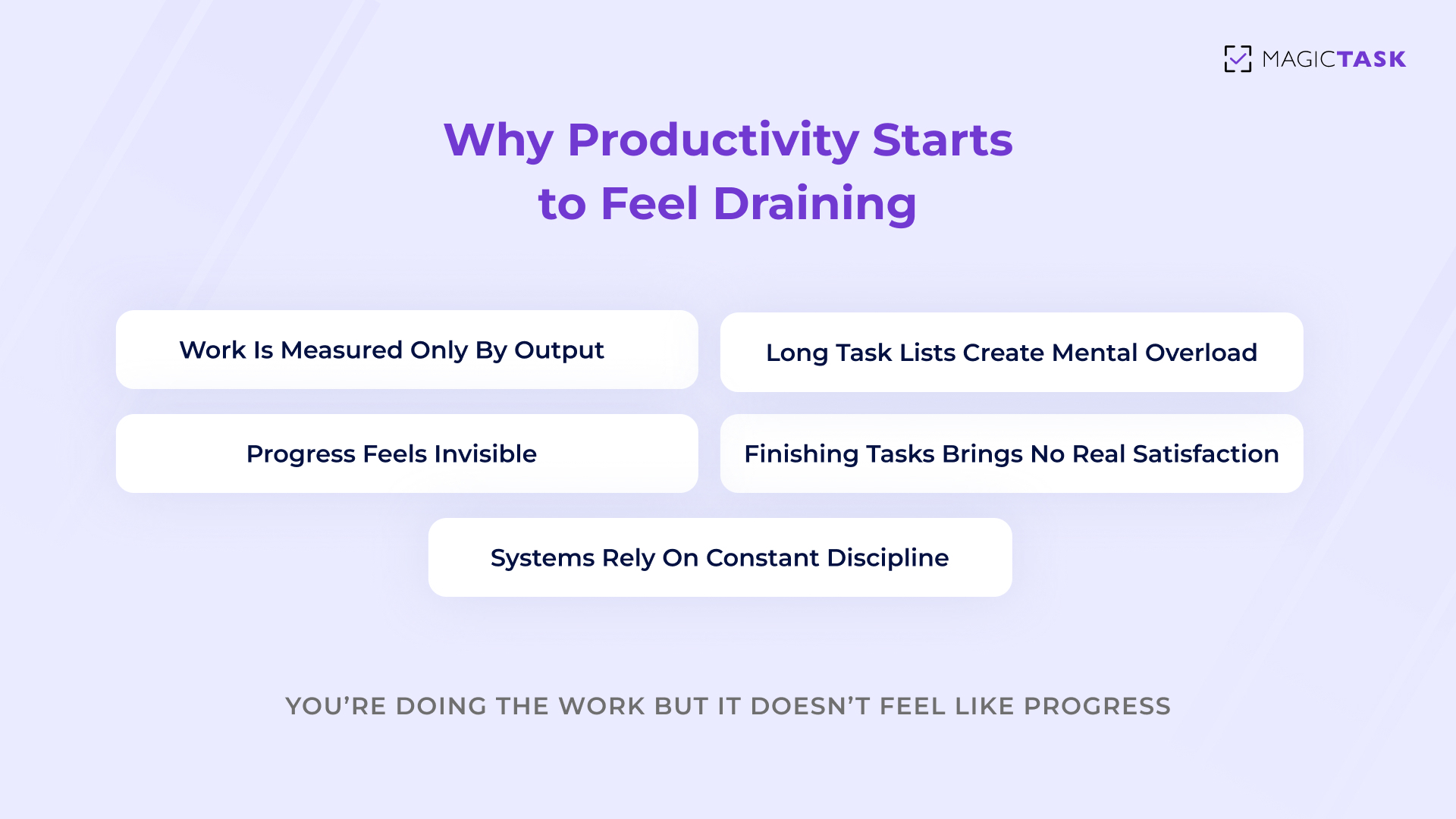
Many people confuse resetting with planning. They’re not the same.

Planning Resetting
Focuses on long-term goals and future strategy Focuses on today’s clarity and immediate alignment
Often involves reorganizing systems or workflows Involves clearing mental clutter and choosing priorities
Can become complex and time-consuming Is short, simple, and time-boxed
Optimizes structure Optimizes focus
Happens occasionally Happens daily

Planning asks, “What should I accomplish this month?”

Resetting asks, “What matters right now?”

The 10-Minute Reset Framework (Step-by-Step)

Now that you know what a productivity reset ritual is, let’s make it practical.

Minute 1–2: Clear the Mental Noise

Start by emptying your head.

Not organizing. Not prioritizing. Just extracting.

Open a blank space and do a rapid brain dump. Write down every task, worry, reminder, or loose idea floating in your mind. Big or small. Personal or professional. If it’s taking up mental space, it goes on the list.

  • Unfinished tasks: Things you meant to do yesterday but didn’t.
  • Lingering worries: Deadlines, conversations, follow-ups.
  • Random ideas: Thoughts that keep resurfacing.
  • Tiny reminders: The small tasks that quietly drain attention.

The goal isn’t structure. The goal is relief.

When everything lives in your head, it competes for attention. Once it’s captured in one place, your brain stops trying to hold onto it. You’ll already feel lighter by minute two.

Minute 3–4: Clean & Close

Now that everything is out of your head, it’s time to tidy it up — quickly.

This isn’t deep organizing. It’s fast refinement.

  • Mark completed tasks: Acknowledge what’s already done so it stops lingering mentally.
  • Delete irrelevant items: Remove things that no longer matter.
  • Clarify vague tasks: Turn “Work on presentation” into “Draft slide outline.”

This step matters because ambiguity creates resistance. When tasks are unclear, starting feels heavy. When they’re specific, action feels possible.

By minute four, you’ve gone from mental clutter to a usable list.

Minute 5–6: Identify the “Big 3”

Now choose the three tasks that will define your day.

Not ten. Not everything. Just three.

  • One high-impact task: The work that truly moves something forward.
  • One supportive task: Something necessary but lighter in cognitive load.
  • One quick win: A small, easily completable task to build early momentum.

This works because it balances pressure and progress. The high-impact task creates meaning.  The supportive task keeps the momentum steady. The quick win builds confidence fast.

Instead of staring at a long list, you now have a focused starting line.

Minute 7–8: Time Block Intentionally

Next, assign realistic time slots to your Big 3.

This is about protecting intention.

  • Assign clear windows: Decide roughly when each task will happen.
  • Protect deep work time: Give your high-impact task uninterrupted space.
  • Leave buffer space: Don’t overfill the day. Expect interruptions.

Time blocking forces commitment. When a task has a home on your calendar, it becomes harder to ignore.

You’re no longer hoping to get to it. You’ve decided when it happens.

Minute 9–10: Motivation Lock-In

The final step is small but powerful. Define today’s intention in one sentence. Something simple, like:

  • “Today I move the proposal forward.”
  • “Today I protect my focus.”
  • “Today I finish what I start.”

Then briefly visualize completing your Big 3. Imagine closing the day knowing those tasks are done. That mental rehearsal strengthens follow-through.

If you want, add a quick reward trigger:

  • A favorite playlist for deep work.
  • A streak tracker you don’t want to break.
  • A small end-of-day reward if the Big 3 are complete.

This final step connects clarity to emotion. And emotion is what sustains action. Ten minutes later, your day becomes intentional.

Why This Ritual Works (Psychology Behind It)

A reset ritual isn’t just “something productive you should do.” It solves real psychological challenges that slow people down every day, especially when work feels overwhelming. The science behind these effects helps explain why a short daily habit can change how your brain responds to tasks, decisions, and momentum.

Reduces Cognitive Load

Your brain has a limited mental capacity for processing information and maintaining focus. When too many tasks, open loops, and decisions accumulate, cognitive load increases, and your ability to think clearly decreases. A 2025 integrative review on decision fatigue found that repeated decision-making leads to reduced efficiency and impaired decision quality, highlighting how excess mental load can drain your cognitive resources over time.

By clearing mental noise in the first steps of your reset, you shift tasks out of your mind and into your system, freeing up precious mental space. This reduction in cognitive load makes it easier to stay focused and act without hesitation.

Replaces Decision Fatigue With Clarity

Decision fatigue describes how our decision-making quality declines after making many choices in a short period, a familiar experience in today’s task-heavy schedules. Studies estimate that an average adult makes tens of thousands of decisions a day, many of them small but mentally draining.

When your reset ritual helps you clarify what matters early, you reduce the number of spontaneous decisions your brain has to make later. Instead of choosing what to do next dozens of times throughout the day, you already have a clear structure to follow. That turns daily decision-making from draining to directional.

Builds Consistency Through Small Daily Wins

Psychological research shows that frequent small wins can significantly improve motivation and “inner work life,” the ongoing emotional experience of work.

When your reset ritual surfaces quick wins (like the “Big 3”), each completed step reinforces a sense of achievement. Those small wins give your brain a regular dopamine signal because progress has become visible. Over time, micro-successes build momentum and make consistency feel easier than hesitation.

Creates a Visible Sense of Progress

Humans are wired to respond to progress cues. When we see movement toward a goal, our engagement increases. This is one reason why games use progress bars, levels, and milestones: visible feedback drives motivation, not just the tasks themselves.

In the context of your reset ritual, capturing mental noise, clarifying tasks, and marking wins creates a sense of forward motion. This visible progress helps anchor your productivity, turning abstract intentions into something concrete you can measure and repeat.

Morning vs. Night: When Should You Do It?

The beauty of a productivity reset ritual is that it works at different times of day. What matters isn’t when you do it but that you do it consistently.

Some people need clarity before they begin. Others need closure before they rest. Your work style and energy patterns should guide the choice.

Here’s how to decide.

  • Morning reset: clarity before actionStarting your day with the 10-minute ritual helps you move from reactive to intentional. Instead of opening the email first, you define your Big 3, protect focus time, and begin with direction. This works well if your mornings are your most focused hours and you want to control momentum early.
  • Morning reset: reduced decision fatigue throughout the dayBy choosing priorities upfront, you eliminate constant “What should I work on next?” decisions. This is especially helpful in remote or flexible schedules where structure isn’t built in.
  • Night reset: calm mind before sleepIf unfinished tasks tend to linger mentally, doing the ritual at the end of the day clears open loops. Capturing tomorrow’s priorities reduces rumination and makes it easier to disconnect.
  • Night reset: smoother morning startWaking up to a pre-aligned plan lowers resistance. Instead of thinking through priorities half-awake, you step directly into action.
  • Hybrid approach: light reset at night, deeper reset in the morningSome people prefer a quick capture and clean-up at night, followed by choosing the Big 3 in the morning when energy is higher.

The best option is the one you can repeat. If mornings feel rushed and chaotic, try evenings. If evenings feel drained and distracted, try mornings.

Common Mistakes to Avoid

Watch out for these common mistakes:

  • Turning 10 minutes into 45: Expanding the ritual into a full planning session defeats its purpose. Keep it tight, focused, and time-boxed.
  • Overloading the “Big 3”: Choosing three heavy, demanding tasks increases pressure instead of momentum. Balance impact with realism.
  • Skipping it when you feel behind: The days you feel most overwhelmed are the days you need the reset most. Skipping reinforces chaos.
  • Perfecting instead of extracting: Spending too much time organizing instead of clearing mental clutter slows the process.
  • Planning without execution follow-through: A reset sets direction, but action still needs to happen. Don’t let the ritual become another form of productive procrastination.

Keep it simple. Keep it consistent.

Turning the Ritual Into a Habit

A reset ritual only works if it happens regularly. When it becomes part of your routine, you stop debating whether to do it. You just begin.

Here’s how to make that happen.

  • Attach it to an existing trigger: Pair the reset with something you already do daily. After your first cup of coffee. Right before you open your inbox. During your shutdown routine at night. Habit stacking removes the need to remember. The trigger does the reminding.
  • Track streaks for visibility: Seeing consecutive days builds momentum. Even a simple visual cue that says “Day 6” reinforces consistency and gives you something to protect.
  • Use the “don’t miss twice” rule: Missing once is normal. Missing twice turns into a pattern. If you skip a day, make the next reset non-negotiable, even if it’s shorter than usual.
  • Review weekly for pattern improvement: At the end of the week, look back. Were your Big 3 realistic? Did you overload certain days? Small adjustments improve the ritual without reinventing it.

Habits aren’t built through intensity. They’re built through repetition. When the reset becomes automatic, clarity becomes automatic too.

Conclusion: Control the Start, Control the Day

When you begin your day scattered, the rest of the day follows. When you begin with clarity, intention, and a defined focus, momentum builds naturally. Ten deliberate minutes can shift everything, from reactive busyness to meaningful progress.

The productivity reset ritual works because it’s simple. It clears mental noise. It reduces decision fatigue. It helps you choose what matters. And it gives you small wins that carry you forward.

You don’t need a new system every time things feel messy. You just need a reset.

If you want a clean, distraction-free space to run this ritual daily, try it inside MagicTask. Its simple interface, task clarity, and visible progress cues make resetting effortless.

Start with one 10-minute reset tomorrow. Control the start, and you’ll control the day.
Have you ever ended a day feeling exhausted… but not accomplished? You answered emails. You jumped between meetings. You handled urgent requests. You were busy the entire time. And yet, when you finally close your laptop, there’s this quiet thought in the back of your mind: What did I actually move forward today?

That feeling is the modern productivity trap. We start our days reacting instead of resetting. We open our inbox before we open our priorities. We let notifications decide what matters. And without meaning to, we spend the day managing noise instead of making progress.

You don’t need a new productivity system. You just need a short, consistent reset. A simple 10-minute daily ritual can clear mental clutter, realign your priorities, and rebuild momentum, even on your busiest days.

What Is a Productivity Reset Ritual?

A productivity reset ritual is a short, daily practice that clears mental clutter and realigns your priorities before you move deeper into work. It’s not a full planning session. It’s not a weekly overhaul. It’s simply a focused pause — a way to step back, reset your direction, and start with clarity instead of chaos.

Think of it as wiping the mental whiteboard clean.

During the day, open loops build up: half-finished thoughts, small tasks you meant to remember, worries about deadlines, ideas you haven’t captured yet. When those stay in your head, they compete for attention. A reset ritual moves them out of your mind and into a clear system so your brain can focus again.

Why 10 Minutes Works

Ten minutes feels small, and that’s exactly the point.

Long planning sessions sound productive, but often get skipped when you’re busy. A 10-minute reset is short enough to do even on low-energy days. The low friction makes consistency possible.

  • Short duration: You don’t need motivation or ideal conditions to begin.
  • Clear boundary: Time-boxing prevents overthinking and perfectionism.
  • Daily repetition: Small resets done consistently beat occasional big overhauls.

When something feels achievable, you’re more likely to repeat it. And repetition is what turns clarity into habit.

Planning vs. Resetting: What’s the Difference?

Difference between planning and resetting

Many people confuse resetting with planning. They’re not the same.

Planning Resetting
Focuses on long-term goals and future strategy Focuses on today’s clarity and immediate alignment
Often involves reorganizing systems or workflows Involves clearing mental clutter and choosing priorities
Can become complex and time-consuming Is short, simple, and time-boxed
Optimizes structure Optimizes focus
Happens occasionally Happens daily

Planning asks, “What should I accomplish this month?”

Resetting asks, “What matters right now?”

The 10-Minute Reset Framework (Step-by-Step)

Now that you know what a productivity reset ritual is, let’s make it practical.

Minute 1–2: Clear the Mental Noise

Start by emptying your head.

Not organizing. Not prioritizing. Just extracting.

Open a blank space and do a rapid brain dump. Write down every task, worry, reminder, or loose idea floating in your mind. Big or small. Personal or professional. If it’s taking up mental space, it goes on the list.

  • Unfinished tasks: Things you meant to do yesterday but didn’t.
  • Lingering worries: Deadlines, conversations, follow-ups.
  • Random ideas: Thoughts that keep resurfacing.
  • Tiny reminders: The small tasks that quietly drain attention.

The goal isn’t structure. The goal is relief.

When everything lives in your head, it competes for attention. Once it’s captured in one place, your brain stops trying to hold onto it. You’ll already feel lighter by minute two.

Minute 3–4: Clean & Close

Now that everything is out of your head, it’s time to tidy it up — quickly.

This isn’t deep organizing. It’s fast refinement.

  • Mark completed tasks: Acknowledge what’s already done so it stops lingering mentally.
  • Delete irrelevant items: Remove things that no longer matter.
  • Clarify vague tasks: Turn “Work on presentation” into “Draft slide outline.”

This step matters because ambiguity creates resistance. When tasks are unclear, starting feels heavy. When they’re specific, action feels possible.

By minute four, you’ve gone from mental clutter to a usable list.

Minute 5–6: Identify the “Big 3”

Now choose the three tasks that will define your day.

Not ten. Not everything. Just three.

  • One high-impact task: The work that truly moves something forward.
  • One supportive task: Something necessary but lighter in cognitive load.
  • One quick win: A small, easily completable task to build early momentum.

This works because it balances pressure and progress. The high-impact task creates meaning.  The supportive task keeps the momentum steady. The quick win builds confidence fast.

Instead of staring at a long list, you now have a focused starting line.

Minute 7–8: Time Block Intentionally

Next, assign realistic time slots to your Big 3.

This is about protecting intention.

  • Assign clear windows: Decide roughly when each task will happen.
  • Protect deep work time: Give your high-impact task uninterrupted space.
  • Leave buffer space: Don’t overfill the day. Expect interruptions.

Time blocking forces commitment. When a task has a home on your calendar, it becomes harder to ignore.

You’re no longer hoping to get to it. You’ve decided when it happens.

Minute 9–10: Motivation Lock-In

The final step is small but powerful. Define today’s intention in one sentence. Something simple, like:

  • “Today I move the proposal forward.”
  • “Today I protect my focus.”
  • “Today I finish what I start.”

Then briefly visualize completing your Big 3. Imagine closing the day knowing those tasks are done. That mental rehearsal strengthens follow-through.

If you want, add a quick reward trigger:

  • A favorite playlist for deep work.
  • A streak tracker you don’t want to break.
  • A small end-of-day reward if the Big 3 are complete.

This final step connects clarity to emotion. And emotion is what sustains action. Ten minutes later, your day becomes intentional.

Why This Ritual Works (Psychology Behind It)

A reset ritual isn’t just “something productive you should do.” It solves real psychological challenges that slow people down every day, especially when work feels overwhelming. The science behind these effects helps explain why a short daily habit can change how your brain responds to tasks, decisions, and momentum.

Reduces Cognitive Load

Your brain has a limited mental capacity for processing information and maintaining focus. When too many tasks, open loops, and decisions accumulate, cognitive load increases, and your ability to think clearly decreases. A 2025 integrative review on decision fatigue found that repeated decision-making leads to reduced efficiency and impaired decision quality, highlighting how excess mental load can drain your cognitive resources over time.

By clearing mental noise in the first steps of your reset, you shift tasks out of your mind and into your system, freeing up precious mental space. This reduction in cognitive load makes it easier to stay focused and act without hesitation.

Replaces Decision Fatigue With Clarity

Decision fatigue describes how our decision-making quality declines after making many choices in a short period, a familiar experience in today’s task-heavy schedules. Studies estimate that an average adult makes tens of thousands of decisions a day, many of them small but mentally draining.

When your reset ritual helps you clarify what matters early, you reduce the number of spontaneous decisions your brain has to make later. Instead of choosing what to do next dozens of times throughout the day, you already have a clear structure to follow. That turns daily decision-making from draining to directional.

Builds Consistency Through Small Daily Wins

Psychological research shows that frequent small wins can significantly improve motivation and “inner work life,” the ongoing emotional experience of work.

When your reset ritual surfaces quick wins (like the “Big 3”), each completed step reinforces a sense of achievement. Those small wins give your brain a regular dopamine signal because progress has become visible. Over time, micro-successes build momentum and make consistency feel easier than hesitation.

Creates a Visible Sense of Progress

Humans are wired to respond to progress cues. When we see movement toward a goal, our engagement increases. This is one reason why games use progress bars, levels, and milestones: visible feedback drives motivation, not just the tasks themselves.

In the context of your reset ritual, capturing mental noise, clarifying tasks, and marking wins creates a sense of forward motion. This visible progress helps anchor your productivity, turning abstract intentions into something concrete you can measure and repeat.

Morning vs. Night: When Should You Do It?

The beauty of a productivity reset ritual is that it works at different times of day. What matters isn’t when you do it but that you do it consistently.

Some people need clarity before they begin. Others need closure before they rest. Your work style and energy patterns should guide the choice.

Here’s how to decide.

  • Morning reset: clarity before actionStarting your day with the 10-minute ritual helps you move from reactive to intentional. Instead of opening the email first, you define your Big 3, protect focus time, and begin with direction. This works well if your mornings are your most focused hours and you want to control momentum early.
  • Morning reset: reduced decision fatigue throughout the dayBy choosing priorities upfront, you eliminate constant “What should I work on next?” decisions. This is especially helpful in remote or flexible schedules where structure isn’t built in.
  • Night reset: calm mind before sleepIf unfinished tasks tend to linger mentally, doing the ritual at the end of the day clears open loops. Capturing tomorrow’s priorities reduces rumination and makes it easier to disconnect.
  • Night reset: smoother morning startWaking up to a pre-aligned plan lowers resistance. Instead of thinking through priorities half-awake, you step directly into action.
  • Hybrid approach: light reset at night, deeper reset in the morningSome people prefer a quick capture and clean-up at night, followed by choosing the Big 3 in the morning when energy is higher.

The best option is the one you can repeat. If mornings feel rushed and chaotic, try evenings. If evenings feel drained and distracted, try mornings.

Common Mistakes to Avoid

Watch out for these common mistakes:

  • Turning 10 minutes into 45: Expanding the ritual into a full planning session defeats its purpose. Keep it tight, focused, and time-boxed.
  • Overloading the “Big 3”: Choosing three heavy, demanding tasks increases pressure instead of momentum. Balance impact with realism.
  • Skipping it when you feel behind: The days you feel most overwhelmed are the days you need the reset most. Skipping reinforces chaos.
  • Perfecting instead of extracting: Spending too much time organizing instead of clearing mental clutter slows the process.
  • Planning without execution follow-through: A reset sets direction, but action still needs to happen. Don’t let the ritual become another form of productive procrastination.

Keep it simple. Keep it consistent.

Turning the Ritual Into a Habit

A reset ritual only works if it happens regularly. When it becomes part of your routine, you stop debating whether to do it. You just begin.

Here’s how to make that happen.

  • Attach it to an existing trigger: Pair the reset with something you already do daily. After your first cup of coffee. Right before you open your inbox. During your shutdown routine at night. Habit stacking removes the need to remember. The trigger does the reminding.
  • Track streaks for visibility: Seeing consecutive days builds momentum. Even a simple visual cue that says “Day 6” reinforces consistency and gives you something to protect.
  • Use the “don’t miss twice” rule: Missing once is normal. Missing twice turns into a pattern. If you skip a day, make the next reset non-negotiable, even if it’s shorter than usual.
  • Review weekly for pattern improvement: At the end of the week, look back. Were your Big 3 realistic? Did you overload certain days? Small adjustments improve the ritual without reinventing it.

Habits aren’t built through intensity. They’re built through repetition. When the reset becomes automatic, clarity becomes automatic too.

Conclusion: Control the Start, Control the Day

When you begin your day scattered, the rest of the day follows. When you begin with clarity, intention, and a defined focus, momentum builds naturally. Ten deliberate minutes can shift everything, from reactive busyness to meaningful progress.

The productivity reset ritual works because it’s simple. It clears mental noise. It reduces decision fatigue. It helps you choose what matters. And it gives you small wins that carry you forward.

You don’t need a new system every time things feel messy. You just need a reset.

If you want a clean, distraction-free space to run this ritual daily, try it inside MagicTask. Its simple interface, task clarity, and visible progress cues make resetting effortless.

Start with one 10-minute reset tomorrow. Control the start, and you’ll control the day.

Why Gamification Works for Productivity in Modern Workflows

Why Gamification Works for Productivity in Modern Workflows

Gamification is often misunderstood. For many people, it brings to mind flashy rewards or surface-level motivation, things that feel distracting rather than useful.

But when designed with intention, gamification isn’t about making work playful.

It’s about supporting focus, consistency, and follow-through in environments where attention is constantly pulled in different directions.

Modern workflows are fragmented by nature. Work happens across tools, time zones, and shifting priorities. In that reality, relying on discipline alone isn’t enough. People need systems that provide clear feedback, visible progress, and a sense of momentum. That’s where thoughtful gamification proves its value.

This post explores why gamification works for productivity today as a design approach that helps people stay engaged, complete meaningful work, and follow through in the flow of everyday tasks.

Why Traditional Productivity Tools Struggle in Modern Workflows

Most productivity tools look good on paper. Clean lists. Clear deadlines. Plenty of features. But once you’re in the middle of a real workday where messages are coming in, meetings are popping up, priorities are shifting, those tools start to feel heavy instead of helpful.

They weren’t built for how work actually feels today.

Why Traditional Productivity Tools Struggle in Modern Workflows

They Don’t Match How Work Really Happens

Modern work isn’t linear. You don’t sit down, complete one task, and move neatly to the next. You jump between conversations, documents, and decisions, often across different tools and time zones.

Traditional tools assume:

  • Work happens in long, uninterrupted blocks
  • Everyone is online at the same time
  • Tasks move forward in a straight line

When reality doesn’t match those assumptions, progress starts to slip, and the tool feels out of sync with your day.
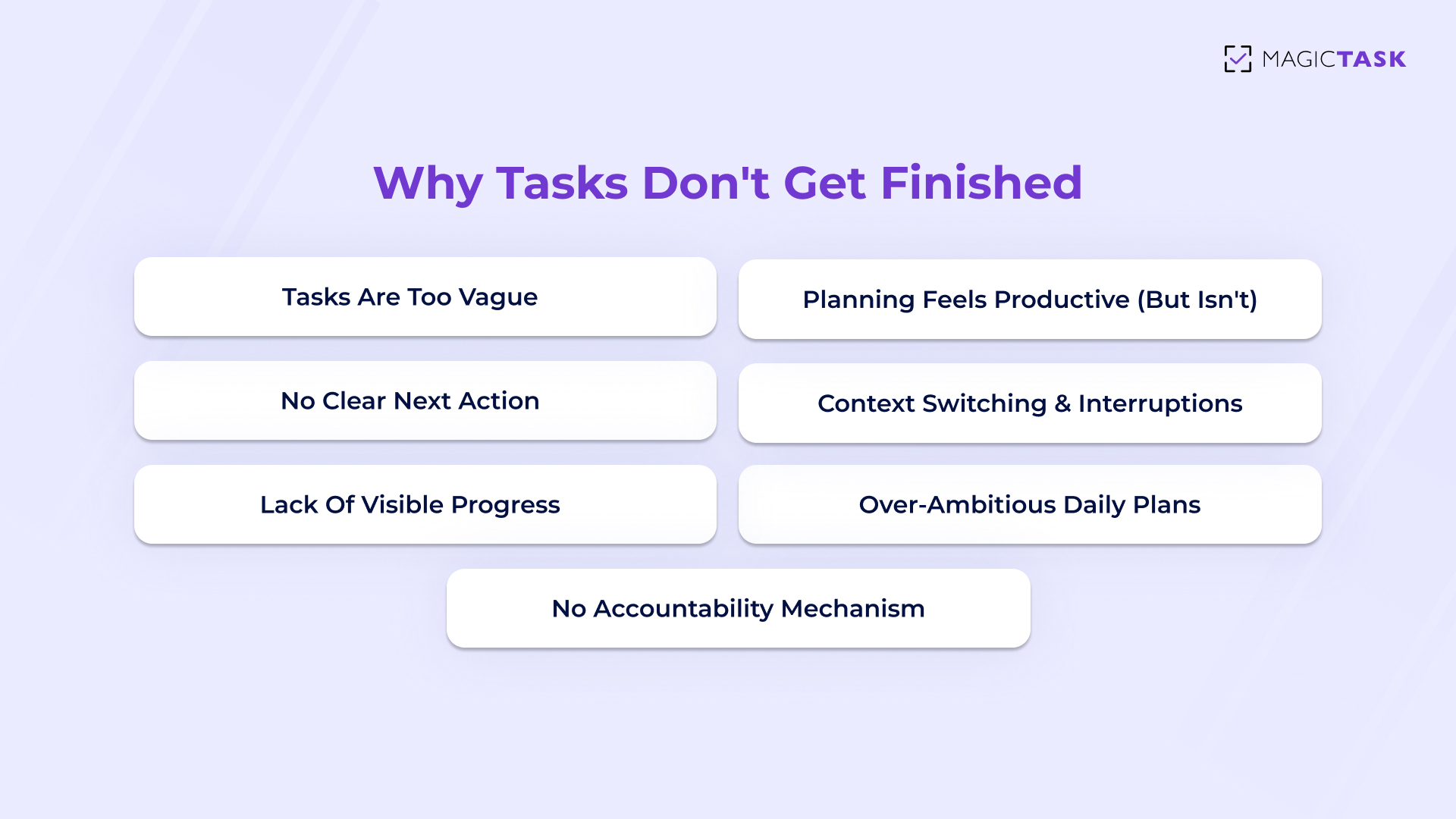
They Expect Motivation on Demand

Most task managers rely on one thing: your discipline. They list what needs to be done and assume you’ll handle the rest.

There’s usually no:

  • Feedback when you make progress
  • Reinforcement for showing up consistently
  • Support when energy drops

When work gets busy or overwhelming, tasks don’t move, not because you don’t care, but because the system gives you nothing to lean on. Over time, opening the tool feels more like pressure than help.

They Create More Switching

Ironically, many tools meant to improve focus end up breaking it. Multiple views. Endless filters. Notifications everywhere.

You open the tool to work and immediately have to decide where to look, what matters right now, and which view to use.

That mental overhead pulls attention away from the work itself. Instead of helping you focus, the tool becomes another thing to manage.

They Don’t Make Progress Feel Real

This is the quiet problem most tools ignore. You check off a task… and nothing happens. No sense of buildup. No momentum. Just another item gone.

Without visible progress:

  • Effort feels invisible
  • Consistency feels unrewarded
  • Motivation fades over time

Eventually, people stop checking the list altogether.

Modern workflows don’t struggle because people lack discipline. They struggle because the systems they rely on don’t support attention, effort, or momentum.

What Gamification Actually Solves in Everyday Work

When people hear “gamification,” they often imagine distractions layered on top of work. In reality, well-designed gamification does the opposite. It removes friction, reduces mental load, and supports follow-through in moments where motivation usually drops.

At its best, gamification doesn’t compete with productivity. It reinforces it.

Progress Feels Immediate

One of the biggest gaps in everyday work is delayed feedback. You put in effort now, but the payoff feels distant. Gamification shortens that gap by making progress visible as it happens. When effort leads to immediate confirmation, momentum builds naturally. You don’t have to wonder if today mattered because the system shows you that it did.

Effort Becomes Visible

Traditional tools only acknowledge outcomes: finished projects, closed tasks, completed milestones. Gamification shifts the focus to effort itself. Showing up, taking small steps, and moving work forward all count. When effort is recognized, people stay engaged longer — especially during long or complex projects where results take time to show.

Consistency Is Reinforced, Not Forced

Staying consistent is harder than starting. Small rewards act as gentle reinforcement, encouraging people to return without pressure. These signals don’t need to be dramatic. They simply need to confirm that consistency matters. Over time, repetition feels rewarding instead of draining, and follow-through becomes easier to maintain.

Motivation Comes From the System

Relying on willpower works until it doesn’t. Gamification shifts motivation away from mood and discipline and into the structure of the workflow itself. When progress, effort, and consistency are supported by design, people don’t have to push themselves as hard to keep going. The system carries part of the load.

That’s why gamification works best when it’s quiet, intentional, and grounded in real work.

What Gamification Actually Solves in Everyday Work

Why Gamification Works When It Is Designed Intentionally

Gamification doesn’t fail because the idea is flawed. It fails when it’s added without purpose. When rewards are disconnected from real work, they feel hollow. When competition is forced, it creates pressure instead of motivation. Intentional design is what separates gamification that supports productivity from gamification that gets ignored.

When done right, it quietly reinforces the behaviors that matter most.

1. Rewards Are Tied to Real Work

Gamification only feels motivating when rewards mean something. That happens when they are directly connected to real effort. When rewards reflect actual work completed, they reinforce progress instead of distracting from it.

In intentional systems, every reward answers a simple question: What did I move forward today? Completing a task, finishing a focused session, or making steady progress all earn recognition because they represent meaningful effort. Nothing feels random or inflated.

This alignment builds trust. Users don’t feel like they’re being nudged for engagement’s sake. They feel acknowledged for doing real work. Over time, that trust is what keeps people coming back. Rewards stop feeling like incentives and start feeling like confirmation that their effort counts, which is exactly what sustains productivity.

2. Progress Feels Supportive

When gamification is designed intentionally, progress creates reassurance. Instead of asking you to perform or compete, it quietly shows that you’re moving forward. That sense of support makes it easier to stay engaged, especially during long or demanding stretches of work.

Progress feels supportive when it’s framed around growth, not comparison:

  • Personal progress: You see how your own work is advancing, without being measured against others. This keeps focus on improvement rather than performance.
  • Visible movement: Small steps register clearly, so effort never feels wasted or invisible.
  • No penalty for slow days: Progress doesn’t disappear because of missed time or lower energy. Momentum stays intact.
  • Encouraging signals: Feedback confirms that consistency matters more than speed.

Supportive progress reduces anxiety and keeps motivation steady. Instead of pushing harder, people feel safe continuing, and that’s what allows productivity to last.

3. Consistency Matters More Than Perfection

Perfection feels productive on paper, but it rarely survives real life. Consistency does. The difference becomes clear when you look at how work actually unfolds over time.

So when you’re trying to build a daily writing habit with a “go big or go home” mindset:

  • Monday: An hour of focused writing. It feels like a great start.
  • Tuesday: Another strong session. Confidence is high.
  • Wednesday: Meetings run long, energy dips, and writing gets skipped.
  • Thursday: The habit already feels broken. Guilt creeps in.
  • Friday: Starting again feels heavier than stopping, so nothing happens.

Now contrast that with a consistency-first approach. Writing for ten minutes a day fits even on busy or low-energy days. Some sessions are productive, others aren’t, but the habit continues.

That’s why consistency wins. It removes pressure, keeps momentum intact, and reinforces identity. Progress doesn’t depend on perfect days; it survives real ones.

4. Friction Is Reduced, Not Added

The best gamification blends into the workflow. It doesn’t demand extra decisions or attention. Instead, it clarifies priorities, reinforces progress, and gently nudges users forward. When gamification reduces mental effort instead of adding noise, it becomes a natural part of getting work done.

Intentional gamification works because it respects how people actually work. It supports focus, rewards effort, and helps consistency grow without turning productivity into a performance.

What intentional gamification fixes

How Gamification Supports Focus and Consistency Over Time

Motivation is loud at the beginning of any new system, and quiet a few weeks later. That’s where most productivity tools lose people. Gamification, when designed intentionally, fills that gap by supporting focus and consistency long after the initial excitement fades.

It doesn’t push harder. It reinforces gently.

Here’s how gamification sustains productivity over time:

  • Progress stays visible: Seeing effort accumulate helps people stay engaged even when work feels repetitive or slow.
  • Small wins create momentum: Completing manageable tasks provides regular signals that progress is happening.
  • Consistency feels rewarding: Returning day after day feels worthwhile because effort is acknowledged, not ignored.
  • Focus is easier to protect: Clear feedback reduces decision fatigue and keeps attention on what matters.
  • Motivation becomes reliable: The system supports follow-through instead of relying on mood or willpower.

Over time, these small reinforcements add up. Focus becomes steadier. Consistency becomes easier. Productivity feels less like a struggle and more like a rhythm.

That’s why gamification works best as a quiet layer beneath daily work.

Conclusion

Gamification works for productivity because it makes progress feel clear, supported, and worth continuing. In modern workflows filled with interruptions and shifting priorities, people don’t need more pressure or complexity. They need systems that reinforce effort, protect focus, and help consistency grow naturally over time.

When gamification is designed intentionally, it becomes invisible in the best way. It supports real work, rewards showing up, and keeps momentum alive long after motivation fades. That’s when productivity stops feeling forced and starts feeling sustainable.

MagicTask is built around this philosophy. It uses thoughtful gamification to reinforce progress, focus, and follow-through.

If your current tools rely too heavily on discipline alone, it may be time to rethink how motivation is designed into your workflow. Try MagicTask and experience how intentional gamification can make everyday productivity feel clearer, lighter, and easier to sustain.